A channel that publishes every day without its author appearing once on the screen: this is the principle of video faceless. The idea attracts more and more people, especially as the AI Now knows how to write the script, read the text with a natural voice, choose images and subtitle it all. It remains to be seen where to start, what it really costs and what platforms tolerate. This guide unfold the method with Revid (revid.ai), a tool Designed to produce serial vertical videos, and details what we tested.
Tested 24.10.2026: generators Free Revid scripts, without an account; rates and documentation recorded on the same day. This page contains partner links.
Contents: Essential · What's faceless? · Four ways · Step by step method · Cost in credits · Rates · What we tested · Monetization YouTube · Declare AI · Cautions · Other tools · Who is it for? · Verdict · FAQ
Essentials
- Everything's in one tool : Revid runs script, voiceover in 70+ languages, visuals, subtitles, editing and publication on TikTok, YouTube and Instagram.
- The cost is announced before launching: the page of the tool faceless displayed « Estimated cost 10 credits » before seizure. According to the documentation, 30 seconds of animated images with voice cost about 40 to 80 credits.
- What we checked ourselves: on generators free scripts, which produce three versions in 30 seconds but sometimes invent anecdotes. No complete video with credits yet.
- Price: Hobby and Growth both show 39 € per month, but only Growth has 2,000 credits per month and details direct publication.
- Monetization: YouTube discards mass, generic or repetitive product content. A faceless string remains possible if each video has a clean angle and a real value.
With our link, the BEKOE code opens 20% in the first month for new subscribers.
What's a faceless video?
The word comes from English: « faceless ». A faceless video shows neither its author nor a presenter. Instead, we find a voiceover, images or video shots, from text to screen, sometimes a gameplay in the background, and almost always animated subtitles that bring attention. There are many requests about the subject: « faceless video » is looking for about 880 times a month in France (DataForSEO, 24.10.2026), and the results page mixes tools mobile applications and directories.
The format seduces for very concrete reasons. We don't need to film, light up or control a camera. It is possible to publish under a pseudonym, or in a language that is not spoken orally if the synthesis voice follows. Above all, a process based on a script and a tool repeats itself: this makes it possible to hold a rhythm of several videos a week. Our guide on the chain YouTube cost-effective treats the economic angle (nettles, incomes, classical errors). Here we deal with mechanics: how to make videos.
How to make videos without showing your face: four approaches
Before choosing a tool, you have to know what kind of faceless you want to produce, because each family has its strengths and limits.
- Voiceover on stock images or videos : the historical formula. Simple and inexpensive, but very recognizable, therefore exposed to the reproach of generic content.
- Images generated by AI, animated : Each scene has an image specific to you, with a slight movement. This is the land of the tools like Revid, who offer « moving images » Low cost.
- Video generated by AI : real animated plans produced by a model (Seedance, Veo 3, MiniMax at Revid). More spectacular, much more expensive in credits.
- Background gameplay or parkour with story above: style « brainrot » And the stories read out loud. Revid has some tools dedicated, to use knowing that this style is very copied.
The talking avatars also exist: the screen then shows an artificial presenter. It is not faceless in the strict sense (there is a face, even synthetic) and it is not the object of this guide. For an overview of the tools see our comparison of the best AI software video.
The step by step method with Revid
Revid presents itself as a platform of short videos (TikTok, Reels, Shorts) where the same account manages script, visuals, voice, subtitles, music, the editing and publication. It was founded in Paris in 2023 under the name Typeframes and renamed in April 2024, after the documentation of the publisher. Here is how a video faceless takes place, step by step. For the details of our review global, read our review on Revid AI.
Step 1: Write the script and its catch
Everything in the text. Revid offers free and without account a generator TikTok scripts, a generator of scripts YouTube Shorts and one generator generalist scripts. We describe his video, we choose a style from thirteen (General, Fun Facts, News, Educational, How To, Listicle, Motivational, Personal, Horror, Life Hack, Fantasy, Business, Philosophy) and a duration of 10 seconds to 2 minutes. Three versions arrive in about 30 seconds. We return to it further with what we have observed.
You can also use your own text. Our guide for Write a video script with AI details the method and prompts that avoid flat text. Above all, remember a rule: the script must be readable aloud, with short sentences and a careful punctuation, as the synthetic voice presses on it for its rhythm.
Step 2: choose the tool and format
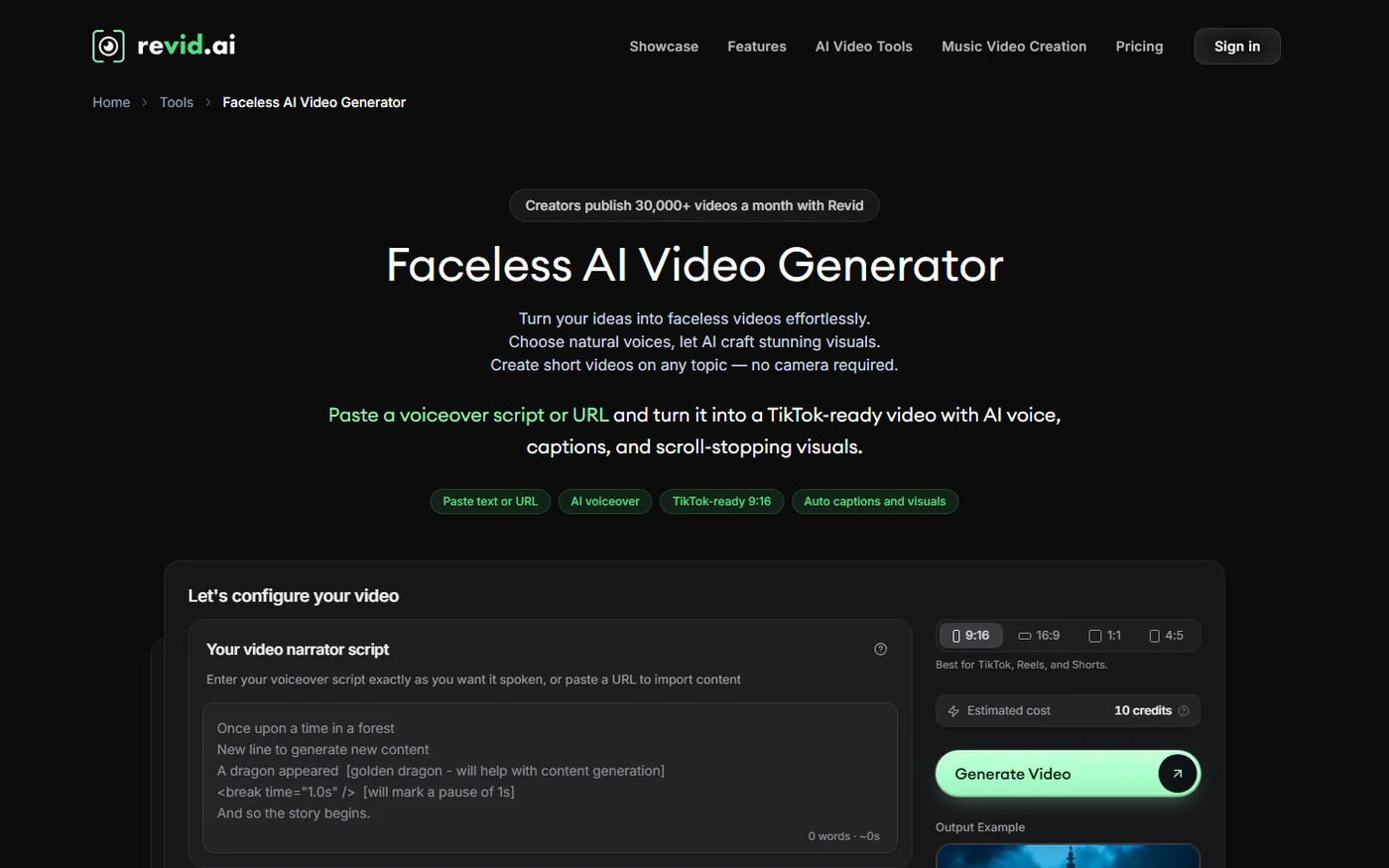
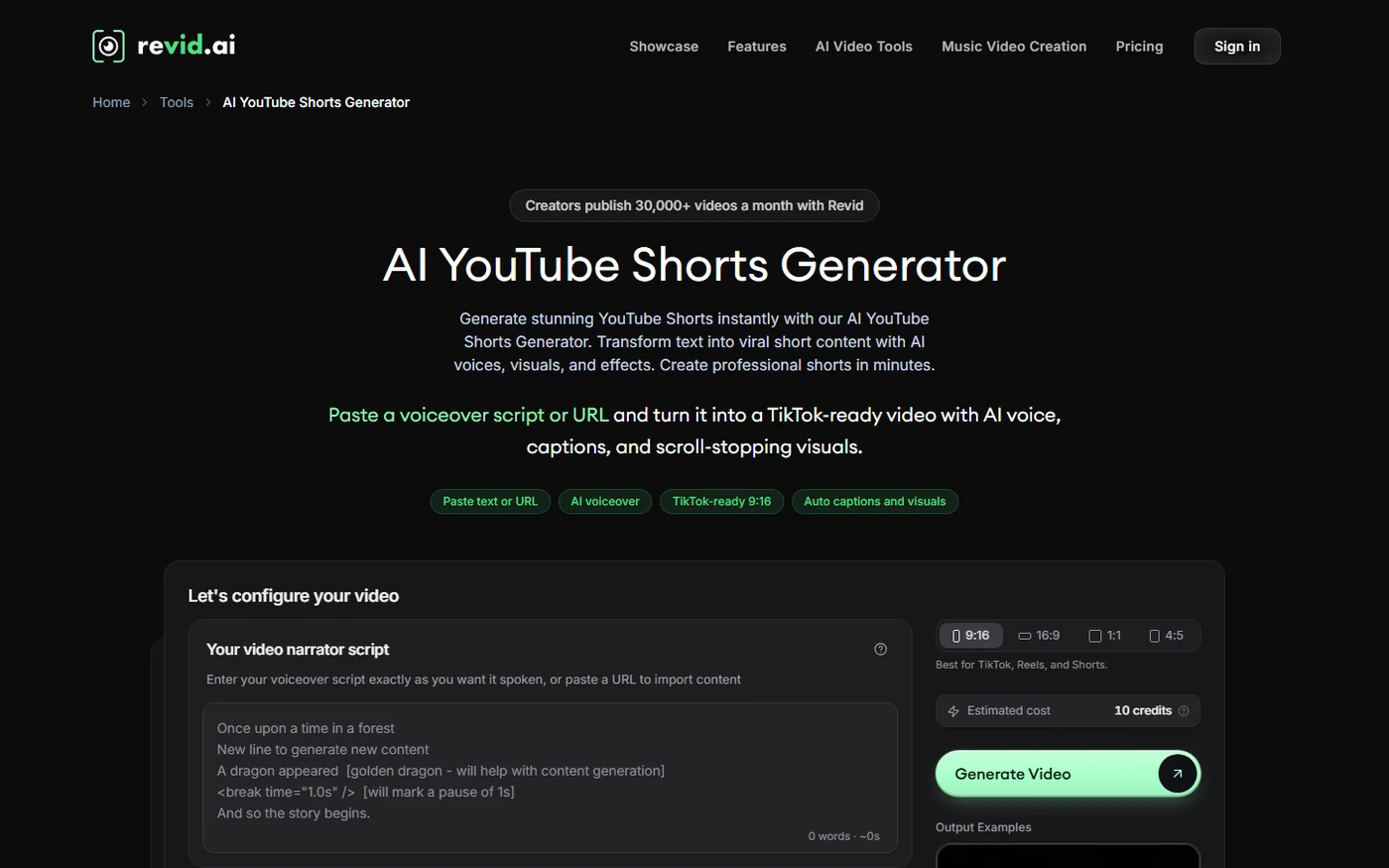
In the application, click on « Create New Video », then we choose a tool. For faceless, the most direct is the « Faceless AI Video Generator », which accepts a script from voiceover or a link to import. The format is set at the top right: 9:16 for TikTok, Reels and Shorts, 16:9 for YouTube classic, 1:1 or 4:5 for current yarn. Estimated cost appears next to the button « Generate Video ». On the capture of 24.10.2026, he displayed 10 credits before entering: it is a starting point, which evolves with the length of the script and options.
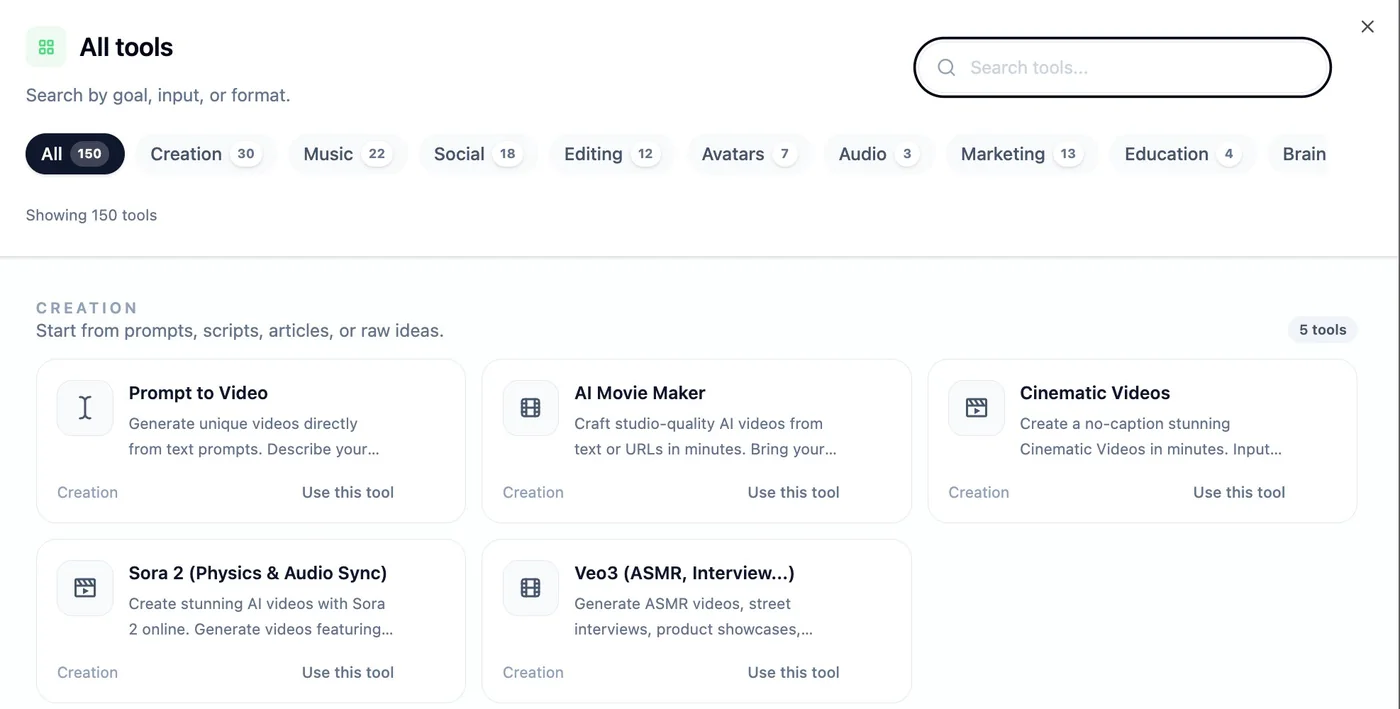
For another format, there is no obligation to stay on this tool. Revid's catalogue has 163 pages tools listed on 24.10.2026, classified by theme: creation from a prompt, article, PDF, tweet or post Reddit, music, avatars, subtitles, advertisements. The capture below, provided by Revid and dated April 2026, shows the catalogue as it appeared then, with 150 tools.
Step 3: Set Visuals
It is the stage that makes the price of the video. According to official documentation, the type of media (stock, images) is chosen. AI animated, video AI, your own media or gameplay background), a level of quality (Low, Pro, Ultra), a visual style among more than 40 (photorealist, Ghibli, Pixar, anime, Lego, Minecraft, claymation, sketch), a global atmosphere and density of plans. A line jump in the script opens a new scene with its own visual, and a text in square brackets guide image without being pronounced. This syntax is valuable: it allows us to say « Wide plan of a bakery at dawn » without the voice reading it.
Our advice, without having measured ourselves: start with the most economical level to validate the script and the rhythm, and only increase in range for the videos that work. The price differentials are one to more than ten between an animated image and a premium video plan.
Step 4: choose the voiceover
The voice is synthesized by ElevenLabs, after Revid, with more than 70 languages of voiceover and a filterable library by language, gender, age, use and accent. The speed is set from 0.7x to 1.2x and the stability: « Stable », « Balanced » or « Expressive » (more emotion, with a risk of artifacts). The script accepts pause tags of the type <break time="1.0s" /> to silence. French is one of the languages supported, but we did not listen to French voices generated by Revid: we do not judge its natural. To compare the engine itself, our review on ElevenLabs details his French voices.
The voice costs 10 credits per 500 script characters. A text of 70 words, or about 30 seconds, stands in this slice. Ultra subscription also allows you to create and clone a voice, which can be used to keep a sound identity stable on a whole channel.
Step 5: Enable subtitles
Subtitles are enabled by default in generated videos and follow the word-for-word voice. Revid offers 16 ready-made styles: Default, Revid, Hormozi, Ali, Wrap 1 and 2, Faceless, Elegant, Difference, Opacity, Playful, Bold Punch, Movie, Outline, Cove and Beat. The publisher recommends Faceless, Hormozi and Bold Punch for vertical contents that aim to retain. The position (top, middle, bottom), size and colours are then adjusted. A board of format valid everywhere: keep the text out of the areas covered by the interface of each network, explained in our guide of the video formats of social networks.
Step 6: Check, retouch, export
Each video opens in a timeline editor: text and media of each editable slide, regeneration of a plan from a new prompt, addition of sound and music effects, setting of security zones, format change, export in 720p, 1080p or 4K. Exporting 4K costs 10 credits and scaling up AI Five credits per second. The music library has 199 tracks at no extra cost, and the music generated by AI Cost 20 credits per generation.
It's also time to read again. Our tests generators Scripts show why: the texts come out rhythmically, but the AI sometimes adds a personal anecdote or a figure you never provided. One voiceover that tells « I found this in an aquarium. » While no one went, that's exactly the kind of detail to remove.
Step 7: Publish directly
After export, the Publish button sends the video to TikTok, YouTube (Classic shorts and videos) or Instagram (Reels), once accounts are linked in settings. It can also be planned: the documentation describes a queue of publication with one hour to set, and specifies that publication does not consume generation credits. The paid formulas follow up to five channels (Growth) or fifty (Ultra) in the statistics. A webhook output exists for custom pipelines.
Step 8: automate with Auto-Mode
Auto-Mode is the function that transforms the tool in the production chain. According to Revid's documentation, a worker configures once (a tool or a workflow, a content source such as a quick, stream or niche, creation settings), then prepares one video a day. The Auto-Mode page describes another scenario: one pastes the address of a product, Revid reads the page, offers a one week schedule and adds a new video every night. The formats listed range from the UGC pub to the educational explanation via the street interview or the TV news style. The number of workers depends on the formula: 3 on Growth, 10 on Ultra.
Point to be clarified: the Auto-Mode page says that nothing is published without your consent (each video offers « Review » and « Post »), while technical documentation refers to possible automatic publication. In any case, validate each video yourself before it leaves on your channel, for monetization reasons seen below.
How many credits does a faceless video use?
Credits are Revid's currency, and their scale is public. These are the positions that count for a faceless video, based on the official documentation recorded in October 2026.
| Post | Credits | Unit |
|---|---|---|
| Image AI Low / Pro / Ultra | 1 / 4 / 16 | per image |
| Video AI Low | 15 | per 5 s (40 if image to video) |
| Video AI Pro | 50 | by 5 s |
| Video AI Ultra (Seedance 2.5, MiniMax H3 in 720p) | 100 | by 5 s |
| Veo 3 (Google) | 100 | per 5 s, clips about 8 s with audio |
| Seedance 1080p / 4K | 250 / 500 | by 5 s |
| Voiceover | 10 | per 500 characters |
| Music AI / piece of library | 20 / 0 | by generation |
| Export 4K | 10 | per export |
Billing is proportional to the second: a 10-second clip costs twice a 5-second slice. Revid himself gives three orders of magnitude for 30 seconds: about 40 to 80 credits with animated images Pro and one voice, about 100 credits in AI video Low, and more than 600 credits with Veo 3. Sora 2 is no longer proposed since the closure of its API by OpenAI 24.09.2026.
Let's do the calculation that the publisher doesn't do. On Growth, which includes 2,000 credits per month, 30 seconds to 40 credits give 50 videos, 80 credits 25 videos, and 100 credits 20 videos. With Veo 3, we fall to three videos. These are calculations based on official figures, not measurements on our part. They show a useful point for Auto-Mode: a worker who publishes one video a day produces about 30 per month, i.e. at least 1,200 credits to 40 credits per video and 2,400 to 80 credits, which already exceeds the 2,000 credits of Growth. The credits of the package do not refer from one month to the other, but one-off packages do not perish: 1 000 credits for 49 $, 4,000 for 99 $10 000 for 199 $.
Revid rates recorded on 24.10.2026
The pricing page displays euros from France. Hobby and Growth are at the same price of 39 € per month, and the difference is in the content.
| Formula | Monthly | Annual (per month) | Appropriations per month | To be retained |
|---|---|---|---|---|
| Hobby | 39 € | 32 € (384) € per year) | not stated | Creating from text or links, editable videos, occasional use |
| Growth (« Best Value ») | 39 € (99 € Barred) | 32 € (384) € per year) | 2 000 | Publication TikTok, Instagram, YouTube 3 Auto-Mode workers, voiceover 70+ languages, API, MCP, CLI |
| Ultra | 199 € | 166 € (1 992) € per year) | 12,000 (up to 200,000) | All Growth, 10 Auto-Mode workers, voice creation and cloning, followed by 50 channels |
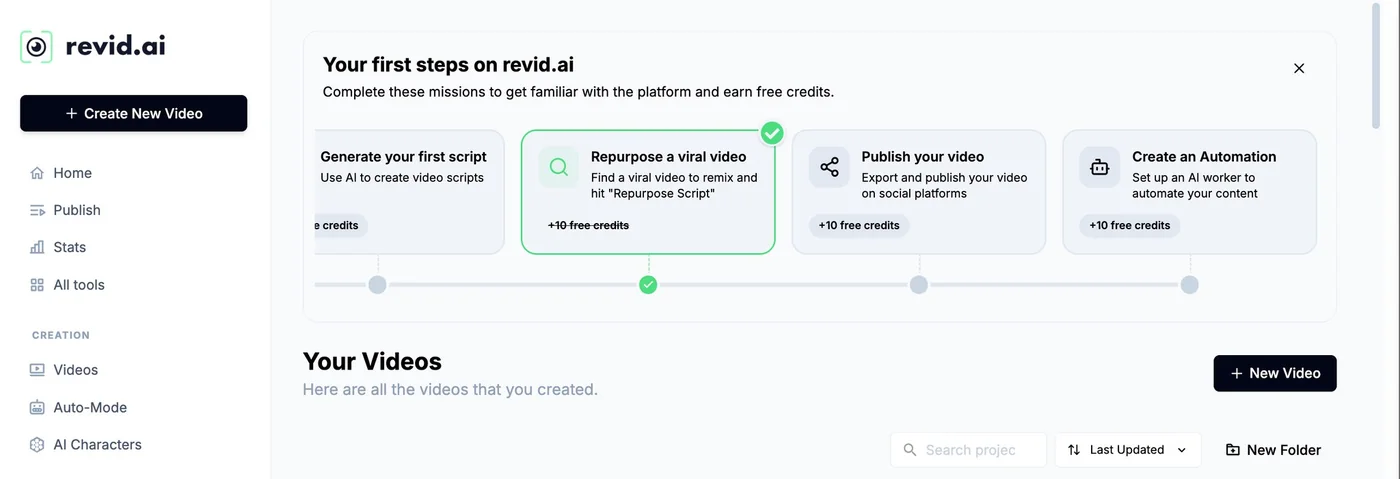
Our reading: for regular faceless, Hobby has no visible interest since Growth costs the same price and displays 2,000 credits, direct publication and Auto-Mode workers (but the page header ensures that each formula includes publication and Auto-Mode: check before paying). Revid also offers an Elite formula to 89 $ per month, 5,000 credits, reserved for existing subscribers according to its rate page, which does not appear on a public card. Free registration is done without bank card and gives credits not published, as well as missions of the onboarding which bring back other (+10 credits per mission on the capture of the kit from April 2026). The subscription terminates at any time and remains active until the end of the paid period.
If you decide to subscribe, the BEKOE code gives 20% over the first month, reserved for new subscribers.
What we really tested: scripts, not video
To be clear: we did not generate full video with credits. This is what we did on 24.10.2026, without an account, in a browser.
Test 1, TikTok script in French. Brief: three baker's tips to keep your bread fresh (linen towel, no fridge, sliced freezing), warm tone, active youth audience, Life Hack style, 30 seconds. Three French scripts arrived in 25 to 30 seconds, all with the hook from the first sentence, short sentences that go well to the oral and the three tricks in order. The defects are those of a text to read: invented characters (« my first boss », « my mother, baker »), a numerical statement that we did not provide (« He shaves twice as fast ») and a small inconsistency in one of the texts.
Test 2, script YouTube Shorts in English. Brief: A Short faceless explaining why the octopus has three hearts and blue blood, Fun Facts style, 30 seconds. Three scripts from 70 to 80 words, with correct facts on the background (two gill hearts, a systemic heart, copper-based blood). Even tick: one of the texts invents a personal anecdote (« I found out at an aquarium »).
Each script is accompanied by a button « Create Video » which opens the publisher, which requires an account. We tried to go further: the connected pages of revid.ai have frozen the piloted browser used to test us, and we preferred not to invent verdicts. We will complete this article when we have made a real rendering, with the actual cost found in front of the estimate. In the meantime, remember that the script is the stage where Revid is already verifiable: free, fast, usable, provided you read it again.
Can one monetize a chain faceless made with AI on YouTube ?
It is the question that decides everything. We reread 24.10.2026 the official page of the Partner programme YouTube (rules for monetizing channels). Its last amendment dated July 2025, with the change of name of « repetitive content » in « inauthentic content ». Here's the essential, in our words.
- Mass, generic or repetitive product content: he is not eligible. The examples given are slideshows of images, all-made stories or text that scrolls, with very little narrative.
- Series : they remain accepted if each video has its own subject, angle or story. A common intro or outro is not a problem.
- Content reused: Resuming another's work with minimal changes is not eligible. The comment, reaction and the editing transformers are allowed.
- Content generated by AI : content made with generic models, which give the impression of mass production, are excluded, as well as characters AI presented as human experts in health, law, finance or politics. However,AI is accepted when the result shows the creative vision of its author and brings educational or entertaining value.
Practical translation for a faceless chain: l tool is not the problem, the chain is if it looks like a factory chain. A reading tip: our analysis of the monetization YouTube and videos AI details what the platform specified in 2026 and our five adjustments to remain monetizable. Eligibility thresholds (subscribers, viewing hours, Shorts views) do not appear on the page we read: check them on the page « overview and eligibility » before planning an income.
Does it have to be declared that a video is generated by the AI ?
On YouTube in some cases. The official help page asks to declare realistic content generated or modified by AI A real person who seems to say or do something that she has not said or done, a sequence that changes a real event or place, a realistic scene that never happened, or a music that is the heart of the video. Excluded are clearly unrealistic content (animation, fantastic scenes), aesthetic touches, subtitles, audio enhancement and use of the AI to write a script, plan, title or miniature. The setting is called « AI use » : we find it in YouTube Studio, at the time of mailing, under Attributes.
For a faceless channel with synthetic voices and stylized images, most videos fall to the side « Unrealistic » or « Production aid ». As soon as you stage a real person or an event that seems true, declare. On TikTok, based on platform announcements, realistic content generated by AI must be labelled with a tool the rules change, see our guide AI TikTok and our article onlabelling of AI videos since 2 August 2026 for the European framework.
Precautions before publishing a faceless channel
- An angle specific to each video. Same model, same duration, but a different subject, structure or idea. This is the most effective label protection « repetitive ».
- Read every script. Invented characters, figures never provided, facts to be checked: our own tests show that AI add matter. Remove what you cannot support.
- Avoid licenses and real people. Revid offers styles inspired by known franchises and celebrity avatars; The documentation recalls that each user is responsible for the proper use of similarities. Do not use them for monetized content. Our article on the copyright of videos AI Make the point.
- Check music rights. The built-in library has 199 tracks at no extra cost, but read the conditions of the platform on which you publish.
- Keep track. Keep your scripts, prompts and exports: in case of complaint, you can show what you have written and decided.
- Test on small scale. Ten videos on a single subject with the cheapest image level are better than an annual subscription taken too quickly.
What others tools To faceless?
Revid isn't the only one. Depending on what you are looking for, other tools the site is better suited. Prices often change: raise them on official pages.
| Tool | What he does best | To go further |
|---|---|---|
| Revid | Serial vertical videos, from voice to publication, with Auto-Mode | See Revid |
| InVideo AI | A complete video from a set | Our review InVideo or Try |
| Fliki | Text to video when voice counts more than image | Our review Fliki or Try |
| Syllaby | Editorial calendar and automated faceless videos | Our review Syllaby |
| Submagic | Animated subtitles to be put on any video | Our review Submagic or Try |
| CapCut | Editing free manual, when you want to control everything | Alternatives to CapCut |
If your main platform is YouTube, our guide of lAI for YouTubeur reviews ideas for topics, voiceover, miniature and editing, and the best AI for YouTube Shorts compares six tools on this format.
For long format, with script, voiceover, one image per scene, the editing and the miniature combined in a single project, we also tested NimbleVid: a video of 9 min 05 cost 1,089 credits (about 19 $ and is released in MP4 1080 p watermark-free In about 35 minutes. The limits and prices are detailed in our review on NimbleVid.
Revid for faceless: for whom, and for whom not?
- Yes if You often want to publish vertical videos with a simple stream, and that you agree to reread each script before you start.
- Yes if You like to pilot the budget: the estimated cost is displayed before the generation and the scale is public.
- Yes if you need direct publication and statistics in the same tool, or automate with API, MCP or command line.
- Not if your idea is based on a single film plan: a generator dedicated clips will be more direct, and less expensive in credits.
- Not if you don't have an editorial line yet:tool accelerates production, it does not replace an idea.
- Caution if you rely on video quality or French voice: we did not judge them.
Verdict
Our review on Revid for faceless
This calls for: a complete course in one tool a cost announced before each generation, a public scale, a direct publication and a function of automation only a few tools propose. The generators free scripts, which we tested, are fast and well rhythmic.
What remains to be verified: the real quality of videos and voice in French, the difference between estimated cost and debited cost, and the behaviour of Auto-Mode.
For a faceless channel, leave free scripts to validate your idea, then open an account to estimate the cost of a first video before choosing a subscription. And, whatever it is tool, take care of the angle of each episode : it is he who protects your monetization.
FAQ: video faceless with AI
What's a faceless video?
A faceless video is a video where no one shows his face: you hear a voiceover (human or synthetic), we see images, video plans, text or gameplay, and subtitles carry the message. The format is used both for Shorts, Reels or TikTok as well as for videos YouTube long.
How to create videos without showing your face?
We need a script, a voiceover, visuals and subtitles, then a regular publication. With Revid, these steps hold in a single tool : we paste a script or link in the generator faceless, the format and the voice are adjusted, the estimated cost is checked in credits, and then we export or publish directly on TikTok, YouTube or Instagram.
Is Revid free to faceless?
The generators Revid scripts use without account and without credit, but the video itself consumes credits. Registration is free and without credit card, with credits not published (our test account had 70 credits on 24.10.2026). The cheapest paid subscription is displayed at 39 € per month.
How much does a 30-second faceless video on Revid cost?
According to Revid's official documentation, a 30-second video with animated images of the Pro level and a voiceover costs about 40 to 80 credits. AI Video At Low level, have about 100 credits, and more than 600 credits with Veo 3. The estimated cost is displayed next to the generation button before launch.
YouTube Does he agree to monetize a faceless chain with AI ?
Yes, provided the chain is not mass, generic or repetitive content. Based on the official Partner page YouTube reread 24.10.2026, use AI is allowed when the result shows a real creative vision and brings value to the viewer. A stack of interchangeable videos is not eligible.
Does it have to be said that a faceless video is generated by AI ?
On YouTube, the declaration is requested for realistic content generated or modified by AI For example, a scene that never happened or a real person who would say something she didn't say. Help with writing a script, clearly unrealistic subtitles or content are exempt. The setting « AI use » is in YouTube Studio, Attributes section, at the time of mailing.
Can we automate a faceless chain with Revid?
Revid offers Auto-Mode: workers who prepare one video a day from a source you configure, with 3 workers on Growth and 10 on Ultra. The Auto-Mode page specifies that nothing is published without your validation, while the technical documentation also refers to automatic publication. Reread each video before posting it online.