
Revid AI seduces on paper: complete short videos, a direct publication on TikTok, YouTube and Instagram, to automate a channel. But it's not tool Everyone. You may be looking for a more readable credit system, a more classic editor, a specialist in video cutting or a product advertising solution. We reviewed eight truly comparable alternatives, each with the capture of its price page taken on 24 October 2026 and the prices recorded on the same day. Revid remains the reference: this is where he does better, and where he does less well.
Prices and catches recorded on the official pages 24.10.2026. This page contains partner links (Opus Clip and Crayo: official links, without affiliation).
Contents: Essential · Why look for an alternative · Revid as reference · Choose according to need · Opus Clip · Submagic · CapCut · NimbleVid · InVideo AI · Crayon · Syllaby · Creatify · Table comparison · Verdict · FAQ
Essentials
- Cut long videos into Shorts: Opus Clip (15 $ per month at entry) or, more oriented subtitles, Submagic (19 $ per month, 12 $ in annual terms).
- Get yourself up, with a free big: CapCut, free, with a Pro package at 23,99 € per month for functions AI.
- Make videos YouTube Long faceless: NimbleVid (from 49 $ per month).
- Text to generalist video: InVideo AI (10 € per month in annual billing for 400 credits).
- Faceless chains with planning: Syllaby (9 $ per month for 7 videos, 29 $ for 38) or Crayo (13 $ per month in annual billing).
- Advertising in UGC format: Creatify (from 10 $ per month, with a free plan of 10 credits).
With our link, the BEKOE code opens 20% in the first month for new subscribers.
Why look for an alternative to Revid AI?
Three reasons come back. The first is the credits. At Revid, everything is paid in credits, and the cost rises fast when choosing premium video models: about 100 credits for 30 seconds in AI video entry-level, more than 600 with Veo 3, according to official documentation. With the 2,000 credits in the Growth formula, you go from 25 to 50 videos from 30 seconds in animated images to three videos with the most expensive model. Those who want a predictable budget look elsewhere.
The second relates to the tariff schedule. On 24 October, Hobby and Growth posted at the same price of 39 € per month, while only the Growth card announces credits. This is not a reason to flee, but it requires careful reading of the page. The third is a question of profession: Revid covers everything (script, visuals, voice, publication, automation) and, by definition, tool who does everything doesn't necessarily do every step as well as a specialist. To cut a podcast, subtitle a Short or produce a product ad, tools Dedicated exist.
The comparison covers what is measured: functions, prices, billing models and how each tool This is the case with the production chain. For rendering, try two tools on the same subject.
Revid AI in reference: what it does, what it costs
Revid turns a script, link, article, PDF, audio or long video into a short video with voiceover, subtitles and music, then publishes it on the networks. The platform lists 163 pages of tools, many of which operate without account (generators Scripts, library of more than 130 TikTok hooks, account audit, Video to Prompt). She adds a automation (« Auto-Mode » One video per day per worker, 3 workers on Growth) and access via API, MCP server and command line included in paid packages.

Price side, October 24, 2026 : 39 € per month in Hobby and Growth (32 € in annual terms), with 2,000 appropriations announced for Growth, and 199 € per month in Ultra (12,000 credits). Details, credits by model and our test of free scripts are in our review complete on Revid AI ; If it's the free one that interests you, our guide Free revid AI list what works without paying.
Which alternative to choose according to your need?
| Your need | The most suitable alternative | Why? |
|---|---|---|
| Transform a podcast or interview into multiple Shorts | Opus Clip | Automatic cutting of strong moments, viral score, vertical cropping |
| Add powerful subtitles to your own videos | Submagic | Animated subtitles, B-rolls, silence suppression, video credits |
| Go up freely, without paying to start | CapCut | Free editor, features AI optional |
| A video YouTube long faceless | NimbleVid | 10 to more than 60 minutes format, characters that remain consistent |
| A video from a simple prompt | InVideo AI | Text to general video, monthly credits |
| Fast content for TikTok and Reels | Crayon | Tools of voices, images and edition, packages in hours of export |
| Plan and produce a faceless chain | Syllaby | Search topics, scripts, faceless videos, planning |
| Video commercials | Creatify | URL to UGC video, avatars, free plan to try |
Opus Clip: the best alternative to cutting long videos?
If your raw material is a long video (podcast, webinar, interview, live), Opus Clip is the specialist. L tool analyzes the entire video, identifies the moments that hold alone, frames them in vertical and subtitles. Its October 24 tariff page displays a 15 starter $ per month (monthly invoice only, 150 credits), one Pro to 29 $ per month, reduced to 14,5 $ in annual billing (174 $ per year, 300 credits, carry forward of unused credits over two months, team space at two seats, six social accounts), and one Business on estimate. A free trial without credit card is offered.
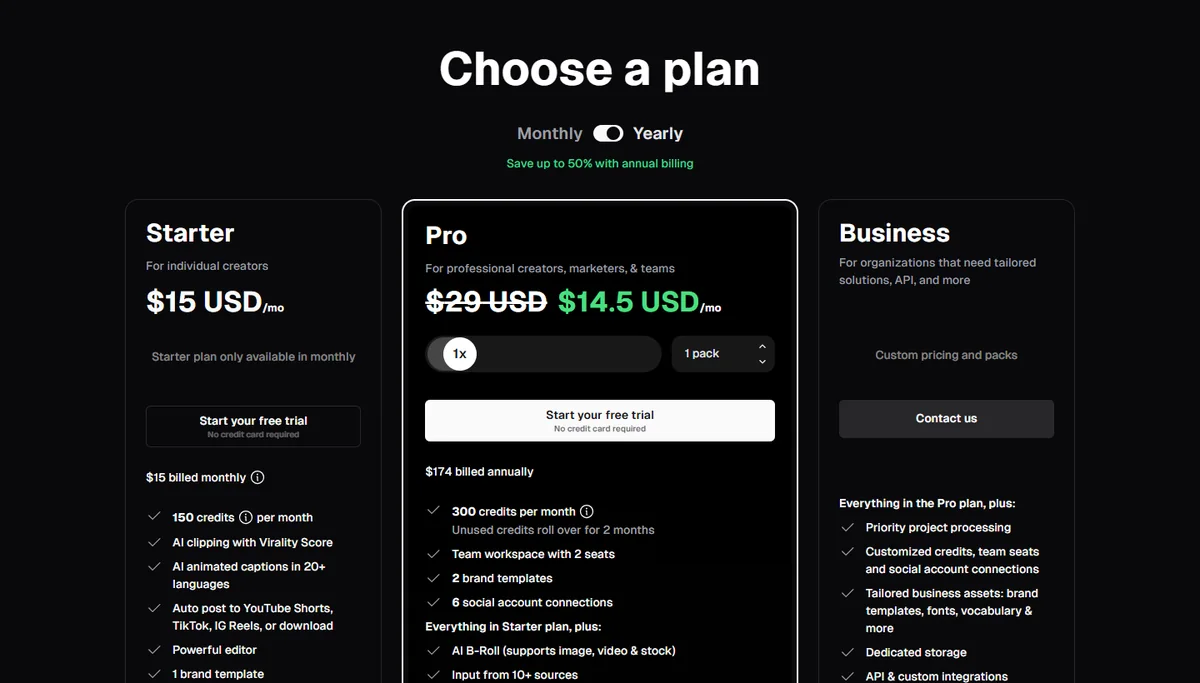
In front of Revid, the difference is clear. Revid can also convert a long video to Short (a tool dedicated announces about 10 credits), but this is only one function among 163. Opus Clip made it his job: viral score, moment-by-time detection, scheduled publication. Conversely, it does not generate zero video from a script or idea. Our review Opus Clip details his duties, and our comparison of the alternatives to Opus Clip Place it in front of the other cutters.
Submagic : instead of Revid, for subtitles and the editing Shorts?
Submagic from a video that you have already shot or generated elsewhere, and turns it into a neat Short: animated subtitles, B-rolls, automatic zooms, removal of bad shots and silences, audio cleaning. Its October 24 tariff page displays three formulas, in both dollars and euros for the same amounts: Starter at 19 $ per month (12 $ in annual billing) for 45 credits, i.e. 15 videos of up to 2 minutes; Pro to 39 $ (23) $ annual) for 120 credits, i.e. 40 videos of 5 minutes; Business to 69 $ (41 $ annual) for 300 credits, i.e. 100 videos of 30 minutes. Registration is done without credit card.
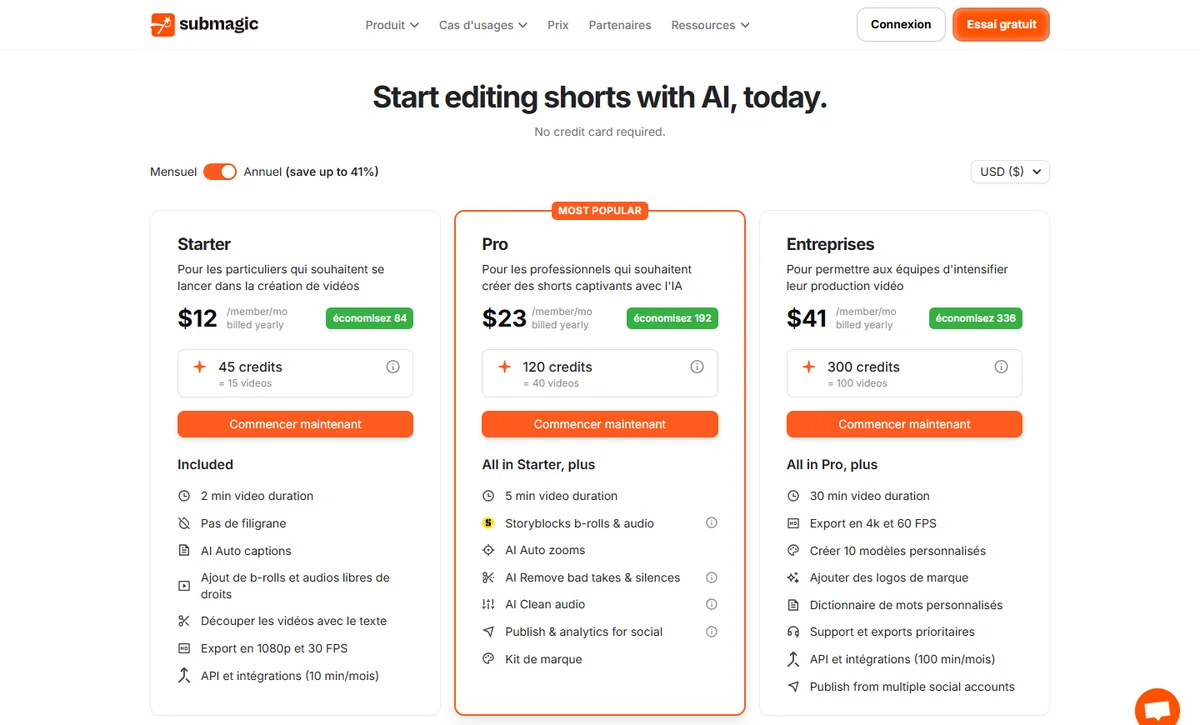
Submagic a benefit of readability: a credit is a video, with a maximum duration per formula, while Revid bills on the second and model. In return, it is a tool finishing, not a generator images or scripts. If you already have your videos and look for beautiful subtitles, it is better placed. Read our review Submagic, our guide Submagic free and alternatives to Submagic.
CapCut: the free alternative for editing your own videos?
CapCut is first a publisher of editing, one of the most used for vertical videos, with a solid free level. Its October 24 package page, displayed in euros from France, shows a Free package at 0 €, a Pro at 23,99 € per month (199.99) € per year, 1,400 credits AI monthly, 1TB storage), an Ultra at 68 € per month (779) € per year, 7,483 credits) and one Teams package at 14,99 € by month and by post. CapCut states that these prices are given for reference and that the final amount depends on the account and the country.

Compared to Revid, CapCut does not try to produce a video in your place from end to end: it is you who go up, with the help of the AI. For someone who publishes little and likes to keep his hand, it's much cheaper. For a chain that wants to automate, Revid goes further. Our guide of the alternatives to CapCut and our views on the CapCut Pro price detail the subject, and the match Submagic against CapCut compares the two approaches to subtitles.
NimbleVid: Better than Revid for a video YouTube long faceless?
Revid targets the short format. NimbleVid reverse: it produces videos YouTube 10 to more than 60 minutes, with search, script, voiceover, visuals, miniature and description, and a chain style that it can clone. Its October 24 tariff page announces four monthly formulas: Entry to 49 $ (2 850 credits), Basic to 99 $ (6 500 credits), Pro to 259 $ (23 000 credits) and Creator at 579 $ (65 000 credits), with a 15% discount for a six-month payment. New accounts in some regions receive free credits valid for 7 days without a bank card.
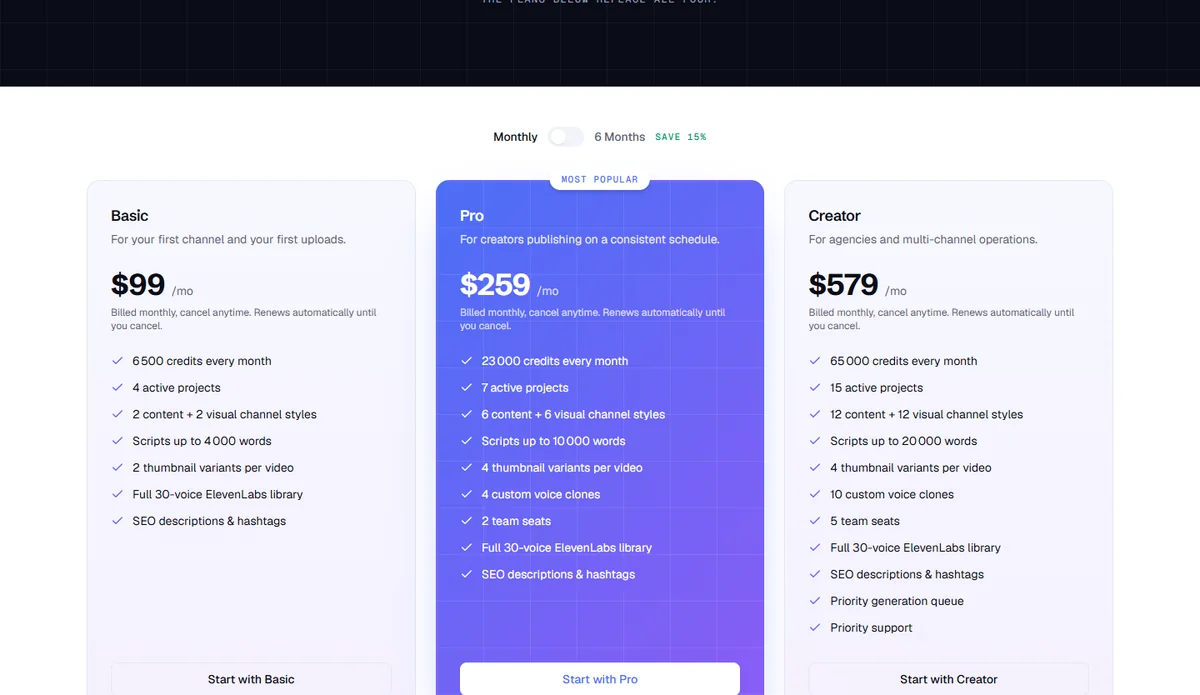
We tested NimbleVid from end to end on 23 October: a video of 3 minutes 27 and a 9 minutes, with coherent characters. The result, generation times and debits are in our review NimbleVid. This is the best choice if your target is YouTube long; For daily TikTok, Revid is more natural.
InAI Video: A general alternative for text to video?
InVideo AI transforms a quick video into a mounted video, with voice, subtitles and music. Its October 24 tariff page displays, in euros per seat and per month in annual billing, three formulas at half price of their monthly tariff barred: Starter at 10 € (20) € monthly) for 400 credits, plus 30 € (60 €) for 2,000 credits and Max at 75 € (150 €) for 5,000 credits. The page details what credits are worth: for example 15 videos Seedance 2 quicks for Starter and 52 videos Seedance Two for Plus.

InVideo AI plays in the same general category as Revid, with less d tools of niche and less than automation published, but a more readable price page thanks to conversion credits to videos. See our review InVideo AI, our guide InVideo Free AI and alternatives to InVideo.
Crayon: an alternative for viral content creators?
Crayon is intended for creators who publish in volume on TikTok, Reels and Shorts. His October 24 tariff page offers three forms, displayed in annual billing (per month): Hobby à 13 $ (160) $ per year, 250 workflow credits, 2 hours of export, 30 minutes of voiceover, 100 images AI), Clipper to 27 $ (327) $ per year, 1000 credits, 10 hours of export) and Pro at 55 $ (664) $ per year, 3,000 credits, 30 hours of export). The page states that all forms give access to all forms tools (AI Voice, images AI, voice change, Face Swap, deletion of subtitles, advanced editor).
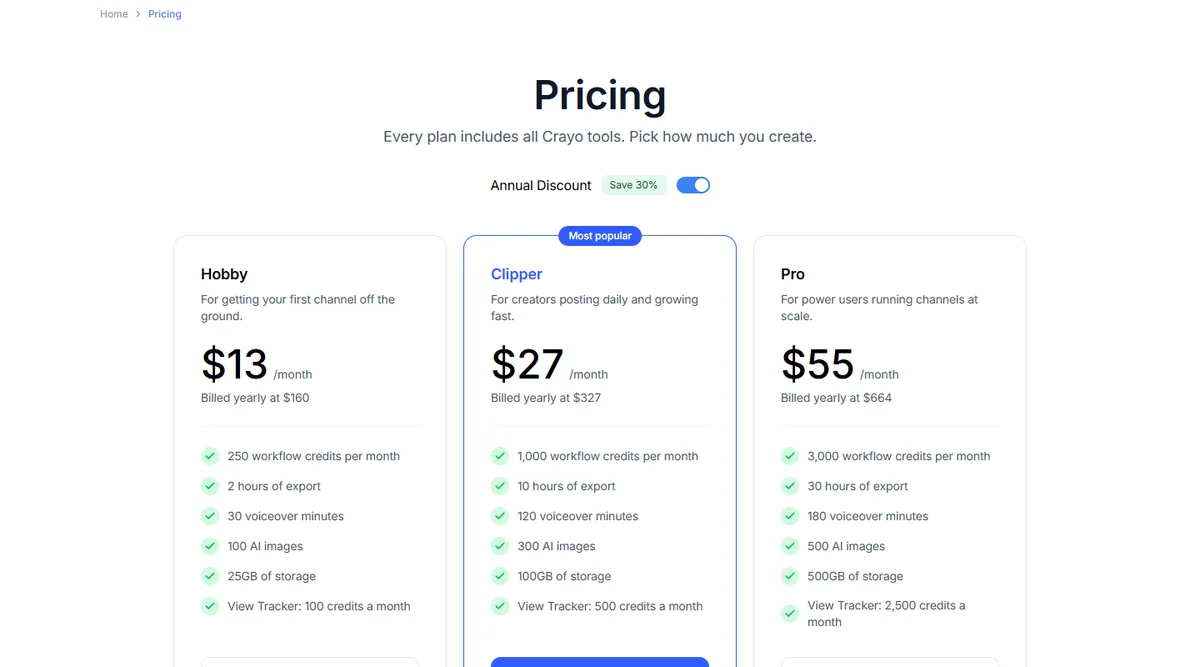
Two points to know before you subscribe: the page does not mention free formula or trial period, and its FAQ indicates that payments are non-refundable, with possible termination at any time. In front of Revid, Crayo counts less tools and does not promote automated publication, but its pricing in export hours and minutes of voice is easier to anticipate than a credit scale per model. We did not test it: this sheet is based on its price page.
Syllaby: the alternative to planning a faceless chain?
Syllaby covers the entire production chain of a faceless creator: search for topics, scripts, faceless videos, voice cloning, planning. His October 24 tariff page, in monthly billing, displays Starter at 9 $ (100 credits, about 7 videos per month, monthly only), Basic to 29 $ (500 credits, about 38 videos; 24.67 $ per month invoiced 296 $ per year), Standard at 78 $ (1,500 credits, approximately 115 videos), Premium to 153 $ (5,000 credits, about 384 videos) and a Done For You offer to 699 $ where the team produces about 30 publications per month for you.

The page contradicts itself on the free trial (a banner talks about a trial included, the FAQ says there is no one): check before registering. Compared to Revid, Syllaby puts the content strategy at the forefront, where Revid puts the catalogue tools and automation. The cost per video is announced more eloquently (about 7 videos for 9 $). Our review Syllaby details the functions.
Creatify : alternative for video advertising ?
Creatify focuses on a narrowly used case: turning a product URL into UGC-style video advertising, with avatars. Its October 24 tariff page displays, for individuals, Standard to 10 $ per month (15 $ 55 credits), Pro à 38 $ (55 $ and Max at 66 $ (95 $ 730 credits), a Business at 136 $ (1,500 credits), API formulas from 99 $ and a 30% discount announced annually. According to the FAQ of the page, a free plan offers 10 credits per month, with watermark on exports.
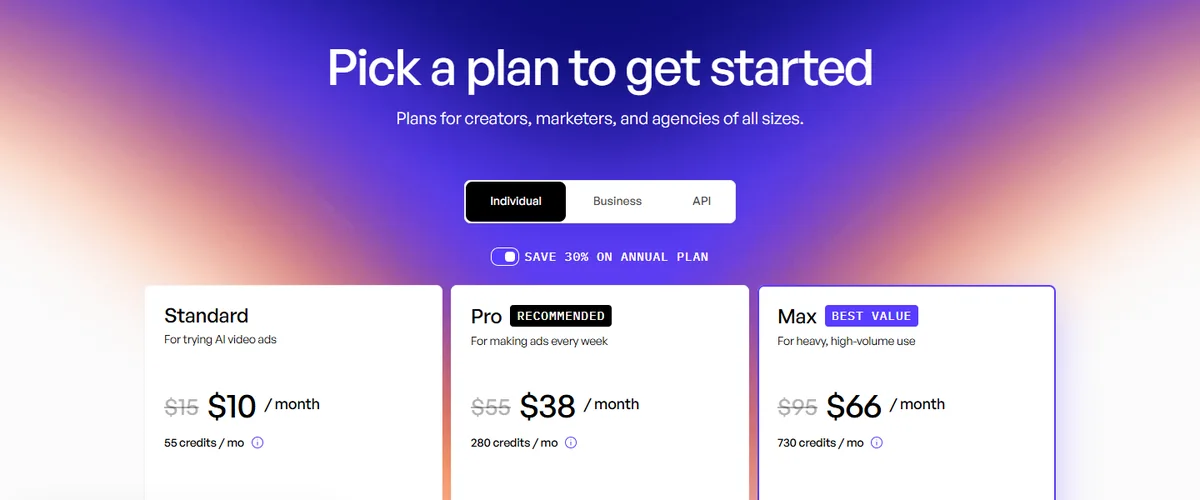
Revid also offers a generator UGC commercials among its tools, but the offer of Creatify is more thorough on this niche. If your goal is to sell a product online and not to grow a chain, it's the right reflex to try Creatify before Revid. See our Creatify review.
Table comparison : entry price recorded on 24.10.2026
| Tool | Main use | Displayed entry price | Free or Trial | Revid does better for |
|---|---|---|---|---|
| Revid AI (reference) | Full short videos, publication, automation | 39 € per month (Hobby or Growth), 32 € annual; Growth announces 2,000 credits | Tools without account, credits offered for registration | – |
| Opus Clip | Cut long videos | 15 $ per month (Starter); Pro 29 $, or 14.5 $ Annual per month | Free trial without card | Create a zero video, automate |
| Submagic | Subtitles and editing Shorts | 19 $ per month, 12 $ annual (15 videos) | No card to start | Generate scripts and visuals |
| CapCut | Editing manual with AI | Free; Pro 23,99 € per month | Free package | Producing without yourself |
| NimbleVid | Videos YouTube long | 49 $ (Entry, 2,850 credits) | Free credits 7 days, some regions | Short format, publication, tools free |
| InVideo AI | Text to generalist video | 10 € Annual per month (20 € monthly), 400 credits | Not specified on page | Auto-Mode, API, catalog tools |
| Crayon | Viral content by volume | 13 $ per month in annual terms (160 $ per year) | No display | Free trial, tools without account |
| Syllaby | Faceless chain and planning | 9 $ per month (Starter), 29 $ (Basic) | Contradictory page | Scope tools free and automation |
| Creatify | Product advertising UGC | 10 $ per month (Standard) | Free plan: 10 credits per month, watermark | Organic content chain |
The prices are those displayed by each publisher on October 24, 2026, in display currency. They often change and sometimes depend on annual billing: check on the official page before buying.
Verdict: Revid AI or an alternative?
Our recommendation
Keep Revid AI if you are looking for a tool who writes, produces, publishes and automates short videos for one or more channels, and if you agree to monitor credits. His box to tools Free is a real plus to start.
Move on to an alternative if your need is specific: Opus Clip to cut, Submagic for subtitle, CapCut to mount yourself, NimbleVid for the YouTube long, Syllaby to plan, Creatify For commercials. In these cases, the specialist is generally more economical or readable than the specialist.tool That does everything.
We will update this page after our test of a full video with Revid, to finally compare the renderings.
With our link, the BEKOE code gives 20% discount on the first month of Revid, reserved for new subscribers.
FAQ: Alternatives to Revid AI
What is the best alternative to Revid AI?
It depends on your use. Opus Clip to cut long videos, Submagic for subtitles, CapCut to mount yourself, NimbleVid for the YouTube Long, Syllaby for a faceless chain, Creatify for product advertising.
Is there a free alternative to Revid AI?
CapCut offers a free package (released on 24.10.2026) and Creatify a free plan of 10 credits per month with watermark. Revid himself offers many tools without account and some credits for registration. Check the current conditions on each official page.
Is Revid AI cheaper than its competitors?
Not always or ever. At 39 € per month, Revid lies between the formulae of Submagic (19 $) or opus clip (15 $) and those of NimbleVid (49 $). The real price depends on the credits consumed: from 40 to more than 600 credits for 30 seconds according to the chosen model.
What an alternative to Revid AI for Shorts YouTube ?
Opus Clip or Submagic if you are leaving an existing video, Revid or Syllaby if you want to generate faceless videos. Our selection of AI for Shorts details these cases.
Revid AI or Opus Clip: Which Should You Choose ?
Opus Clip is a specialist in the cutting of long videos with viral score. Revid also knows how to do this but also offers the generation of zero videos, the publication and the automation. If you never leave long content, Opus Clip has no interest.
Revid AI or CapCut: Which Should You Choose ?
CapCut is a publisher: you go up,AI The free package is generous. Revid produces the video for you and publishes it. To publish little, CapCut is enough; To automate, Revid goes further.
Are the prices on this page up to date?
They were noted on the official pages on October 24, 2026. Publishers often change their rates and promotions: always check the official page before you subscribe.