CapCut Pro has a price that doesn't read at first glance: 23,99 € per month, 199.99 € per year, one offer « up to -60 % » during the Black Friday, and rates that change depending on whether you subscribe to PC, web or App Store. This article puts everything down. Rates were raised on the official website on 23.10.2026, what the subscription unlocks compared to the free version, and it is said for whom it is worth it (and for whom not).
Article containing partner links: If you subscribe via a link, we get a commission, no extra cost to you. The prices and functions below come from the official pages of CapCut, not from a long-term test on our part.
Contents: The prices of CapCut Pro in 2026 • Black Friday CapCut 2026: up to -60%, until 30 October • What CapCut Pro releases compared to free • CapCut free against CapCut Pro in one table • How to subscribe to CapCut Pro • Should we pay CapCut Pro? Our review • And if the price stops you: alternatives • FAQ
Essentials
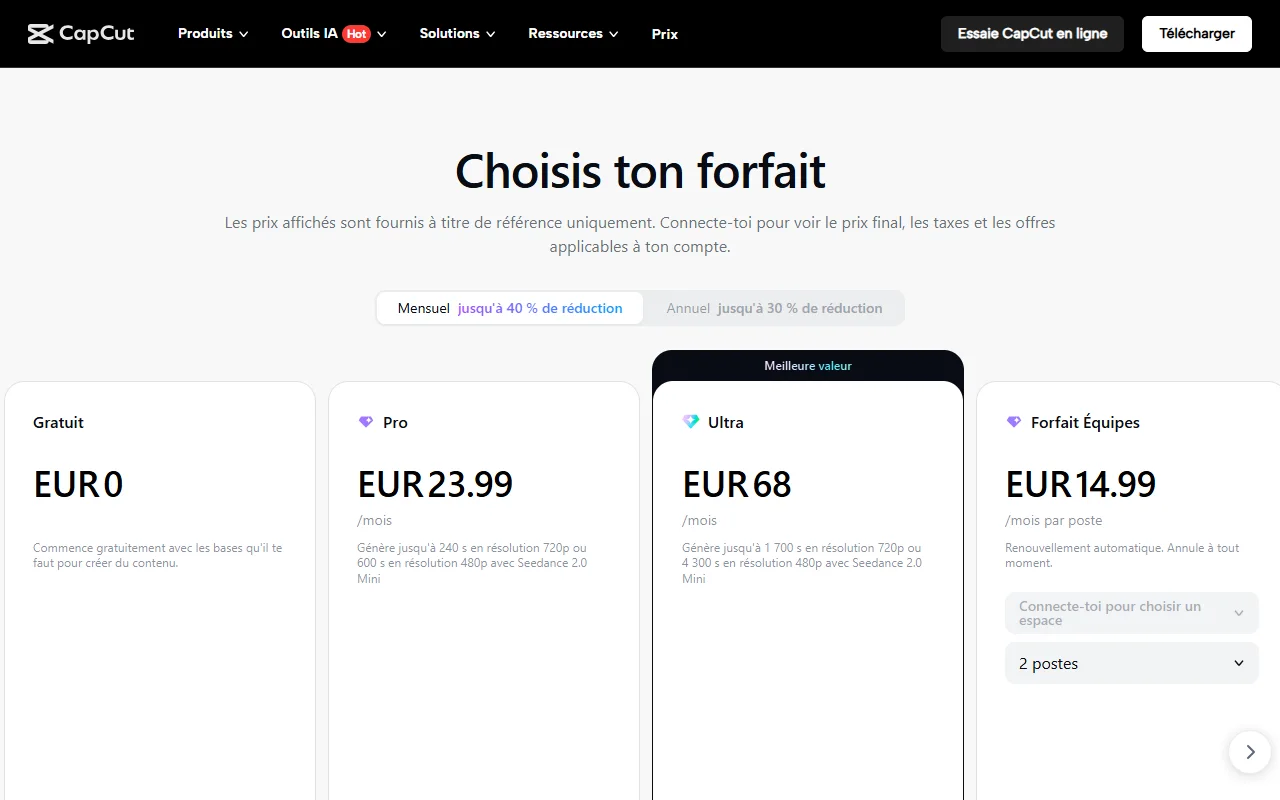
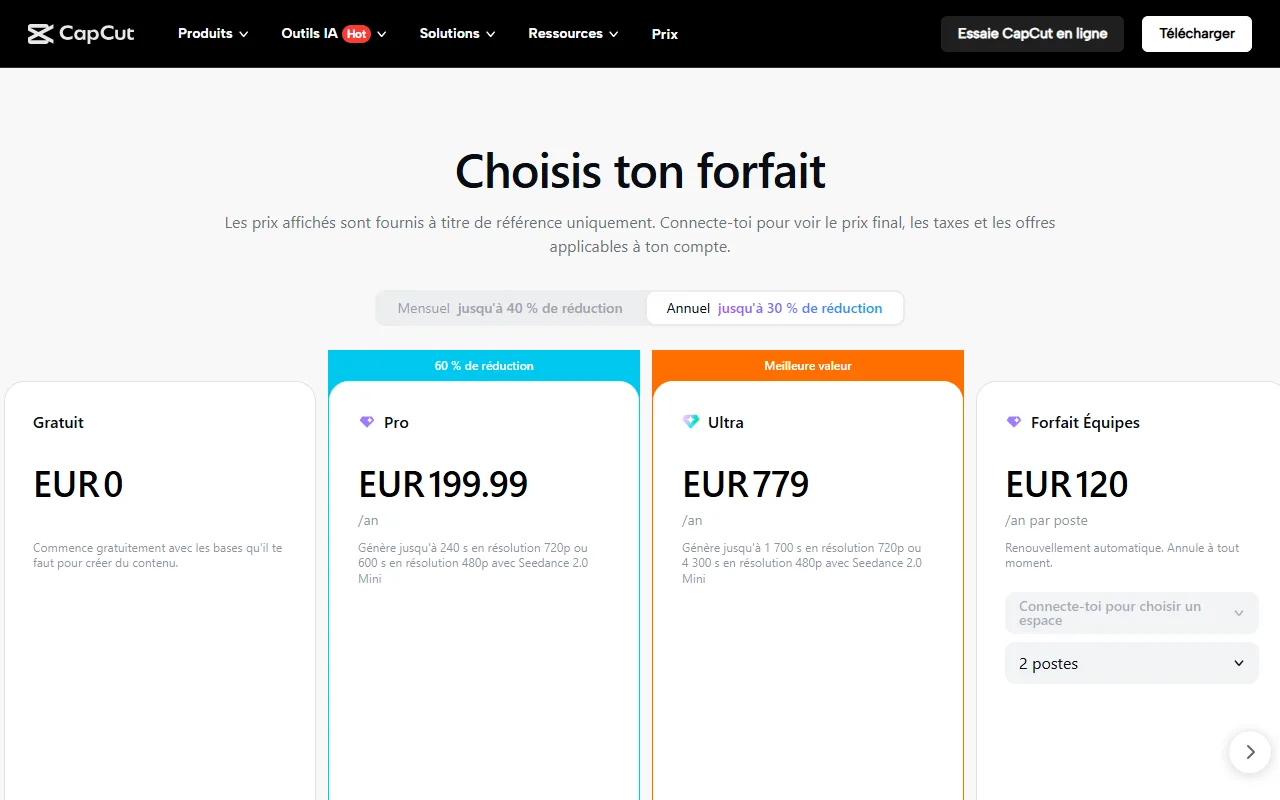
- Price increased on 23.10.2026 : Pro at 23,99 € per month or 199.99 € per year, Ultra at 68 € per month or 779 € per year, Teams package from 14,99 € by post and month.
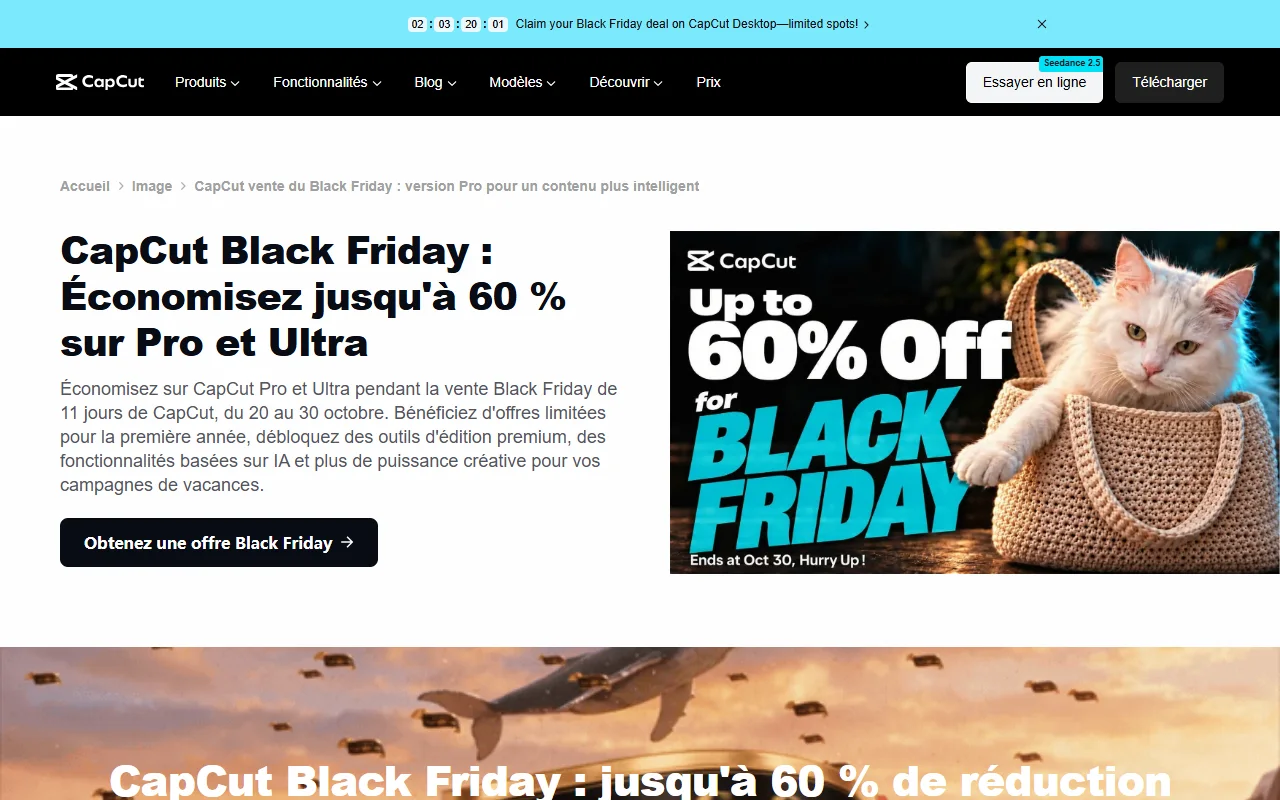
- Black Friday CapCut : from 20 to 30 October 2026, up to -60 % on Pro in the first year, only on the PC version (Windows and Mac). The final price only appears in the app.
- Pro, what's more Appropriations AI monthly, 1TB cloud storage, premium models, and exportable Pro elements watermark-free.
- Annual or monthly : Annual becomes more profitable since 8 months of use (199.99) € against 23,99 € per month).
- Our review : useful if you often mount videos with models and AI Tools Pro. No need for use from time to time.
The prices of CapCut Pro in 2026
Here are the rates posted by CapCut in France, recorded on 23.10.2026 on its official package page.
| Package | Monthly | Annual | Appropriations AI per month | Cloud storage |
|---|---|---|---|---|
| Free | 0 € | 0 € | Not specified | Not specified |
| Pro | 23,99 € | 199,99 € | 1 400 | 1 TB |
| Ultra | 68 € | 779 € | 7 483 | 1 TB |
| Teams (2 posts) | 14.99 € by post | 120 € by post | 1,400 per post | 1TB per space |
Three things to know before you compare.
The annual tariff saves about 88 €. Twelve months to 23,99 € cost 287.88 €, against 199.99 € in annual payment. This is a 30% discount, as confirmed by the page banner (« up to 30% reduction » annual, « up to 40 % » monthly). The annual is paid at once, for the whole year.
The displayed price is indicative. CapCut himself writes that the prices are « for reference » and that it is necessary to log in to see the final price, taxes and offers applicable to his account. Two people can see two different amounts depending on their country, their subscription history or their device.
On mobile, the price can change. Subscription taken from the App Store or from Google Play passes through the shop, with its own rates and promotions. In our previous statement for the article on alternatives to CapCut, Pro prices had been observed between 11 € and 24 € per month depending on the shop and period. CapCut also displays dollar prices in certain aid items (19.99) $ per month and 179.99 $ per year in one guide published on 23 September 2026). In short, always compare the amount at the time of payment.
Black Friday CapCut 2026: up to -60%, until 30 October
CapCut launched on 20 October 2026 its « Black Friday Sale » 11 days, which ends on 30 October 2026. That's what she says. official page of the operation (released on 23.10.2026):
- CapCut Pro up to -60 % in the first year, for new users and non-members.
- CapCut Ultra -40 % in the first year for existing eligible members who are not already on Ultra.
- Version concerned CapCut Desktop only, on Windows and on Mac. The page states that the discount is not available elsewhere.
- Payment The annual subscription is paid at once, and the rebate applies to this first year. Then the subscription is renewed at the normal rate until it is terminated.
- Final price : it displays only in the desktop application, after connection. According to CapCut, the offer depends on the status of the account, the system and the region.
To be checked before paying
The operation page is not perfectly consistent: the Pro block displays « up to 60% reduction », while a response from the Frequently Asked Questions speaks of 40% on Pro. The page also displays a countdown (about 2 days and 3 hours during our survey) that CapCut does not explain; the end announced in the text and on the visual remains 30 October. Above all, the final price could not be raised after discount, since it appears only in the app. So we don't give you an amount instead of CapCut: open the desktop app, log in, and read the price before you validate. After October 30, this section will be updated.
If you hesitate between the monthly and the annual during this sale: the annual promotion is almost always the most interesting, provided you know that the renewal will take place at a higher rate. Record the date in your calendar and cut the renewal if you don't need it anymore. For a panorama of other end-of-year offers in the AI and the video, see our page Black Friday AI 2026.
What CapCut Pro releases compared to free
CapCut does not publish a single and perfectly aligned list of what is Pro. Crossing the official help page, the package page and an article comparison of CapCut, dated September 23, 2026, this is retained.
Cleaner and more quality export
Pro elements (effects, models, fonts, some AI Tools) do not export freely from a free project: they block export or leave a watermark. With subscription, they normally export. The help page also announces an export in 4K at 60 frames per second and the lack of watermark for Pro.
A flat: the article comparison CapCut claims that free users like Pro can export in 8K on computer. So CapCut's pages don't tell exactly the same thing. Before paying for resolution alone, test the export of your project in the free version: if you do not use any Pro element, you may not need subscription.
Appropriations AI each month
Pro gives 1,400 credits AI per month, Ultra 7,483. They are used for generative functions. The package page details the video generation with Seedance : on Pro, up to 240 seconds in 720p or 600 seconds in 480p per month with Seedance 2.0 Mini. Tariffs Seedance 2.5 are given in dollars (from 0.12 $ per second on Pro the first month), which shows that credits go fast if you target high-end models.
Cloud storage and tools advanced
Pro, Ultra and Teams include 1 TB cloud storage. The free plan offers more: the free gigabyte disappeared in August 2024, according to the article comparison of CapCut. The subscription also opens tools such as motion tracking, background suppression, noise reduction, video enhancement or generation of music and images. CapCut classifies automatic subtitles among Pro functions in one article and lists them without a package mention in another: check them in your version.
CapCut free against CapCut Pro in one table
| Criteria | Free | Pro |
|---|---|---|
| Prices | 0 € | 23.99 € per month or 199.99 € per year |
| Editing basic (cut, multitrack, text) | Yes | Yes |
| Elements Pro exported without blocking or watermark | No | Yes |
| Export 4K 60 images per second announced | According to page consulted | Yes |
| Appropriations AI Monthly | Not specified | 1 400 |
| Cloud storage | No | 1 TB |
| Premium models, effects and fonts | Limited access | Full access |
| Teamwork | No | Teams Package |
| Available on PC, web and mobile | Yes | Yes, with a Pro status valid on all three |
To deepen the free side, our guide on CapCut Pro free details what remains without paying and why pirated versions are a bad idea.
How to subscribe to CapCut Pro
The Pro status, once purchased, is valid on the web, on computer and on mobile. Here are the three paths described by the help of CapCut.
- On computer (Windows and Mac) : click on « Account » top right then « Switch to Pro »or on « Join CapCut Pro » when you use a Pro function. The app opens your browser for payment.
- On the Web : from the profile icon, « Switch to Pro ». This is the only place where all packages are compared side by side and where one can pay without going through an app store. Credit cards, PayPal, Apple Pay or Google Pay by region.
- Mobile : tab « Me », « Join CapCut Pro », then purchase via the App Store or Google Play.
To terminate, mobile subscription is handled in your Apple account settings or Google. For others, termination is done from CapCut account settings. According to the article comparison of CapCut, a termination made in the course of a month shall take effect the following month. Refunds depend on the purchase platform and the time of termination.
Should we pay CapCut Pro? Our review
This is how we reason, without claiming a six-month test.
Yes, if you publish several videos a week, that you like ready-to-use models, animated subtitles and the AI Tools, and that time saved is worth more than 17 € per month (or 16.67 € Annual per month). For a content creator or a small brand, this is a reasonable amount.
No, I don't. You mount a vacation video from time to time, or if you are content with cuts and texts. In this case the free version is enough, avoiding items marked Pro.
Monthly or annual? The balance point is about 8.3 months (199.99 - 23.99). If you only need CapCut for a specific one or two month project, take the monthly and cancel. If you go up all year long, the annual is more profitable, especially during the Black Friday.
Vigilance points
- Automatic renewal. Subscriptions are renewed at the current rate until they are cut. The first year discount lasts only one year.
- The variable price. Depending on the store, region and account history, the amount differs. Compare the time to pay.
- Conditions of use. The conditions updated in 2025 on the rights granted to the publisher on the content made it react. Read them if you set videos of customers or brands.
- The addiction to an app. The temporary shutdown of CapCut in the United States in January 2025 recalled that tool may become unavailable for reasons that have nothing to do with the technique.
And if the price stops you: alternatives
No need for CapCut Pro to mount properly. Our comparison of the alternatives to CapCut review eight tools. In summary: DaVinci Resolve is free and complete on computer, Edits d Filmora repeats the same logic of ready-to-use effects with a possible perpetual license. If you only use CapCut for subtitles, see Submagic against CapCut, and if you mount spoken content, Descript against CapCut.
Our verdict
CapCut Pro is a good value for money for regular use, especially on an annual basis and especially during the sale from 20 to 30 October 2026 on PC. This is not a mandatory purchase: the free version remains very honest if you avoid Pro elements. Look at the final price in the app before validating, and note the renewal date.
See CapCut Pro on the official website
Link partner. Black Friday discount displays in the desktop app until 30.10.2026.
Frequently Asked Questions
What is the cheapest CapCut subscription?
The Pro package in annual payment, at 199.99 € per year (approximately 16.67) € per month), is the cheapest per month among CapCut's individual offers on 23.10.2026. Monthly costs 23,99 €. Teams package starts at 14,99 € by post and month, but it's for teams. On mobile, prices of app shops may differ.
What is the difference between CapCut and CapCut Pro?
Free CapCut covers the editing Basic. CapCut Pro adds credits AI monthly, 1TB cloud storage, full access to premium models and effects, AI Tools advanced and export without blocking Pro elements.
How to use CapCut for free?
Download CapCut on computer or mobile, or use the online editor, and mount without subscription. Avoid items marked Pro: they block export or add watermark.
What are the limits of free CapCut?
Effects, models, fonts and AI Tools marked Pro, lack of cloud storage and lack of credits AI monthly. The editing basic (cut, multitrack, text) remains accessible.
Is CapCut reliable?
CapCut is edited by ByteDance, TikTok's parent company, and widely used. The points to watch are elsewhere: the terms of use on content rights, the automatic renewal of subscriptions and the availability of the app, which was temporarily cut off in the United States in January 2025.
What's CapCut's competitor?
On computer, DaVinci Resolve (free) and Filmora. On mobile, Edits fromInstagram. For subtitles, Submagic. For the editing by the text, Descript.
Is there a CapCut Pro promotion for the Black Friday 2026?
Yes, from 20 to 30 October 2026, CapCut announces up to -60% on Pro and -40% on Ultra the first year, only on the desktop version. The final price will appear in the app after connection.
Is CapCut Pro free for a month?
The Black Friday offer page indicates that Windows users can start with a free trial before applying the discount, without detailing the duration. The CapCut help page does not describe Pro free trial. Check the app for what appears on your account.