If you read somewhere thatInVideo AI offer « 10 minutes of video per week free of charge »Forget that number. In October 2026, InVideo turned his whole model on credits, its plans are now called Starter, Plus and Max, and the free plan no longer appears on the pricing page. It still exists, but InVideo no longer gives it a public quantified quota. I looked at the tariff page and the official help center to sort out what is verifiable, which is no longer the case, and what the actual cost is.
Contents: Essential · The free plan in 2026 · How credit works · What you can do · What you can't do · Tips · Price InVideo · FAQ
📌 Essentials
- InVideo AI remains usable for free, with « limited appropriations » reset to zero every Monday at midnight UTC (help centre, updated 28 July 2026).
- No official quantified quota for the free plan in October 2026: « 10 min per week » which come from old versions of the offer.
- Watermark InVideo (and stock media watermarks) on all videos exported free of charge, after official help.
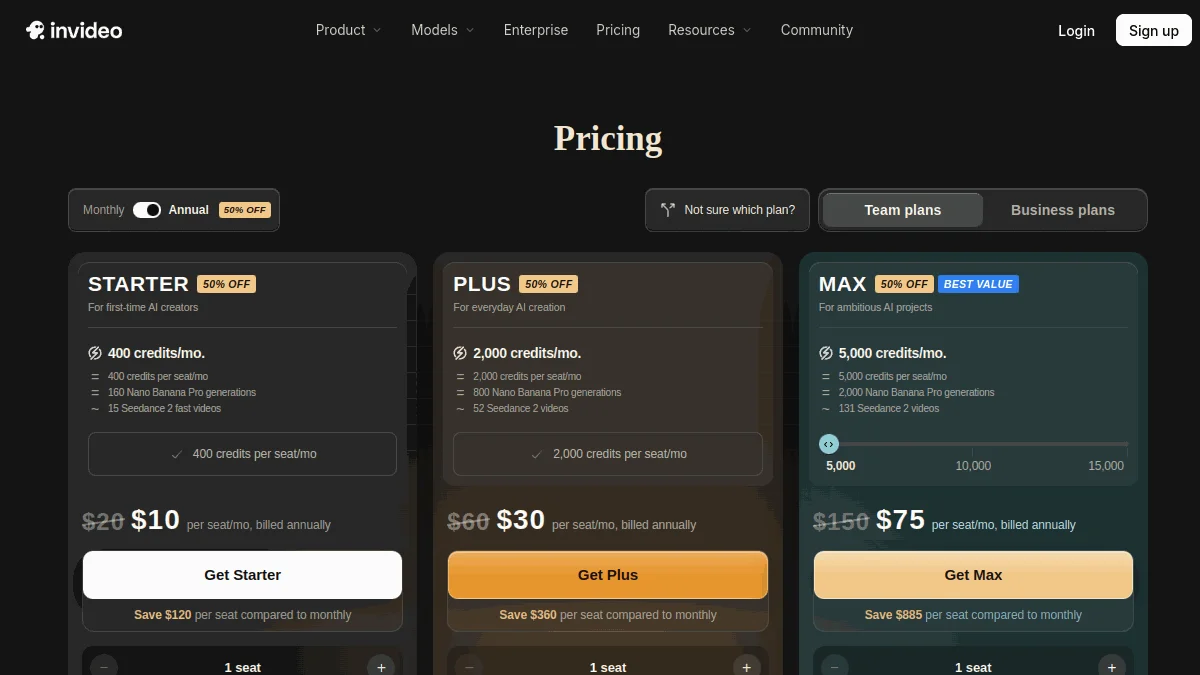
- Starter : 20 € per month or 10 € per month in annual terms, for 400 monthly credits. Plus: 60 € (30) € in annual terms). Max: 150 € (75) € in annual terms).
- Appropriations do not refer One month on the other, and a clip generated by a high-end model can consume dozens.
Is InVideo AI is free in 2026?

Yes, but the formula has become blurred. The Help Center InVideo answer the question « Can I use InVideo AI for free? » in an article updated on July 28, 2026: the free plan gives limited credits to explore the platformand this quota is reset every Monday at 0h UTC, or 1 hour or 2 hours in the morning in France depending on the season. No credits, no video duration, no export numbers are specified. When the quota is exhausted, the application displays « Weekly limit reached » and proposes to wait for the next Monday or move to a paid plan.
Why we still read everywhere « 10 minutes per week » ? Because it was. Previous versions of the aid InVideo announced 10 minutes of generation and 4 exports per week, then a tighter formula around 2 minutes of video, 1 credit AI and 4 weekly exports. These figures are taken from many comparisons which have not been updated. We do not take them back as guaranteed here: the only reliable source, in October 2026, is the meter displayed in your own account.
What remains clearly documented, however, is the watermark. Official aid states that videos created and exported with the free plan carry a Watermark InVideo and media watermarks stock, and that the only way to remove them is to switch to a paid plan.
⚠️ Attention: from this article the promises of « Free 1080p » and « 40 minutes per month » in old versions of the guides InVideo including ours. InVideo do not post them anywhere on its official pages.
How credit works InVideo ?
Since the recast, everything goes through the credits. The aid centre InVideo described as an internal currency, spent on video creation, generative models and certain premium functions. Some rules to know before you start:
- Cost depends on model, duration and resolution. InVideo displays the exact cost before you confirm each generation.
- Models are charged at their original API price, and InVideo reserves the right to change the cost in credits without notice.
- Downloading a video already generated costs nothingno more than edit an existing video.
- Appropriations do not refer Neither the plan nor those purchased in recharge.
- On paying plans, the meter goes back on anniversary day subscription, not the first of the month. Free is Monday.
To measure the gap between a free account and large video models, just look at the grid published by InVideo for its generating models. Some orders of magnitude, recorded on October 10, 2026:
| Video template | Duration of a clip | Cost in credits |
|---|---|---|
| Veo 3.1 Lite (720p to 1080p) | 4-8 s | 4.8 to 25.6 |
| Veo 3.1 (720p to 4K) | 4-8 s | 32-192 |
| Kling 3.0 Turbo (720p to 1080p) | 3-15 s | 13.5 to 84 |
| Seedance 2.0 Mini (480p to 720p) | 4-15 s | 6.8-66 |
| Seedance 2.0 Fast (480p to 720p) | 4-15 s | 10.4 to 102 |
Put this in front of the 400 monthly credits of the Starter plan, the first pay-in level: a single Veo 3.1 clip in high resolution can cost almost half the month. It says everything about what a free quota « limited » allows to generate with premium models: very few. The free is used to discover the interface and the functioning of agents, not to produce cinematographic plans in series.
InVideo AI free: what you can really do
Discover the quick-to-video. This is the central promise of InVideo : you describe your video, the agent writes the script, assembles the plans, poses a voiceover and holds it editing. The free account lets you see how tool interprets a prompt in French and what level of retouch it is then necessary. To make your request well, our guide to create a video with AI gives a method of promptness that also works here.
Take over the editor. Pay plans highlight a publisher with timeline, tools Color, audio and 3D. The free account is used to check that the interface suits you before you commit, which is not a detail: InVideo has changed a lot in a year.
Test a short format. A short short or short explanatory video, published on your personal account, remains the most realistic use. Help InVideo indicates that you can share videos made with the free plan on your social media. The watermark remains visible.
Recover script and structure. Even if the final rendering does not convince you, the script and cutting generated by the agent are reusable in another editor. For a creator who struggles with the structure of his videos, it is already a gain.
Compare before buying. The healthiest thing is to launch the same subject on InVideo And a competitor. You'll soon see which one fits your style. For an approach driven by text and voice, look at what allows Fliki AI free.
InVideo free: what you can't do
Export watermark-free. All videos exported free of charge carry watermark InVideo, plus banks stock. For a monetized channel, a commercial, or a customer, it's resuscitatory.
Produce in volume. The weekly quota is voluntarily short, and InVideo no longer publish its size. Cannot build a reliable publication calendar on a meter whose capacity you don't know in advance.
Use the best models freely. Even on Starter at 20 euros a month, access is restricted: agent « Agent Two Lite » only, and for Seedance Only 2.0 Fast and 2.0 Mini versions. Access to all models and Pro and Ultra agents starts at Plan Plus. The free is logically below.
Access premium stock media and comfortable storage. Premium football quotas (100, 200 or 500 depending on the plan) and storage (200 GB to 2,000 GB) are arguments of paid plans.
Summarize one week over the other. What is not consumed until Monday midnight UTC is lost. Same pay-side logic, where unused credits of the month disappear.
5 tips to get the most out of it InVideo free
1. Work the quick before generating. Target duration, public, tone, language, format 16:9 or 9:16: the more precise your request, the less you burn credits in regeneration. A quick wave is expensive, because it is revived.
2. Read the cost displayed before each generation. InVideo indicates the price in credits before confirmation. On a free account, always choose the minimum resolution and duration for a first trial.
3. Edit rather than regenerate. According to official help, editing an existing video and downloading it does not consume credits. Fixes in the publisher instead of restarting a full generation.
4. Plan your tests around Monday. The quota leaves on Mondays at 0h UTC. If you're preparing an important test, keep your credits for the start of the week instead of starting them on Sunday night.
5. Complete with a generator original plans. InVideo constructs the structure and the voiceover ; for some more striking B-roll planes, a tool specialised as Kling AI can produce the clips to be added to the editing. Simply check the conditions of use of each tool if the video is commercial.
What is the price ofInVideo AI in 2026?
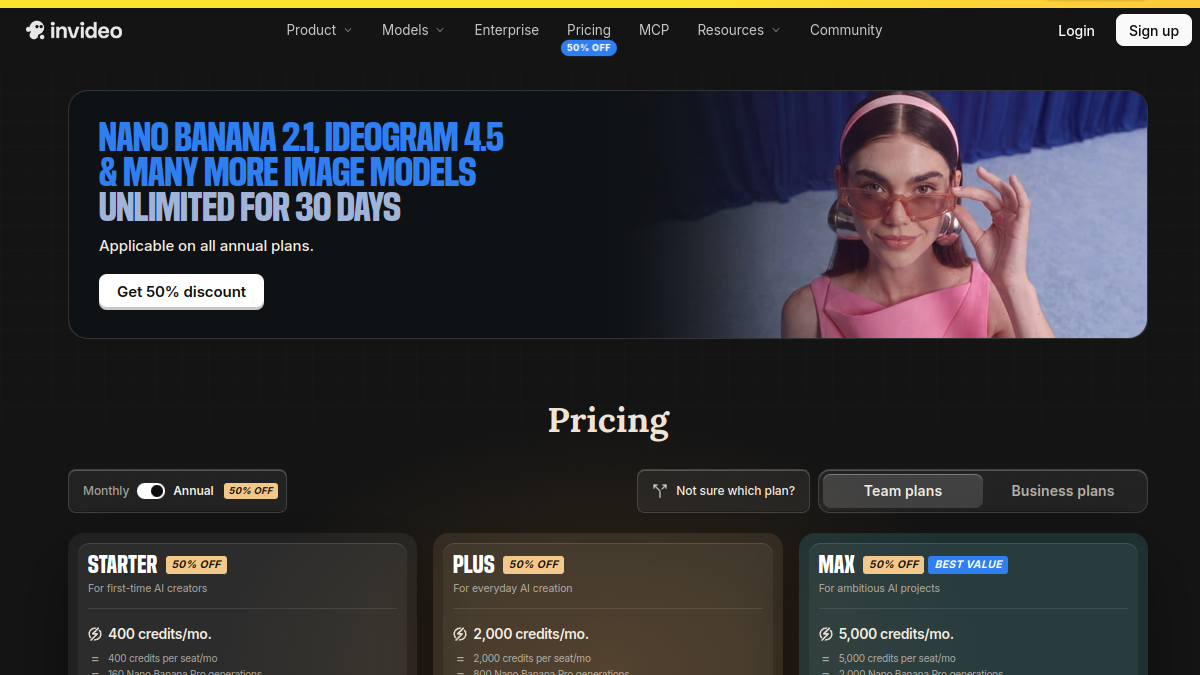
Prices recorded on the page tariffs d InVideo October 10, 2026. They are displayed in euros from France, and with the same dollar amounts from the United States. The 50% rebate applies to annual billing.
| Plan | Monthly | Annual (per month) | Credits / months | What changes |
|---|---|---|---|---|
| Free | 0 € | 0 € | Limited, reset on Monday | Watermark InVideo and stock |
| Starter | 20 € | 10 € | 400 | Agent Two Lite, Seedance 2.0 Fast and Mini, 100 premium footings, 200 GB |
| More | 60 € | 30 € | 2 000 | All models, agents Lite, Pro and Ultra, 200 premium footages, 600 GB |
| Max | 150 € | 75 € | 5,000 (up to 15,000) | Lowest cost per credit, 500 premium footballs, 2,000 GB |
To give an order of thought, InVideo translates these credits into usage: 400 credits correspond to about 160 images Nano Banana Pro or about 15 videos Seedance 2 Fast, and 2,000 credits to about 800 images or 52 videos Seedance 2. These are the publisher's estimates. Older subscribers can still see plans with different names (Basic, Pro, Ultra) in their space: it helps them always, with 190, 1,000 or 3,000 credits per month.
When to go to paid plan
Threshold 1: You want to publish watermark-free. Monetized channel, customer, advertising: Starter is the minimum.
Threshold 2: You publish every week. A short and unencrypted free quota does not keep a steady pace. Starter in annual, at 10 euros per month, remains the most reasonable entry ticket.
Threshold 3: You want the premium models. Seedance 2.5. Seedance 2.0 in 4K and Pro and Ultra agents request the Plus plan. It's a real price jump: think about your front volume.
What's worth InVideo AI versus others tools free?
InVideo has been repositioned as a platform that combines third-party models: Veo 3.1, Sora 2, Kling, Wan, PixVerse, Hailuo or Seedance video side, Nano Banana Pro, Ideogram or Flux side image, ElevenLabs or Minimax audio side. It's convenient to have everything under one roof. But in free of charge, we almost do not take advantage of this force, since these models are expensive in credits.
My review If your goal is only to make simple editing without paying, a free publisher like CapCut will do more for you, even if some features are reserved for subscription. If you want a script-driven video voiceover treated, Fliki AI has at least one clear quota (3 credits per month). InVideo Makes sense when you're willing to pay for his agents and models. For a detailed review of the pay functions, read our review complete on InVideo AI, and for other leads, our comparison alternatives to InVideo.
FAQ: Frequently Asked Questions about InVideo Free AI
InVideo Is AI really free?
Yes, InVideo offers free use. According to its help center, the free plan gives limited credits, reset every Monday at 0h UTC. The exported videos are watermarked.
How many minutes of video offers InVideo free?
InVideo no longer publishes official figures in October 2026. The « 10 minutes per week » often cited correspond to an old version of the offer. The actual quota will appear in your account, with the message « Weekly limit reached » when he's exhausted.
What is the price of InVideo AI?
On 10 October 2026: Starter at 20 euros per month or 10 euros per month in annual (400 credits), Over 60 or 30 euros (2,000 credits), Max at 150 or 75 euros (5,000 credits). Companies go through a quote.
How to remove watermark InVideo ?
Official aid indicates that the only solution is to move to a paid plan. Reframe or hide the watermark of a free video is not a method provided by InVideo, and we advise against it.
Can we publish a video InVideo free of charge on YouTube Or TikTok?
Help InVideo indicates that videos created with the free plan can be shared on social networks. They keep the watermark InVideo and those in stock media, making them poorly adapted to a professional channel.
InVideo Does AI work in French?
Yes, one can write his prompt in French and generate a voiceover in French. The quality depends on the vocal model chosen, InVideo based in particular on ElevenLabs and Minimax for audio.
Need to download an APK to use InVideo AI for free?
No. InVideo works in the browser and offers a mobile app accessible from its site. Go through the official blinds rather than through an APK downloaded from a third party site.
What alternatives to InVideo free?
Fliki AI for text and voice-driven videos, HeyGen for speaking avatar, Kling AI for original generated plans. Our guide of the generator AI video free compares free formulas, and the Complete Comparison details the alternatives.
🎯 Verdict
InVideo AI free, in 2026, it's an extended demo : limited credits each week, a watermark, and no public quota to plan. Perfect for understanding the prompt-to-video and editor, insufficient to publish regularly. The real point of entry is InVideo Starter EUR 10 per month annually. For more spectacular generated plans, associate it with Kling AI, and move on to plan Plus only if you need all the models.