Write an idea, and get a finished short film with characters that don't change face to face at each stage: it's the promise of GenFlick, which presents itself as a cinema studio AI full, from scenario to editing. On paper tool check everything : Creative director AI, Studios Film, Brand and music clip, 4K release, page viewing. We wanted to see what's left of it when we really make something. Verdict after a 30-second film, an advertisement and a voiceover in French, all realized on October 23, 2026.
Transparency: The publisher offered us 200 test credits, added to the editorial account on 23.10.2026. We didn't buy anything and the publisher didn't read this again. review. Everything that follows comes from our test, unless otherwise stated.
Partner link: links to GenFlick on this page can become affiliated links. If you subscribe through this, we will receive a commission at no extra cost to you.
Contents: Essential · What is GenFlick? · Our protocol · The film test · Coherent characters? · The 4K · Studios Film, Brand, clip · French · Appropriations and time · Prices · Rights and watermark · Verdict · FAQ
Essentials
- The strong point is real: On our 30-second film, the baker, her cat and the little boy keep the same face, the same clothes and the same accessories on the three scenes. Ensign « At Margot » is written correctly to the image.
- The price is almost always displayed before launching, and it was respected for the film (81 announced credits, 81 debited). Not for everything: our advertising cost 51 credits for 42 announced, and the voiceover from Genedit 31 credits without any displayed price.
- 4K is an export, not a generation: the video comes out at best in 1080p (and only with a expensive model), the 4K gets by scaling up to export. Our 4K export has remained blocked.
- It's slow. 36 minutes for the 48 key images of the storyboard, 11 minutes for the video. Count an hour for a 30-second movie.
- French goes through the rapids and the voiceover, but the interface remains in English and the director AI Sometimes alternates both languages.
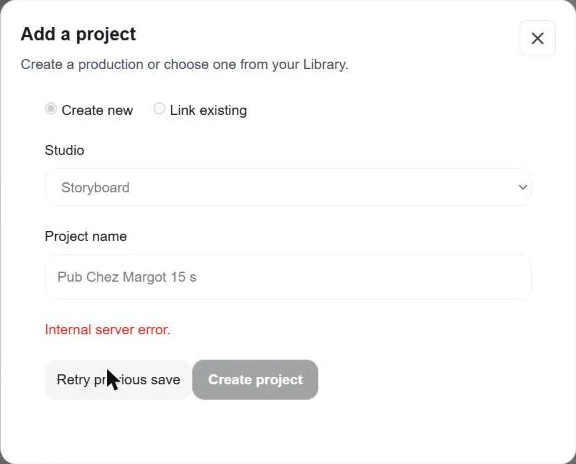
- Not everything works yet: Agent GenAds never responded, and adding a project to the Brand studio returned a server error.
What is GenFlick?
GenFlick (genflick.com) is an American platform that brings together in one account to produce movies, series, music clips and commercials with AI. We don't choose « one » generator : the platform plugs several video models from the market (Seedance, MiniMax, Grok Imagine, HeyGen) and several image models, all paid with a single credit reserve. The catalogue tools displays 112 entries on the day of the test, from storyboard to logo through the subtitling.
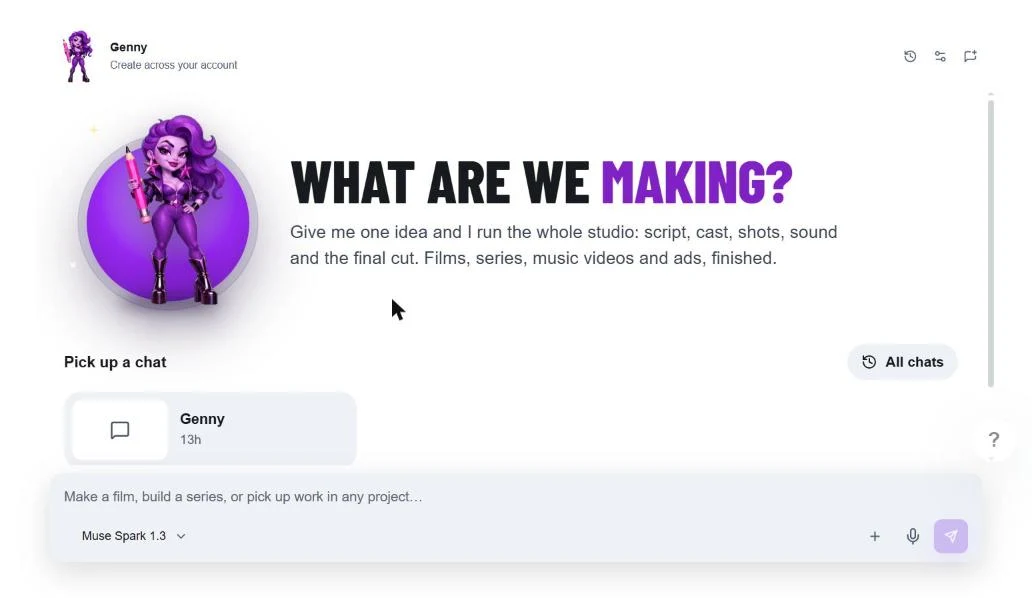
In the centre there is Genny, Creative Director: a discussion interface that welcomes the user with « What are we making? » and promises to manage « script, casting, plans, sound and editing Final ». Around her are specialized studios (Film, Series, Brand, GenAds, Genfluencers, Genclip), a publisher of editing called Genedit and a streaming platform where to publish its films. The product moves fast: the Official version log announces 76 updates since March 2026, the last (v1.66.0) dated October 15.
Our test protocol
We wanted to judge GenFlick on what he promises to do better: tell a little story with recurring characters. The subject is voluntarily neutral. A 30-second film, without dialogue: at dawn, in the rain, Margot, a baker of about sixty years (grey huff, round glasses, green apron), opens his shop with his red cat Pistache. She comes out the first batch, a little boy in yellow wax comes to buy a baguette, and the film ends on the sign « At Margot ».
The briefing was written in French, to check language management. Then we tested two other tracks: an advertisement for the same bakery (fictitious brand created in the Brand studio) and a voiceover in French in Genedit. Before each generation, we noted the advertised cost and then the actual account balance. The times have been timed watch in hand. Everything is done in a Chrome browser on Windows, with a free account credited with 200 credits.
Film test: from idea to video, step by step
Step 1: Briefing and Reference Boards
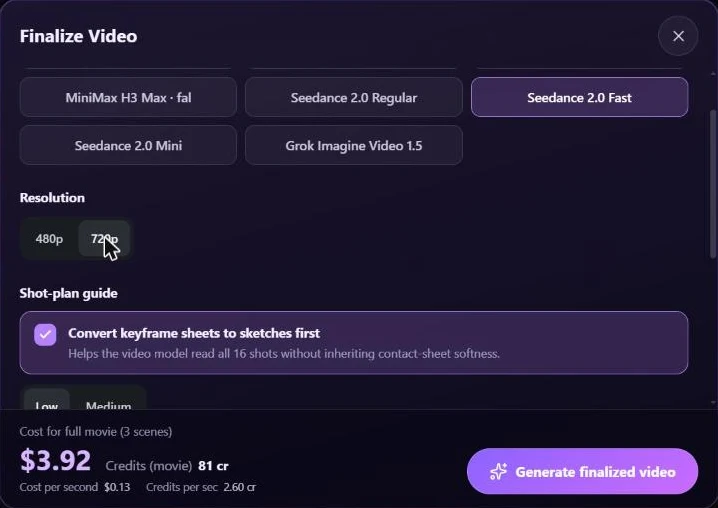
We went through the module « Storyboard to Film » (The film studio also offers a « Film Studio » more comprehensive). We choose a style among twelve (we took « Cinematic 3D »), the landscape format and a duration, from 30 seconds to 20 minutes. L tool immediately displays a price order: for 30 seconds, about 12 credits for storyboard and 24 to 75 credits for video according to the quality level chosen. Good point: you know where you get your feet before you write a line.
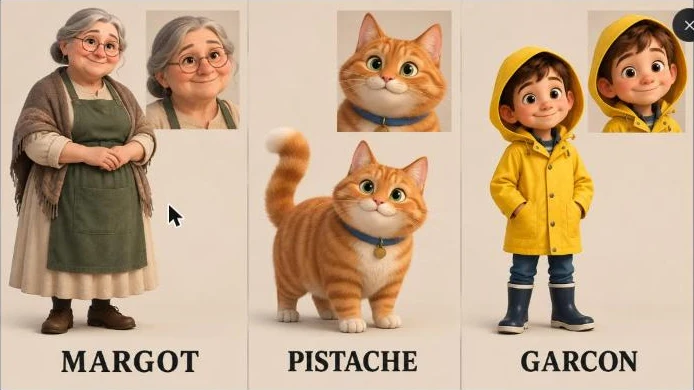
Two and a half minutes after sending the brief, on « Director » had responded in French, summarized the story in three scenes of about 10 seconds and produced two reference plates: one for the characters, one for the places and objects. It is the mechanism that must ensure consistency: each character is drawn from the front and in close-up, then reused in all the following images.
Step 2: 48 key images, in 36 minutes
Once the plan is validated, GenFlick generates a grid of 16 images per scene, or 48 key images for our 30 seconds, with the GPT Image 2.5 model. Announced cost: 6 credits. The result is beautiful and, above all, coherent. But it took 36 minutes, with a scene that was regenerated a second time after the other two were ready (tool check the continuity between nearby scenes). Meanwhile, the interface remained blocked for several minutes on « stage 1 of 3 » without further information.
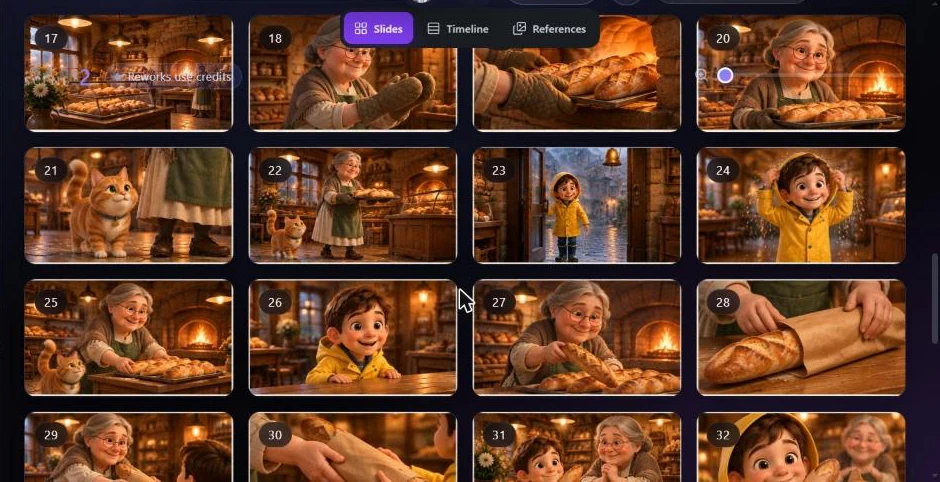
At this point, we can retouch any image: we mark it, we write (or dictate) a note, and the director remakes it. These recoveries use credits with certain models. We didn't need it.
Step 3: Choosing the video model and rendering
This is GenFlick's most instructive screen. Before launching the video, you choose the model and resolution, and the total cost will be displayed in dollars, credits and the second. Here's what he announced for our 30-second film:
| Video template | Proposed resolutions | Estimated cost of 30 s | Native Audio |
|---|---|---|---|
| HeyGen Video 1 | 480p, 768p | 15 credits (480p) | Not indicated |
| Seedance 2.0 Mini | 480p, 720p | 27 credits (480p), 51 (720p) | Not indicated |
| MiniMax H3 / H3 Max | 480p, 768p | 33 / 30 credits (480p), 39 (H3 in 768p) | Yes |
| Grok Imagine Video 1.5 | 480p, 720p | 48 credits (480p) | Not indicated |
| Seedance 2.0 Regular | 480p, 720p | 51 appropriations (480p), 99 (720p) | Not indicated |
| Seedance 2.0 Fast (our choice) | 480p, 720p | 81 credits (720p) | Not indicated |
| Seedance 2.5 | 480p, 720p, 1080 p | 75 (480p), 147 (720p), 363 appropriations (1080p) | Yes |
We have retained Seedance 2.0 Fast to 720p, the default set: 81 credits, plus 3 credits for an option that converts grids into sketches so that the video model reads the 16 planes better. L tool announced « 6-17 minutes » for the first video and « 13-29 minutes » for the whole. The film was ready in 11 minutes, and the status screen indicated « 81 credits used », exactly the figure announced.
The result: our 30-second film
The exported file is 30 seconds, in 1280 x 720 to 30 images per second, with an audio track (ambience and music, since we did not ask for any dialogue). The 12 images below are extracted every 2.5 seconds from the final file, without retouching.
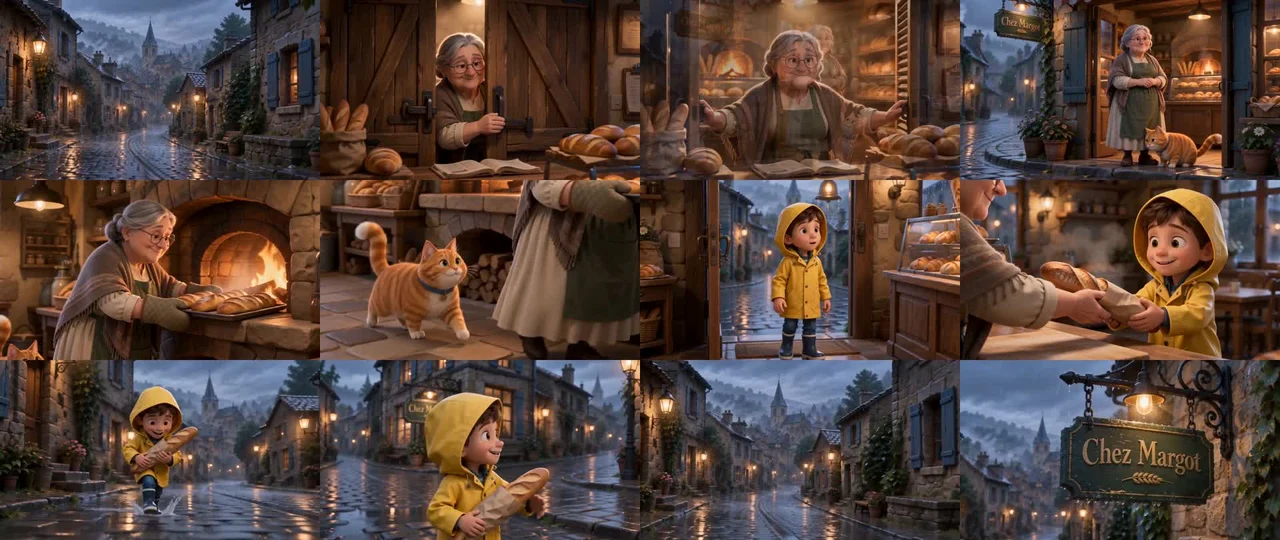
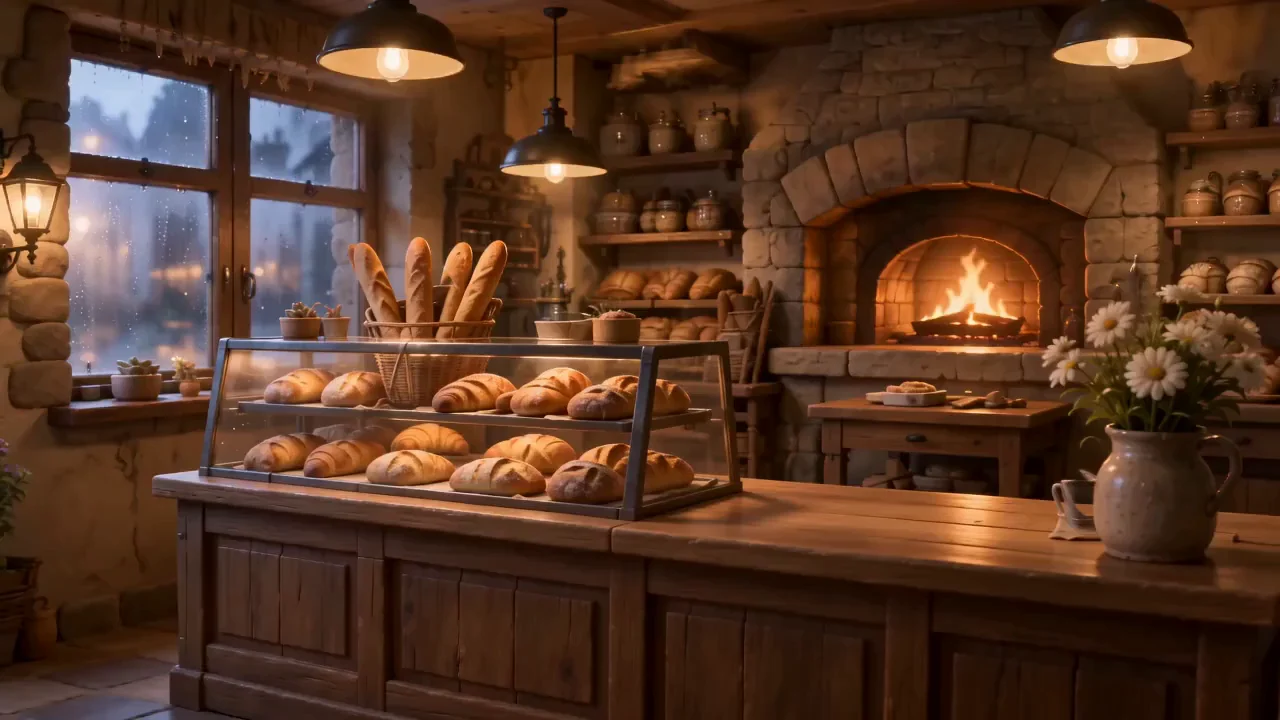
What works: the amber light of the supply against the blue of the street, the drops on the signboard, the cat's approach, the chain of the three scenes that tells the story requested. What's wrong: a melt failed towards the fifth second, where Margot appears split for a fraction of a second, and some floating hand movements. Nothing that prevents the film from being published on a social network, but one exercised eye will see it.
Do the characters remain the same from one plan to another?
Yeah, and that's the best surprise of the test. On our 48 key images, then in the video, Margot keeps his grey bun, round glasses, shawl and green apron. Pistachio remains a striped red cat with a blue necklace and his medal. The boy keeps his yellow wax and blue boots, including when he runs back in the rain. We did not find any change in face or hold between the scenes, a common defect when separated generations are chained in a generator classic.
The method explains the result: the reference boards serve as anchor for each image, and the video model receives these references in addition to the storyboard. It's slower than a simple text-to-video, but that's what gives a real film rather than a series of unrelated clips. If it is the coherence that interests you above all, our guide of the storyboard AI explains why this step changes everything.
The 4K output: actual or only announced?
GenFlick puts forward a 4K output. In fact, no video model proposed in our course generates in 4K: the maximum is 1080p, only with Seedance 2.5, and it would cost 363 credits for our 30 seconds, more than our 200 credits offered. The other models cap at 720p or 768p.
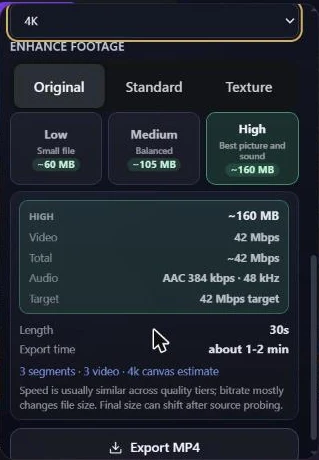
The 4K comes at the time of export. The menu offers « Match source footage », 720p, 1080p or 4K, with three treatments: « Original » (simple scale-up without cost), « Standard » and « Texture » (improvement by AI, paid, price checked before debit according to the interface). We launched a 4K export in Original mode: it remained blocked on « Preparing clips 0 of 1 » for more than six minutes, without ending. The same export in original resolution ended up, after about ten minutes. Our conclusion: 4K exists as an export option, but it's not 4K generated, and we couldn't get it during the test.
Studios Film, Brand and Song to Music Video: what works
Studio Film : convincing
The Storyboard to Film course is the one that did everything right: brief, references, key images, video, export. It's slow, but it's predictable and billed as advertised. Fashion « Film Studio », presented as the advanced control for complex films, was not tested for lack of credits.
Brand Studio and GenAds: Promising, but down during our test
The creation of the fictitious brand « At Margot » is done in five clear steps: identity, existing elements (logo, documents), audience and tone, visual direction, editing. The sheet is clean and contains our answers in French. The idea is good: any project linked to the brand must inherit its tone and palette.
The suite got stuck. In GenAds, the advertising agent received our 15 seconds ad brief, stayed more than 25 minutes on « Generating » then « Waiting to try », and never answered. In the trademark file, adding a project returned twice « Internal server error ». So we made the advertising by the storyboard module, out of the Brand studio. Partner ties do not change our observation: these two functions did not work on test day.
Advertising, finally made with storyboard
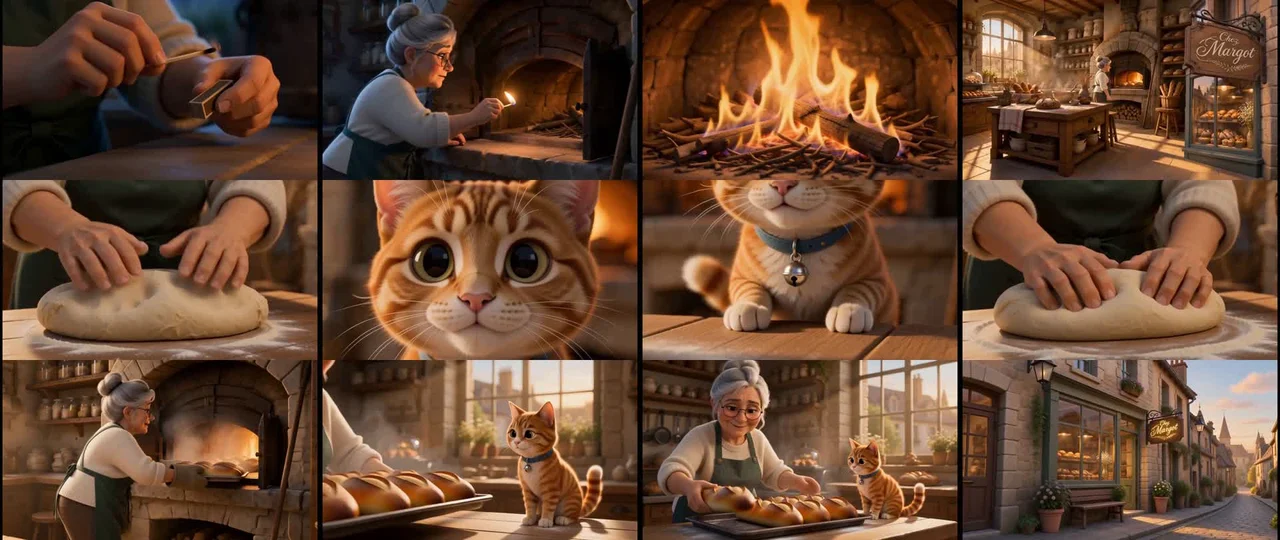
For advertising « At Margot », so we left the Storyboard Generator, as « Low » to save money. The brief, in French, asked for 30 seconds and one voiceover women with a precise text. Plan and reference boards arrived in a minute and a half, the 48 key images in a dozen minutes, without any debited credit for these images. For the video, we chose MiniMax H3 in 768p, a model announced with native audio, for 39 credits plus 3 sketch credits.
The rendering took about 10 minutes and the visual result is good: Margot turns on the oven, kneads, pulls out the sticks, Pistache looks at it from the counter, and the film ends on the window and signs. Three surprises, though. The video lasts 36 seconds instead of 30. The account register displays 51 credits debited instead of the 42 announced (three scenes with 15 credits, sketches, a scale of boards and 2 music credits). And the raw video downloaded from history is completely silent: narration and music only appear once the project is exported.
Song to Music Video: Bring Your Song
The music clip studio starts with a song that you already have: the page of the music clip tool explains that it describes the story, and then it joins its audio file in the Storyboard Generator, the song setting the duration of the clip. No piece royalty-free We didn't test it. GenFlick also offers a generator of songs AI, that we haven't tried either.
Genny and Genedit, the editing
Genny is present on each page of the dashboard as a bar « Ask Genny ». In practice, it is mainly the « Director » specific to each module that works: he planned our scenes, wrote the quick images (in English, behind the scenes) and proposed the covers. He obeys well on the bottom, less on the letter, as we will see with the voiceover.
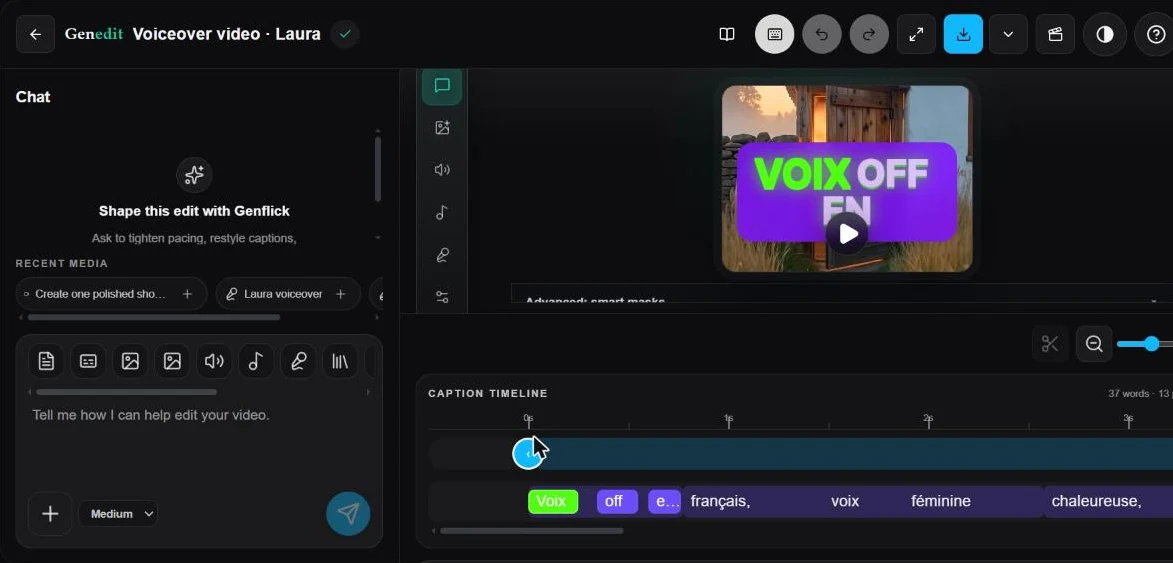
Genedit is the editor of editing : you import a video, you choose a style from 52 « kits » subtitles and animation, then we adjust the cut, subtitles and sound by discussion. It also offers ready-to-use routes: avatar, voiceover on illustrations, subtitles, translation and dubbing, cut long videos. We used it for the voiceover. His download button did not produce files in two tests; the sound had to be recovered in the historical generations.
Does GenFlick work in French?
Partly. The interface is entirely in English and the account does not offer any language settings; only dates and numbers are displayed in French format (« 104.1 appropriations »). On the other hand, the prompts in French are well understood: our two briefs have been followed faithfully, and the boards bear French titles (« Persons », « Places and Objects »).
The Director's language of reply is irregular. On the film, he replied in French and then went to English after validation of the plan. On advertising, the summary of the plan was in English, but the expected narrative was in French. And it was produced well: in the exported file, a female voice reads the text in French, with music in the background. Problem: we provided a text of voiceover exact, and the director rewritten and elongated in his own way, keeping only the last sentence, « At Margot's, morning bread ».
For the voiceover Pure, we used Genedit. The generated voice is based on the multilingual model of ElevenLabs (eleven multilingual v2, voice « Laura »). To check without relying on our ear, we had the file transcribed by a tool voice recognition: language detected « French », sentence returned word for word. Be careful, the field waits for the plain text : we had put a notice there (« Voiceover in French, warm female voice ») and the voice read too. If you want to go further on the French voices, our review ElevenLabs details what this engine is worth.
Credits consumed and generation time: our records
GenFlick has a real merit: most actions are encrypted before launching, and the account offers a log that details each debit (model, task, credits). It was thanks to him that we found the gaps. The journey voiceover Genedit generated on its own a video illustration billed 30 credits, without showing any price. The advertising exceeded the estimate because tool produced 36 seconds instead of 30 and added music. And each MP4 export costs 2 credits, including, according to the register, the two exports of the film that remained blocked. Here is our complete statement of the 200 credits available.
| Action | Projected cost | Credits debited | Measured duration |
|---|---|---|---|
| Film : map, reference plates and 48 key images | ~12 (storyboard), including 6 for images | ~5.5 (8.2 debited and then 2.7 recredited) | 2 min 30 + 36 min |
| Film: video 30 s, Seedance 2.0 Fast 720p | 81 | 81 | 11 min |
| Film: conversion of grids into sketches | 3 | 3 | A few seconds |
| Film: MP4 exports (including two blocked) | Not displayed | 3 x 2 | About 10 minutes for the one who finished |
| Pub : map and 48 key images (Low quality) | ~0,8, images « Free » | 0 (+1 for scaling boards) | 1 min 30 + ~12 minutes |
| Pub : video, MiniMax H3 768p | 39 + 3 (aggregate) | 45 + 3 + 2 (music) | ~10 min |
| Pub : export MP4 | Not displayed | 2 | A few minutes |
| Genedit: voiceover French + video of illustration | Not displayed | 31 (1 + 30) | ~2 min |
| Brand form (Brand) and brief to Agent GenAds | Not displayed | 0 | Agent without response after 25 min |
| Total | 179.9 appropriations out of 200 | 20.1 remaining appropriations |
As for time, the observation is less flattering. One generation does not block the browser, one can work elsewhere during this time, but a 30-second movie takes almost an hour between the brief and the exported file. During our test, the platform seemed loaded: time to display several seconds on each page of the dashboard, exports that remain at zero, agent that does not respond. Monitoring « Activity » generations, which lists each task with its supplier (OpenAI for images, OpenRouter for agent), helps at least to understand what is spinning.
GenFlick price recorded on 23.10.2026
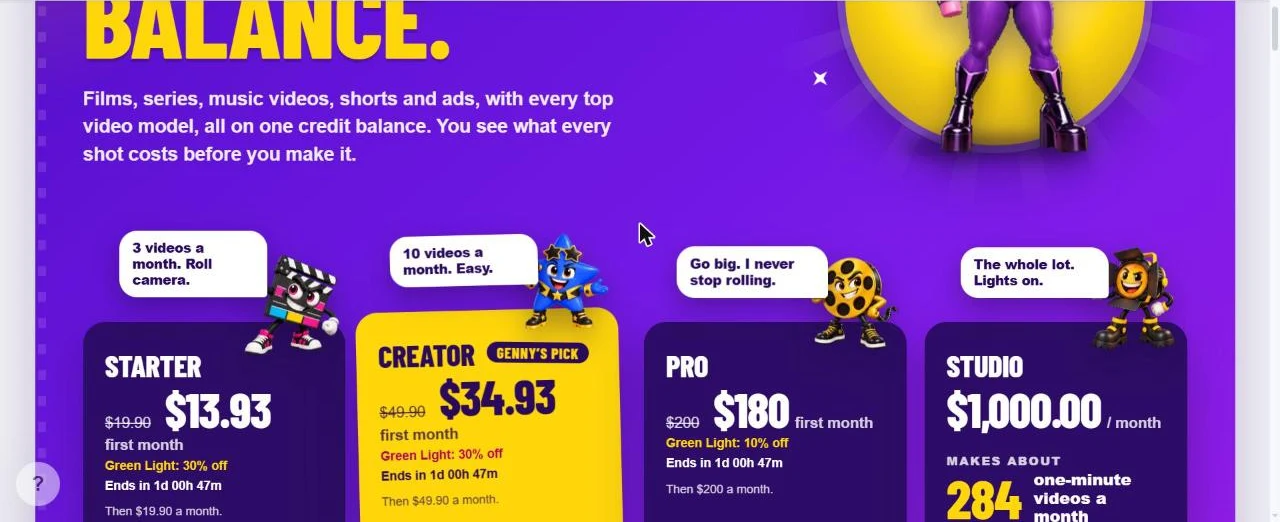
GenFlick works with credits. There is free access (the director and 20 images per day, according to the pricing page), but any video requires credit. The rates below were noted on the official page on the day of the test, in dollars, without taxes. Promotion « Green Light » was in progress, with 30% discount on the first month of the Starter and Creator formulas and 10% on Pro.
| Formula | Monthly price | Appropriations per month | Price of credit |
|---|---|---|---|
| Starter | 19,90 $ | 160 | 0,124 $ |
| Creator | 49,90 $ | 500 | 0,100 $ |
| Pro | 200 $ | 2 400 | 0,083 $ |
| Studio | 1 000 $ | 14 000 | 0,071 $ |
Special packages also exist, without subscription: 80 credits for 9,90 $, 250 for 24,90 $, 600 for 49,90 $ and 1,400 for 99,90 $. The page states that the purchased credits do not expire. To get an idea, our 30-second film cost about 95 credits in total, including exports: on the Starter formula, it represents almost 60% of the credits of the month. GenFlick announces « about 3 videos of one minute per month » on Starter « at the cheapest settings » This is consistent with our survey, provided we accept 480p.
Watermark, commercial rights and viewing page
Watermark: Our exported files do not carry any. We checked image by image, including corners, on the film as on the voiceover. Important clarification: our account was free but credited by the publisher, we cannot say that a free account without purchased credits gets the same result.
Trade rights: on conditions of use of GenFlick (updated October 21, 2026) say that you retain the rights to your prompts and files, and that you can use the generated videos « to the extent permitted » by your formula, by the terms of the supplier of the model and by law. If a supplier (Seedance, MiniMax, etc.) imposes more stringent trade restrictions, they apply. There is therefore no general and explicit commercial licence: for an advertisement broadcast, check the conditions of the model used.
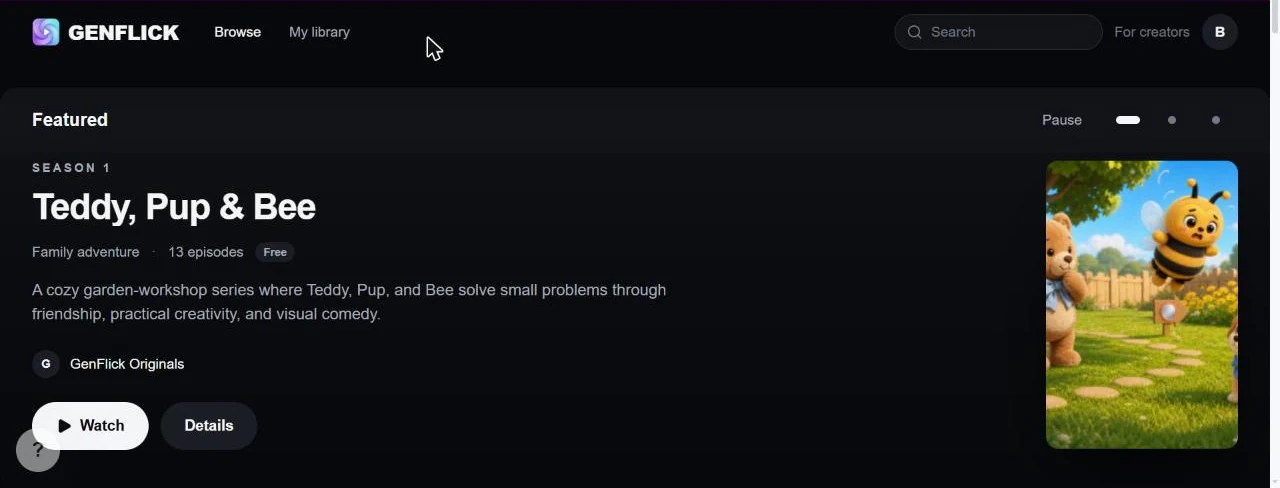
Page Viewing: GenFlick has its own streaming platform, accessible by the menu « Watch ». There are films and series published by the team (« GenFlick Originals ») and by users, free, from one to eight minutes. Since the project, a button « Publish to Genflick » makes it possible to release his film. We didn't use it for our test.
For whom GenFlick makes sense
- Yes if You want to tell a short story with recurring characters (conte, short film, narrative pub, children's series) and that consistency counts more than speed.
- Yes if you want to compare several video models without opening five subscriptions: the cost table per model is a real tool of decision.
- Not if you need a clip in five minutes: one generator direct as Seedance or Hailuo (MiniMax) Go faster for an isolated plan.
- Not if you rely on the native 4K or an interface in French.
- Not yet for intensive advertising use via GenAds and the Brand studio, as long as these modules are not stable.
To locate GenFlick in front of others tools, our comparison of the best AI software video and our guide for create a video with AI go around the alternatives.
Verdict
Our review on GenFlick after test
Which convinced us: the consistency of the characters on a whole film, the storyboard that allows to correct before paying the video, the French narrative that works, and a detailed credit register. The film obtained is clean, watermark-free, and tells exactly the story requested, for the advertised prize.
What's stopping: slowness (nearly an hour for 30 seconds), a 4K which is only an export and which we have not been able to obtain, an interface in English, estimates not always kept (put 51 credits for 42 announced, voiceover Genedit at 31 credits without displayed price) and modules still unstable on the day of the test (agent GenAds mute, server error in the Brand studio, download of Genedit inoperative).
GenFlick is today a good tool for making a short film AI consistent, provided you are patient. The « full studio » announced remains partly to be built. Start with a credit package rather than a subscription, the time to check that the pace suits you.
FAQ: GenFlick, the film studio AI
Is GenFlick free?
There is free access which gives the director AI and 20 pictures per day, according to the price page. All video requests credits: packs from 9,90 $ for 80 credits or subscriptions from 19,90 $ per month (reported on 23.10.2026). For our test, the publisher offered us 200 credits.
Does GenFlick work in French?
The prompts in French are well understood and the voiceover French works, in Genedit as in the narrative of a pub (motor ElevenLabs multilingual). The interface remains in English, with no language option, and the assistant sometimes alternates French and English in his answers.
Does GenFlick really make 4K?
Not in generation. During our test, the maximum in generation was 1080p, with only one model (Seedance 2.5). 4K is offered for export, by scaling up with or without improvement AI. Our 4K export did not succeed.
How much does a GenFlick video cost?
It all depends on the model and the resolution. For 30 seconds,tool announced 15 credits (HeyGen Video 1 in 480p) to 363 credits (Seedance 2.5 in 1080p). Our film in Seedance 2.0 Fast 720p cost 81 credits of video, about 95 credits with storyboard and exports.
Do the characters remain the same from one plan to another?
Yes, in our test. Thanks to the reference plates generated at the beginning, the baker, her cat and the little boy kept the same face and clothes on the three scenes of the film.
Is there a watermark on GenFlick videos?
Our exports had none. Our account was free but credited by the publisher: we cannot guarantee the same result for an account without purchased credits.
Can GenFlick videos be used for commercial purposes?
The terms of use allow the use of videos within the limits of your formula, the terms of the model provider and the law. There is no general commercial licence: check the rules of the chosen model before advertising.
How long does it take to generate a GenFlick movie?
For our film of 30 seconds: 2 minutes 30 for the plan and references, 36 minutes for the 48 key images, 11 minutes for the video, then about 10 minutes for export. Count about an hour.