You have a podcast, a webinar or an interview of an hour, and you know that there are three or four minutes out of there for LinkedIn, TikTok or YouTube Short. The problem is the time to editing. BlitzReels position itself exactly there: it takes a long video, offers highlights, frames them in vertical, adds subtitles, then lets correct the result before export. This review takes stock of what the publisher announces, what subscriptions cost, and above all what we can not yet say.
Transparency: we did not test BlitzReels. No account was used for this review and no credit was offered to us. Everything below comes from the publisher's public pages (home, pricing, documentation, comparison guides) viewed on 24 October 2026, and the demo clips it publishes. When a piece of information is a claim by the publisher, we say so.
Partner link: We are part of BlitzReels' affiliate program. If you subscribe via our links, we receive a commission, without any extra cost for you. This does not change the note or the reservations expressed here.
Contents: Essential · What is BlitzReels? · How it works · What the demo shows · Functions · Prices · Free trial · API, MCP and automation · For who? · What we don't know · Alternatives · Verdict · FAQ
Essentials
- The job: transform spoken recordings (podcast, webinar, interview, Zoom call, video YouTube) in vertical clips with subtitles, to be read before publication.
- Prices are now public: Starter 39 $/month (29 $ Growth 79 $/month (59 $), Agency 199 $/month (149 $), launch rates according to the publisher. Our old sheets talked about non-public rates: it's out of date.
- The test requires a credit card: 7 days, a single import in 720p of up to 15 minutes and three watermarked exports. The chosen subscription starts alone after 7 days if you do not cancel.
- No watermark on pay plans, with an export announced up to 4K. 30-day refund guarantee announced on paid offers.
- What we don't know: the actual quality of the timing, the accuracy of the French subtitles, the processing speed. None of these points is measured here, and the publisher does not publish an independent benchmark.
- An angle apart: BlitzReels also sells as a publisher that can be piloted by agents AI (API, MCP server, SDK, command line). This is especially useful for technical teams.
What is BlitzReels?
BlitzReels (blitzreels.com) is an American video publishing platform by AI. Her current presentation sheet describes her as « a video editor AI that turns podcasts, webinars, interviews, demos and other long recordings into social media clips to your brand ». L tool look for highlights, frame them in vertical, add readable subtitles and title cards, then export for LinkedIn, TikTok, Instagram Reels and YouTube Short. The target displayed: founders, consultants, coaches, marketers and small teams who want to publish regularly without spending hours on a video editing software.
Positioning has evolved. When we checked tool in September 2026, it was presented as a simple tool cutting long videos into shorts. Today, the home page talks about « an agent video editor » and highlights a 215 MCP server tools, REST API, SDK and command line. The two discourses coexist: the clipping for creators, and the automation for developers and agencies. It's important to keep in mind if you want to know to which audience tool It really is.
How BlitzReels works, after the editor
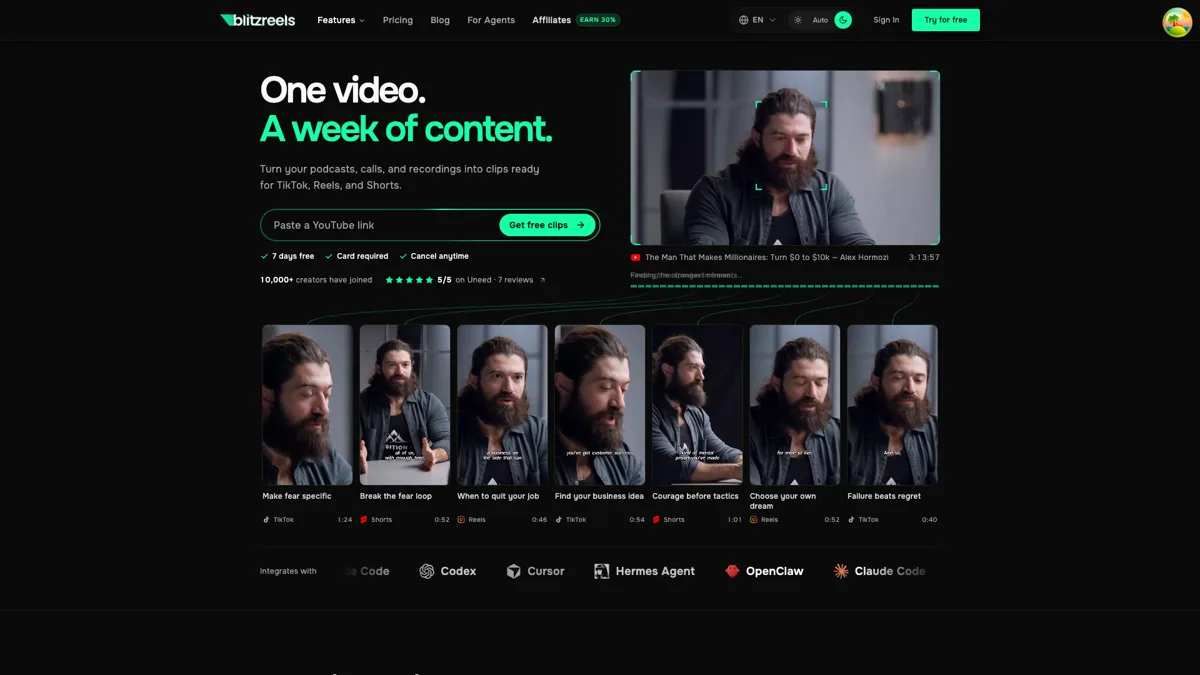
The course described in the documentation is held in four stages. You first import a record: a link YouTube (field « Paste a YouTube link » is at the top of the home page) or a file sent from its computer. L tool then produces a transcription and suggestions of clips. Each suggestion is framed in 9:16, with subtitles. Finally, you refine in a timeline editor, correct subtitles or framing, and then start exporting.
On the API side, the clipping documentation gives concrete parameters that shed light on what the tool know how: a method of selection « auto best », a 9:16 target format, a minimum and maximum duration per clip (the official example uses 8 and 45 seconds), a subtitle option, an automatic layout mode and quality control. The flow even foresees stages of « reselect » (choose another suggestion) and « Repair » (a repair pass). This suggests that the editor knows that the first jet is not always the right one, which is honest, and that human rereading is part of the process.
The publisher himself insists on this point in his guide for consultants: you have to watch the entire export, correct the names and numbers in the subtitles, and check that the extract keeps meaning without the rest of the episode. We share that advice. An automatically selected clip remains a draft.
What the editor's published demo shows
Since we don't have an account, the most useful thing we can do is look at what BlitzReels shows himself. The publisher publishes, in his guide comparison for consultants (updated September 30, 2026), clips from an episode of podcast in French. He states that this export received manual editorial corrections on subtitles, framing and clip purposes. In other words, this is not a raw result from the machine.
We watched one of these clips (« Entrepreneurs and AI », 1 min 32). It shows a video conference with three speakers, presented in three bands stacked vertically, with white large print subtitles placed on the headband of the speaker. The names and companies of the participants remain legible at the bottom of each banner. What this demo says:tool can make a layout to several interlocutors in vertical, and manage French audio with French subtitles. What it does not allow to say: how many corrections it took to get there, or whether the choice of passage was good at first.
To be noted: Demo is a showcase, not a test. A hand-worked clip proves that the final result can be clean, not that the first pass is. To judge BlitzReels on your own recordings, you will have to go through the test.
Functions announced
Based on the price page and the publisher's documents, this is what the offers contain. We have separated what is specified black on white from what remains vague.
- Automatic subtitles: more than 50 announced styles, with possible text correction in the editor.
- Intelligent cropping (« smart crop ») : switch to vertical format with follow-up from the contact person; the agencies page talks about « vertical frame conscious of speaker ».
- Break cleaning and voice isolation: Two tools audio mentioned among the functions common to all offers.
- Library of B-roll: illustration plans searchable and insertable in the editing.
- Timeline Editor: editing manual in the browser (clips, subtitles, overlays, watermarks, audio, exports).
- Series and Story Kits: reusable brand image (« reusable branding ») and « Story Kits » a series of clips to each other; The publisher does not detail further. Reserved for Growth and Agency plans.
- Generation of images and videos by AI : mentioned in the Starter plan via the « appropriations AI ». We have no public details on the models used or on quality.
- Integrations: The publisher quotes Zapier (triggers on exported clips, creation of batches of clips via the API) and a series of code agents. Presentation documents also mention sources such as Loom or Zoom.
What is missing in the public pages: the list of languages supported for transcription, the maximum size of files imported on pay plans, and the platforms to which you can publish directly rather than export a file. If any of this information conditions your purchase, ask the support before you subscribe. Support is announced within 12 hours on all offers.
BlitzReels Prize in October 2026
The grid below reproduces the official page consulted on October 24, 2026. The publisher states that these are launch rates, maintained as long as the subscription remains active, and that the barred prices correspond to future standard prices. Annually offers 25% discount, invoiced in advance. All prices are in US dollars and valid per workspace.
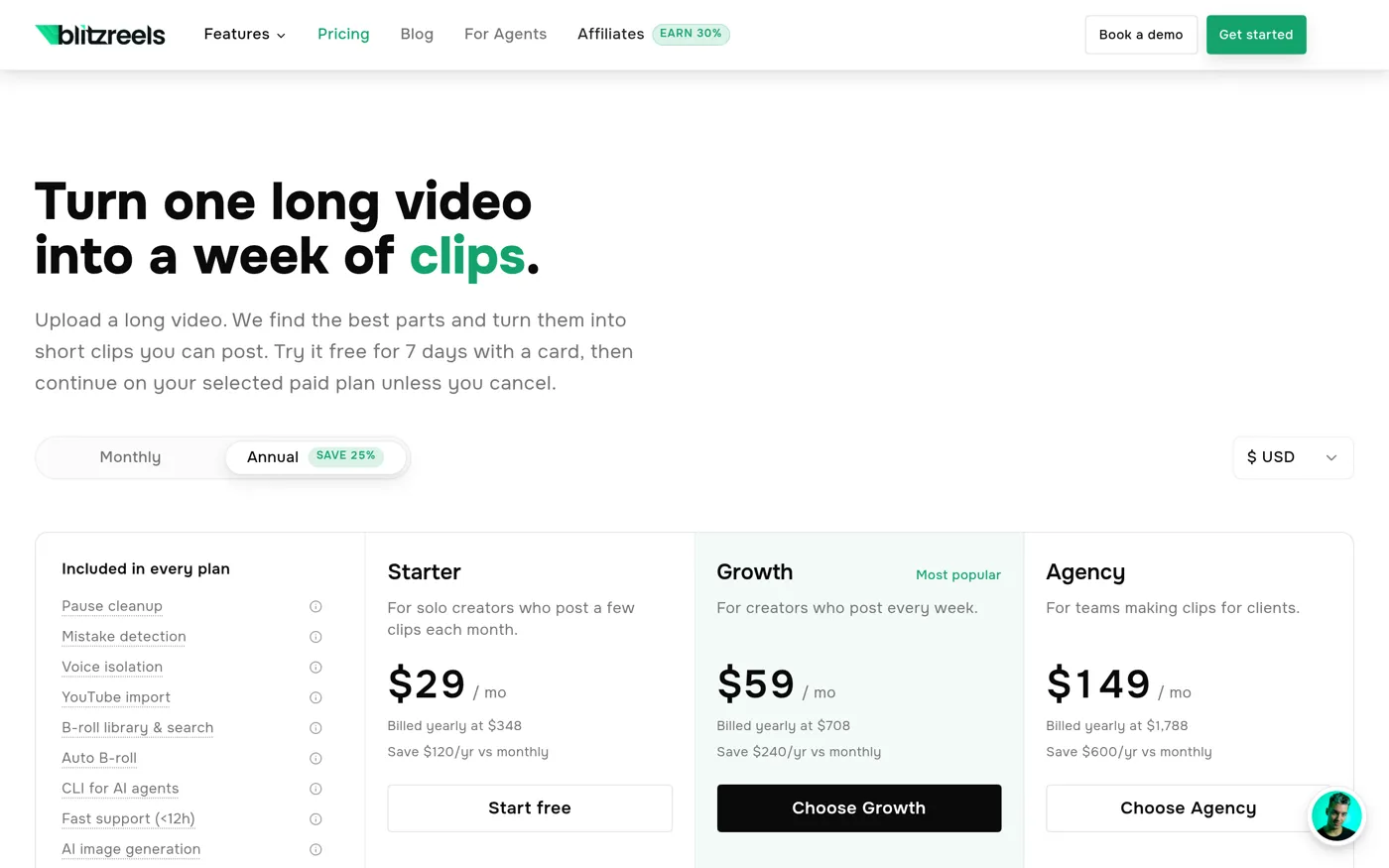
| Plan | Monthly | Annual (per month) | Exports / month | Credits AI | Projects | Storage | Staff |
|---|---|---|---|---|---|---|---|
| Starter | 39 $ | 29 $ (348) $/year) | 30 | 15 | 10 | 25 GB | 1 seat |
| Growth (most popular) | 79 $ | 59 $ (708) $/year) | 150 | 75 | 100 | 500 GB | 3 seats |
| Agency | 199 $ | 149 $ (1 788) $/year) | unlimited | 250 | unlimited | 2 To | 10 seats |
Source: blitzreels.com/pricing, accessed 24.10.2026. Conditions may change: check the official page before you subscribe.
What can I keep from this grid? First, no fee-paying plan imposes watermarks, and export is announced until 4K from the Starter plan. Secondly, the difference between plans is mainly about volume (exports, projects, storage) and team seats, not about output quality. Finally, appropriations AI (15, 75 or 250 per month) are used for generation functions. The page does not say how many credits a clip consumes, nor whether the basic clipping consumes it: the documentation indicates however that on Agency exports are unlimited but « still use credits ». This formulation is ambiguous, and this is the first question to be asked in support.
To situate these prices: to 29 $ per month in annual, Starter returns to about 348 $ per year for 30 monthly exports. If you publish three to five clips a week, 30 exports are enough. A consultant who recycles a weekly webinar in about ten clips per month is therefore in the Starter area; an agency that manages multiple clients at once must watch Growth or Agency.
Free trial: the conditions to read before entering your card
The test is not a free plan in the classical sense. The publisher describes it as follows: 7 days, required credit card, one video import in 720p of 15 minutes maximum, and three exports in 720p with watermark, of 3 minutes each. The chosen paid plan automatically starts after 7 days unless cancelled. The page also provides for the possibility to change or terminate at any time, with access remaining open until the end of the billing period, and a 30-day refund guarantee on paid offers.
In concrete terms, with 15 minutes of import, the test makes it possible to check three things:tool finds the right passages in an excerpt you know by heart, if the French subtitles are correct, and if the vertical framing follows your interlocutors well. It's short but enough to cut. Our advice: prepare before starting an excerpt of 12 to 15 minutes containing a change of contact, a proper name and a number. These are the three classic traps of this type of tool.
Trap to avoid: Put a reminder in your calendar on the 5th day. As the card is requested upon registration and the plan starts on its own, it is up to you to cancel before the end of the 7 days if tool Don't convince yourself. The 30-day warranty exists, but it is better not to need it.
API, MCP server and automation : angle that distinguishes BlitzReels
Most tools clipping stops at the web interface. BlitzReels publishes a product sheet « Machine readable » (a JSON file of facts about the product, revised August 26, 2026) and describes its offer as « a video editor AI Agent ». It displays a hosted MCP server (215) tools announced, OAuth 2.1 authentication), a REST API with OpenAPI specification, a SDK and an installable command line with npm. The guides explain the connection with Claude Code, Codex, Cursor and Zapier.
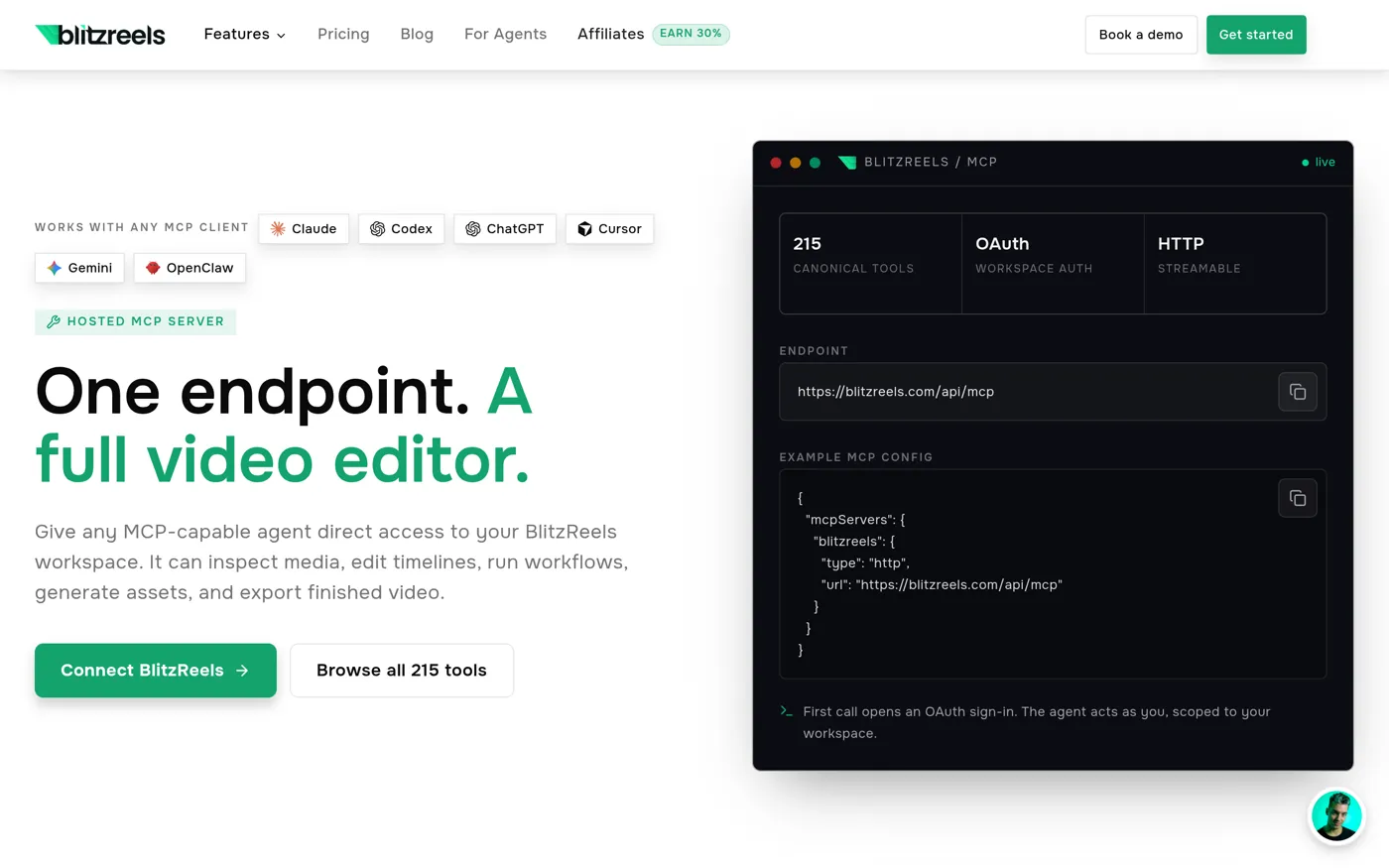
What this changes in practice: a technical team can connect its content stream (new published episode, new recorded webinar) to the automatic creation of a batch of clips, then reread. For a single creator who just wants his shorts of the week, it's superfluous. For an agency that produces for ten customers, this is potentially the decisive criterion. We didn't try, and the vocabulary « Agent » It is also a marketing responsibility: you must check if the documentation covers your needs before you are proud.
For whom BlitzReels seems suitable (and for whom not)
Based on the positioning and price grid, here is our reading. It remains an analysis of documents, not a return to usage.
- A consultant or coach which already records webinars, authorised customer calls or interventions: the case of central use, and the one which the publisher details best in its guide.
- A podcaster who wants vertical extracts for LinkedIn and Shorts without going up by hand. To be compared with tools specialized video-podcast.
- A small agency with several clients: Growth plan or Agency, separate projects per customer, team seats, automation via API.
- A creator who leaves a white page : not the right one tool. BlitzReels is working on existing material; to generate a video from a text, turn instead to the generators of our selection.
- A very tight budget: 29 $ per month at least annually, without a permanent free plan. To test the principle without a map, first look at the alternatives that offer a free landing.
What we don't know yet
One review Honest to list his shadow zones. This is what we cannot say on October 24, 2026.
- The relevance of the chosen moments. No independent measures published. The guide the publisher himself specifies that he does not claim a measured winner against his competitors and that his example has been corrected by hand.
- The quality of French. The official demo is in French, which is reassuring, but nothing says what part of the text has been corrected. Proper names, acronyms and numbers are the first to check.
- Processing times. No duration announced for one hour of source.
- Credit consumption. Page does not specify what a credit clip costs AI.
- Direct publication. The publisher talks about export ready for platforms; we have not seen any evidence of a direct publication to each.
- Social evidence. Home page displays « 10,000+ creators » and a score of 5/5 on Uned after 7 review. These are publisher figures, which we have not checked.
Let's add a method point. Most of the comparisons published on BlitzReels' website (clipping for consultants, video editors for Reels, agent publishers) are written by BlitzReels himself, and the publisher says so. They are useful for understanding its positioning, but do not replace an independent test. We cite them as sources, not evidence.
BlitzReels facing its alternatives
The clipping market AI is crowded. Before choosing, compare at least two solutions on the same extract. Here is how to locate the main names, referring to our own analyses when they exist.
- Opus Clip : the known reference of clipping long videos in shorts. Our review Opus Clip prices and limits, and the guide of the alternatives to Opus Clip compares free options.
- Submagic : More oriented animated subtitles and dressing than extraction of moments. See our review Submagic and alternatives to Submagic.
- Description : the choice if you want to first rework all the episode (by transcription) before pulling clips. See our review Description.
- CapCut : for short montages with models and effects, when you already have the clip; see our alternatives to CapCut.
If you publish on more than one network, keep in hand our markers on the video formats of social networks to verify that your exports meet the times and ratios of each platform. And if your starting point is a podcast you produce with AI, our guide for create a podcast with AI complete this one well.
Our verdict
BlitzReels has good arguments on paper. The prices are now clear, there is no watermark on the paid plans, the money back guarantee is announced, the demo in French shows a self-contained multi-stakeholder layout, and the offer for developers and agencies (API, MCP, Zapier) is a real point of difference, even if we did not compare tool by tool. In return, the test requires a card and is limited to a 15-minute import, no lasting free plan exists, and the actual quality of the choice of passages is documented only by the publisher.
Our position: BlitzReels deserves to be tried if you already have long recordings to recycle and agree to reread each clip. Prepare a 15 minute extract, write down what I tool find and what it misses, and cancel before the 7th day if the result does not save you time. We don't assign a note: a note without a test would be an invented number.
View BlitzReels offers and launch the 7-day trial
Frequently asked questions about BlitzReels
Is BlitzReels free?
No. There is a 7-day trial, but he asks for a credit card and the chosen plan starts automatically after the end of the period unless cancelled. The test is limited to a 15-minute import in 720p and three 3-minute exports. There is no permanent free plan from the fare page consulted on 24.10.2026.
How much does BlitzReels cost a month?
According to the publisher: Starter at 39 $ per month (29) $ in annual billing), Growth at 79 $ (59) $ and Agency at 199 $ (149 $ in annual terms). These are launch rates maintained as long as the subscription remains active. Check the official page before you subscribe, as prices may change.
Is there a watermark on the exported videos?
Only during the test: the three test exports are 720p with watermark. The three pay plans are announced watermark-free, with an export to 4K from Starter.
Does BlitzReels work in French?
The publisher publishes a demo with a podcast in French and subtitles in French, which shows that the case is managed. However, it does not publish the complete list of supported languages. Test your own extract during the test, checking for proper names and numbers.
Which videos can we turn into clips?
Editor quotes podcasts, webinars, interviews, demonstrations, Loom or Zoom recordings and videos YouTube. L tool is designed for existing spoken matter, not to create a video from nothing.
Can the clips be corrected before they are published?
Yes, this is the principle announced: a timeline editor can correct subtitles, framing and duration before export. The publisher himself recommends to reread each export in its entirety.
Is BlitzReels better than Opus Clip?
We cannot say: no test comparison The author wrote the comparatives published by the publisher. The most reliable is to pass the same extract into both tools and compare the exports you would actually publish.
Can we automate BlitzReels with an API?
Yes, the editor offers a REST API, SDK, command line and hosted MCP server, as well as Zapier integration. The tariff page does not specify what limits apply to the API according to the plan: read the documentation before building a stream on it.
Can we get a refund?
The publisher announces a 30-day refund guarantee on paid offers and the possibility to terminate at any time. Detailed conditions are set out in its general conditions; Read them before you subscribe.
Sources consulted 24 October 2026: tariff page, fact sheet produced (revised 26.08.2026), clipping documentation, guide clipping for consultants (30.09.2026) and home page. No test done by us.