Essentials
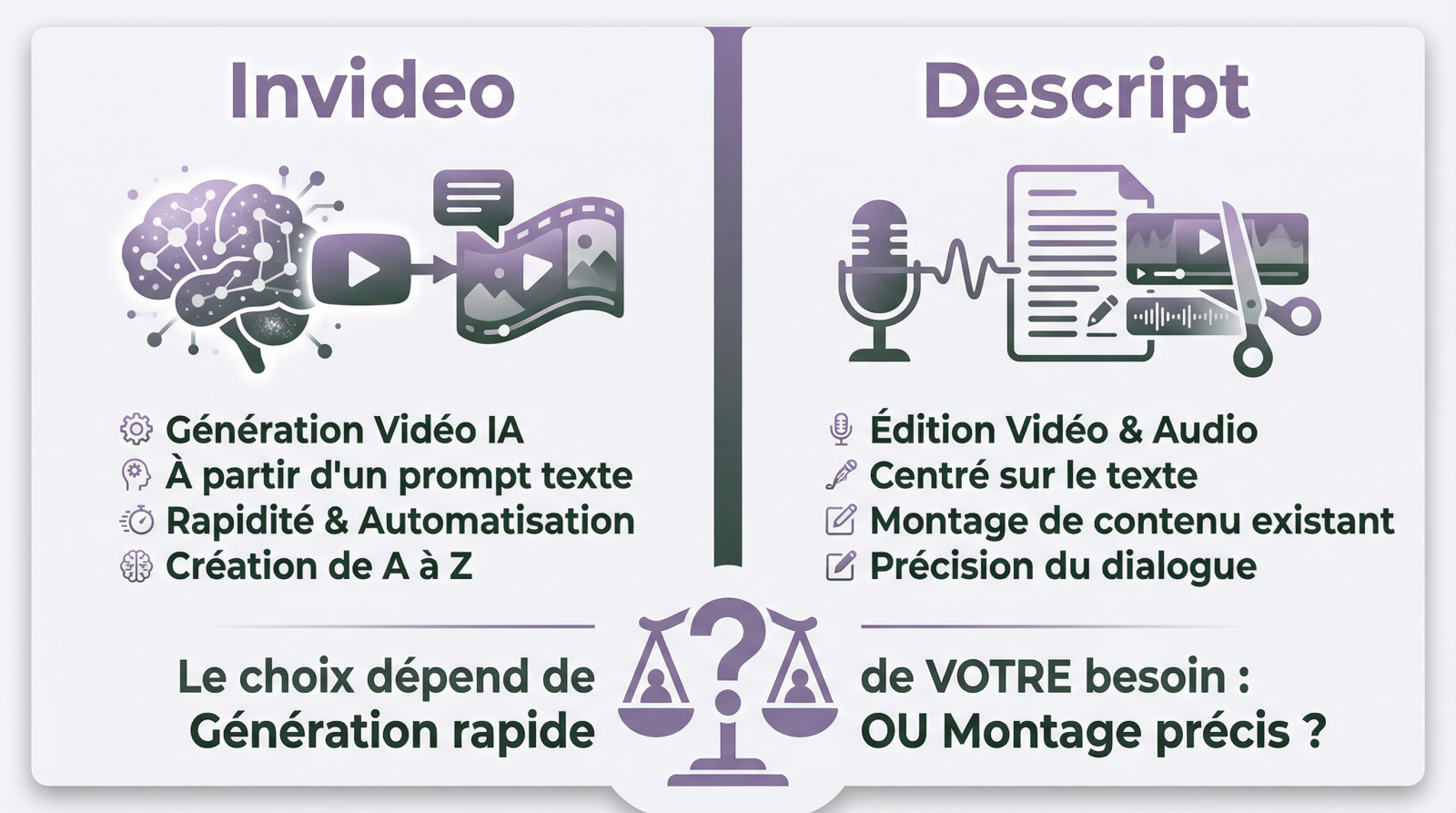
InVideo and Descript do not meet the same need. InVideo is a generator that creates complete videos from a simple prompt, with more than 16 million integrated media.
Description, conversely, is a publishing studio: it mounts your existing files via transcription, removes hesitations, cleans the sound and restructures your content.
The choice therefore depends on your objective: create a video from scratch (InVideo) or sublime existing records (Descript).
Choosing the wrong software between an automatic generator and a text editor can paralyze your video production and drain your budget unnecessarily. This technical comparison invideo description decodes the mechanisms of each solution for determine if your strategy requires ex nihilo creation or advanced editing of your recordings. Identify the tool that can align with your performance goals and find out what technology approach guarantees the best return on investment for your business.
Summary of our comparison Invideo vs Descript
Invideo and Descript today impose themselves as two major pillars of AI-assisted video. Yet, they respond to radically opposite issues despite a promise of common simplicity. Misusing tool here means wasting crazy time on inappropriate tasks. Let's see why these solutions are not interchangeable.
Consider Invideo above all a powerful video generator from a simple prompt. Its engine transforms your text into a complete production with stock and voice-over. The objective remains the maximum automation of creation.
For its part, Descript acts as a text-based video and audio editor. Its strength lies in cleaning existing content such as podcasts or interviews. You're editing the transcript, AI cuts the video.
Our detailed analysis will dissect their technical approaches, tariff schedules and actual limits. We will examine workflows for Identify the one that fits you. You will avoid unnecessary subscription.
The verdict does not designate an absolute winner, but depends entirely on your daily mission. Do you need fast content generation or accurate editing of dialogue? It is this exact shade that will dictate your final choice.
What is Invideo? the video generator by AI

Let's start with the first competitor: the tool that promises to turning your ideas into videos Without effort.
The concept: turning an idea into a video
The process starts with a simple text prompt (prompt) provided by the user. Then, the AI takes over to manage the entire production: it writes the script, generates a voice-over adapted and selects the corresponding media.
To illustrate the point, the system draws directly from a colossal library of more than 16 million images and videos from archives. This immense resource allows the AI to accurately illustrate the script, ensuring a wide visual variety.
A major asset lies in its accessibility: the tool is fully web-based. No software installation is required, which allows you to start creation from any browser without any technical constraint.
For what types of creators and content?
This solution is aimed primarily at marketers, content creators for social networks (TikTok, Shorts) and pressed entrepreneurs. It's the fatal weapon for those who need produce video content quickly and on a large scale.
In concrete terms, the tool excels in creating short advertisements, explanatory videos, promotional content or media for marketing campaigns. The objective is simple: rapid and efficient production, without spending hours editing.
It's the ideal tool for those who leave a blank page and want a published in minutes. You shouldn't believe us on word, the best is‘ try Invideo for free. For detailed analysis, take a look at our complete test of Invideo AI.
Invideo specific AI features
The tool is distinguished by its realistic voice-over generated by AIavailable in more than 50 languages. You have the complete freedom to choose the accent and the precise genre to fit perfectly with your target audience.
The « Magic box » changes the situation: it is an intuitive text editor. You edit the video via simple commands like « remove this scene » or « changes the music« without ever touching a complex timeline.
The platform now incorporates advanced video generation models Like Google Veo. This shows that the tool is constantly evolving to put the latest state-of-the-art technologies directly into the hands of creators.
What is Descript? text-based video editing

The concept: edit the video as a text document
Imagine importing your video rush and instantly getting a perfect transcript. This is the heart of Descript: edition based on transcription. You no longer cut abstract waves on a complex timeline, you manipulate directly the words spoken by your speakers.
Magic works when you erase a sentence: delete a word in the text deletes the corresponding passage in the video. A simple copy-paste reorganizes your entire sequence. It's literally as intuitive and fast as to modify a Google Doc.
But rest assured, purists keep control. Descript incorporates a traditional timeline editor to adjust the cuts to the frame. That's the one.rare alliance of textual simplicity and technical precision For the demanding assemblers.
For what types of creators and content?
This tool is a real blessing for those who speak. I am thinking specifically of podcasters, YouTubers who make face-cameras, online trainers or journalists. If your content relies mostly on dialogue, you will save valuable time in post-production.
Specifically, it excels in editing interviews, tutorials, webinars or product demos. It's the absolute weapon for turning a recording Zoom a little draft into a dynamic video, or produce a quality video podcast with no technical team.
For Breaking hours of speech without going madIt's unbeatable. You really should try Descript to feel this fluidity by yourself. Besides, our detailed opinion on Descript decortics how it changes the deal for solo designers.
Descript's AI superpowers
Sound is often the weak point of independent creators. With Studio Sound, just one click to remove echo and background noise, offering a bluffing studio quality even if you record with a mediocre microphone in an empty room.
Have you flogged or forgotten a word? No need to re-register everything. With Overdub (AI Speech), you type the correction and AI generates audio with your own cloned voice. This is an almost frightening feature of efficiency for quick retouching.
Finally, leave Agent AI « Underlord » Do the dirty work. He find viral moments for your social networks, remove the « Uh. » hesitant and even suggest relevant B-rolls to boost everything without manual effort.
Features of Invideo and Descript: face-to-face
Now that the presentations are made, let's put the two tools side by side for compare their point-by-point functionality.
| Functionality | Invideo | Description |
|---|---|---|
| Main philosophy | ✅ Generation of 100% AI video from a prompt. Ideal for starting from scratch. | ✅ Editing existing video/audio via a text transcript. Ideal for editing dialogue. |
| Edition interface | ✅ Text Editing (« Magic Box ») and classic timeline. | ✅ Main editing by text. Complete timeline available for finishing. |
| Audio tools AI | ✅ Generate voice-over in more than 50 languages. | ✅ Audio cleaning (Studio Sound) and voice cloning (Overdub). Superior quality. |
| Transcription and subtitles | ✅ Automatic subtitle generation. | ✅ Ultra-precise transcription at the heart of the tool. Easy correction. |
| Media library | ✅ Very wide (16M+ elements) and integrated into the generation process. | ❌ More limited, the tool is made to work on its own media. |
| Ideal use case | ✅ Short content for social media, advertisements, quick explanatory videos. | ✅ Podcasts, interviews, tutorials, online training, speech-based content. |
| Agent AI | ❌ No dedicated conversational agent, the AI is the engine of generation. | ✅ « Underlord », an AI assistant to assist in editing and creating clips. |
Editing approach: generation vs edition
Invideo creates for you. You give him direction, he assembles the final product. It is a pure tool of the category AI video generators.
Conversely, Descript helps you edit. You bring the raw material (your recordings), it renders it incredibly easy to handle.
The distinction is crucial. One is an automated content creator, the other is an intelligent post-production tool. Choose the wrong oneIt's like using a hammer to screw a screw.
The duel of advanced AI features
Let's look at voice cloning. The Overdub function of Descript is designed for correction, allowing to regenerate its own voice. Invideo generates voices off from scratch, without personal cloning.
Let's talk about assistants too. Descript to his agent « Underlord » to suggest edicts. Invideo has no assistant but his Generation AI is the core of the reactor, integrating models like Veo.
In the end, Descript focuses on AI to improve the workflow of video editing AI, while Invideo uses theIA for pure creation.
Invideo vs. Descript: What price differences?
A tool is also a budget. Let's see how position Invideo and Descript on a tariff basis.
Invideo's tariff plans
The free plan allows you to test the platform without removing the credit card. You are limited to 4 exports per week, all marked with Invideo watermark. The video generation does not exceed 2 minutes. Finally, you only have one AI credit per week.
To go further, paying offers unlock real potential of AI:
- Plan Plus : This first paid level increases generation quotas, boosts exports and removes watermark.
- Max Plan : The most comprehensive offer for intensive creators, with much higher limits on AI generations and access to more premium media.
There is also the existence of Business plan for custom solutions. It is intended for large teams and organizations that require adequate infrastructure and enhanced security.
Descript tariff plans
The Free Descript plan offers an interesting entrance door for beginners. It includes generously 1 hour transcript per month. However, export is limited to a resolution of 720p. That's enough to test the editor before engaging.
Here are the options for more demanding users :
- Creator Plan : The most popular, offering export 4K, 30h transcription/month and full access to more than 20 AI tools.
- Plan Pro Positioned for professionals with greater requirements in transcription and security features.
- Business Plan : For teams, with advanced collaboration features.
A major difference lies in the Invoicing model. Description is based on the monthly transcription hours consumed. Inversely, Invideo bills according to the minutes of video generated. This is a key point in estimating its costs.
This information is based on public tariffs. It is therefore good to check current offers according to the official information of Descript to avoid surprises.
Customer reviews: what do users think?
Returns confirm a clear divide between two creative philosophies Well distinct. Users choose their camp according to their need for raw speed or surgical accuracy. Once the right tool is adopted, disappointment remains rare.
For Invideo, the number one argument remains the samefulgurant acceleration of the workflow. The creators report going from several hours of difficult editing to only a few minutes. It is often the day and night for productivity.
- « Perfect for my Facebook ads. I can test 5 variations in less than one hour. »
- « I've got a lot of relevant visuals. save life for my YouTube shorts. »
- « Sometimes a little rigid on customization, but for price and speed, this is unbeatable. »
On the other hand, podcasters swear only by the text workflow of Descript. The tool is moreover rated 4.6 stars out of 5 on G2, a real reference of the sector. This approach seduces those who hate classic timelines. It is a plebiscite for narrative publishing.
- « Studio Sound a transformed the quality of my podcast. I couldn't get past it. »
- « Making my interviews by reading a text is just great. No more hours looking for passages on a timeline. »
- « Overdub has saved several times for correct an error without re-registering everything. »
Should we choose Invideo or Descript? Our final verdict
So, in the end, what tool is made for you? It's Time of verdict.
There is no universal winner here. The real battle is not Invideo vs Descript, but opposes the « content generation » at »content editing ». Your choice will only depend on your starting point: do you have a script or video file?
Choose Invideo if... you are a marketer, a social media manager or an entrepreneur who has to produce a lot of short videos very quickly. You often start from scratch, with just an idea or script in hand.
Your top priority is speed and efficiency to feed your social networks without spending the day there. You want a tool that takes care of visual creation and assembly If you're here.
If this is your case, then don't hesitate for a second. Discover Invideo.
Choose Descript if... you are a podcaster, a YouTuber, a trainer or if your content is strongly based on speech (interviews, tutorials, meetings). Text transcribed becomes your editing table.
Above all, you are looking for audio quality, the accuracy of editing dialogues and a workflow capable of divide your brushing time by two. You are working on already existing recordings.
If you recognize yourself in this profile, Run. Discover Descript.
To go further and see how these tools measure up to the rest of the market, see our other comparison tools AI video.
FAQ
What is the fundamental difference between Invideo and Descript?
The distinction lies in their philosophy of creation. Invideo is a video generator: creates content from zero (images, script, voice) via a simple text prompt. It is the ideal tool for starting from a white page.
Conversely, Descript is a post-production editor. It is used for editing existing audio or video files by modifying their text transcript. If you already have rushes (interviews, podcasts), you need to describe.
Can we use Invideo for free?
Yes, Invideo offers a free plan to test the power of the AI. However, this plan requires significant restrictions The videos have watermarks, exports are limited and you do not have commercial rights over the media.
For professional use without watermark and with access to premium stocks (iStock), it is necessary to go on a paid subscription (More or Max).
What are the major drawbacks of Invideo?
The main disadvantage of Invideo is its lack of precision for fine mounting. Since it generates scenes automatically, it is less suitable than Descript or Premiere Pro to precisely cut a hesitation in an interview or synchronize a sound effect to the nearest millisecond.
In addition, although the media library is huge (16 million assets), the rendering can sometimes seem generic if user does not take time personalise the prompts or replace some plans suggested by the AI.
Can we monetize videos created with Invideo AI?
Absolutely, but it depends on your subscription. With paid plans (Plus and Max), you get a commercial license for media used and generated videos, which allows you to monetize them on YouTube or use them for ads.
On the other hand, the free plan does not transfer these commercial rights and includes a watermark, which makes the monetization impossible according to platform standards.
Which is the best video creator by AI at the moment?
If we talk about full video generation (script + visual + voice) from text, Invideo is currently the market leader thanks to its simplicity and integrated stock library.
However, if your definition of « creator » involves the intelligent editing of your own recordings, Descript is indetritable. The « better » tool therefore strictly depends on your workflow : automated generation or assisted editing.
Find out where he ranks in our best video software AI.