One subscription, one credit reserve, and the choice between Kling, Seedance, Veo, Wan or Nano Banana according to the plan to be rotated : it is the promise of Higgsfield. On paper, it's attractive. In practice, what counts is what a clip really costs and what you get for that prize. So we did a voluntary small test, so we could control each credit: one image, two video clips from a text and one clip from a photo, all made on October 26, 2026.
Tested on 26.10.2026 on a Ultra package offered for a month by the publisher, who did not read this review. This page contains partner links.
Contents: Essential · What is Higgsfield? · Our protocol · Image test · Kling 3.0 Test · Test Seedance 2.5. · Photo to video · The real cost · Prices · What's stopping · Alternatives · Verdict · FAQ
Essentials
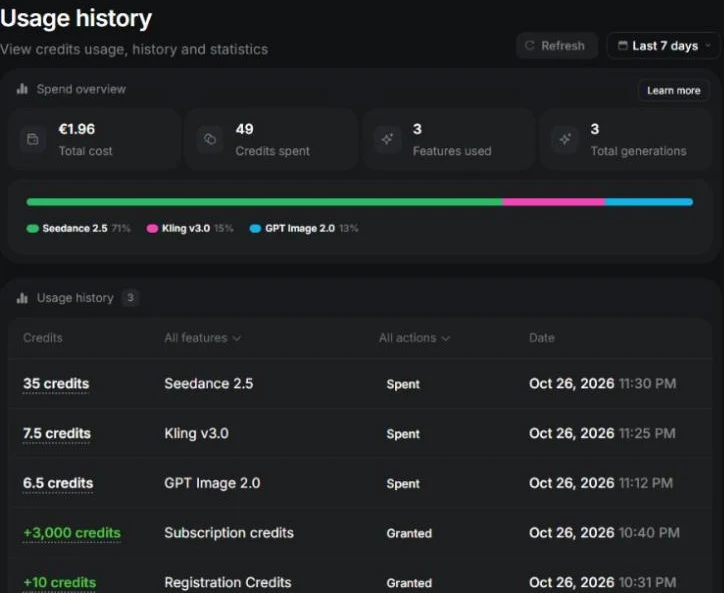
- The price shown is the price charged. Four generations, four debits identical to the button: 6.5, 7.5, 35 and 7.5 credits, representing a total of 56.5 credits.
- Default settings are expensive. Kling 3.0 opens in 4K to 30 credits; In 720p, the same 5-second clip costs 7.5 credits.
- The quality is at the rendezvous on our two clips (Kling 3.0 and Seedance 2.5): credible steam, soft light, clean front travel. The clip created from a photo remains true to the original image.
- Seedance 2.5 is slow: more than ten minutes before being able to read the clip, and the page indicated « Generating » Until we rearrange her.
- The web application is heavy: Each screen asked for one to two minutes before responding in our Chrome, and the prompt entry has frozen the page several times.
- Upgraded offers are incessant: Full screen at opening, countdown banners, pop-ups.
- Not tested: Veo, Wan, Hailuo, home models, effects presets, lip-sync, export and watermark issue.
What is Higgsfield?
Higgsfield (higgsfield.ai) is an American platform that provides access, with a single account, to dozens of image and video generation models: Seedance 2.0 and 2.5, Kling 2.1 to 3.0, Google Veo 3 and 3.1, Wan, Minimax Hailuo, Grok Video, Nano Banana, GPT Image and its own models. The navigation bar also displays a tool influencer AI, an advertising studio, a marketing studio, a film studio, an MCP connector and an API.
The idea is the same as at DeeVid AI Instead of subscribing to each laboratory, you buy credits and spend them where the best model for the plan is located. Our AI video generators table gives the durations and prices of the tools competitors.
Our test protocol
We reduced the brief to a single subject, a ceramic cup placed on a wooden table near a window at sunrise, to pass the three most common uses: a fixed image, a clip from a text and a clip from an image. Even quickly whenever the model allowed.
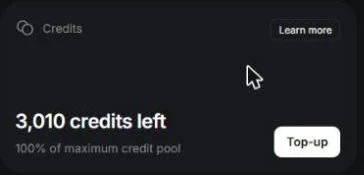
Before each generation, we raised the number of credits on the button « Generate ». After the four, we compared with historical usage. We started from 3,010 credits: 3,000 from the Ultra package and 10 registration credits. Everything was done in Chrome on Windows, without buying or accepting any offer.
Test 1: an image with GPT Image 2 (6.5 credits)
L tool image opens on GPT Image 2, high quality, 2K. We seized the quick cup, added « 16:9 » at the end, and the button displayed 6.5 credits (with a higher price barred next door). The result came after a few minutes in the library: a warm and credible photo of a sandstone cup with a steam net and a valley in the fog behind the window.
She came out square. The format was on « Auto » in the bar tools and the « 16:9 » written in the prompt has been ignored. If you want a specific format, set it in the interface rather than in the text. One detail, but it conditioned the format of our next clip.

Test 2: Kling 3.0 from text (7.5 credits)
On the Kling 3.0 page, the default settings were 5 seconds, 16:9, sound disabled and 4K quality. The button indicated 30 credits. This is the most useful teaching of the interface: the default option is the most expensive. By passing the quality in 720p, the button fell to 7.5 credits, which corresponds to the 7 credits that the pricing page announces for Kling 3.0 in 720p.
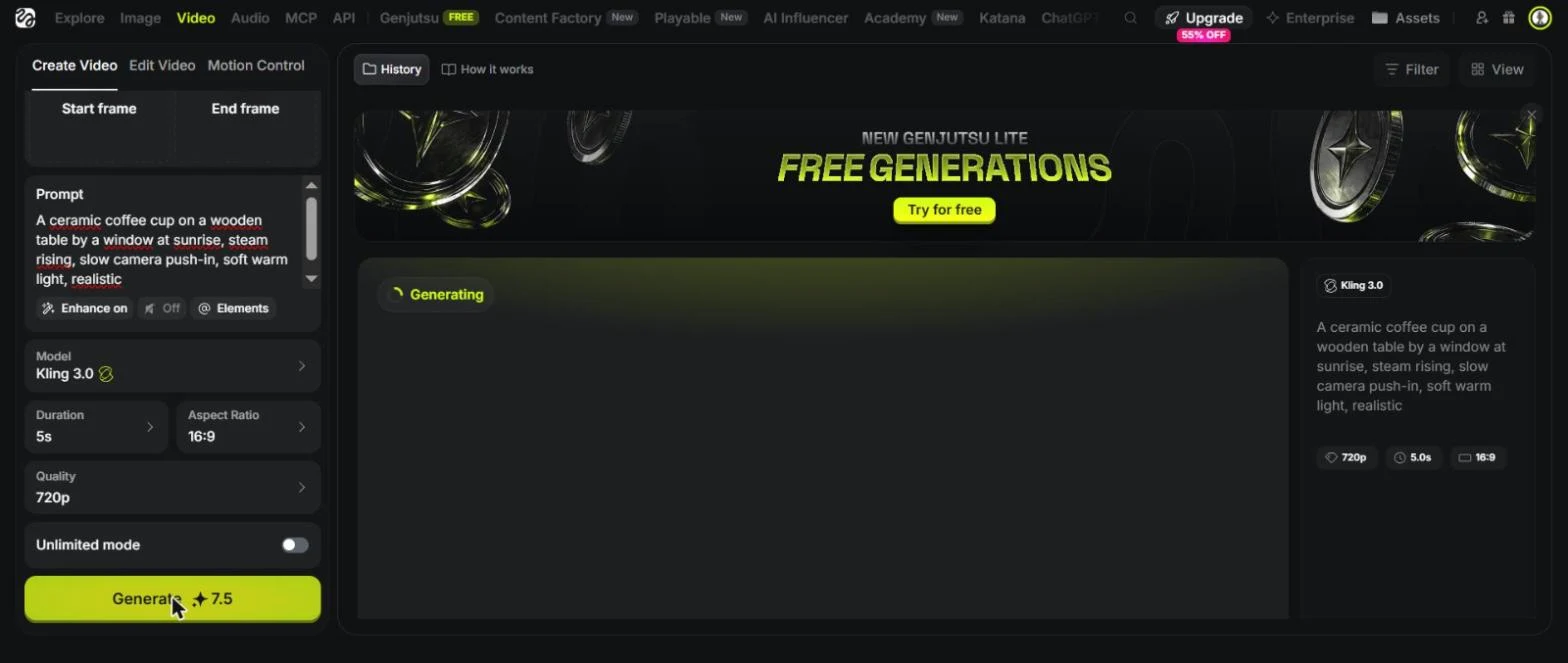
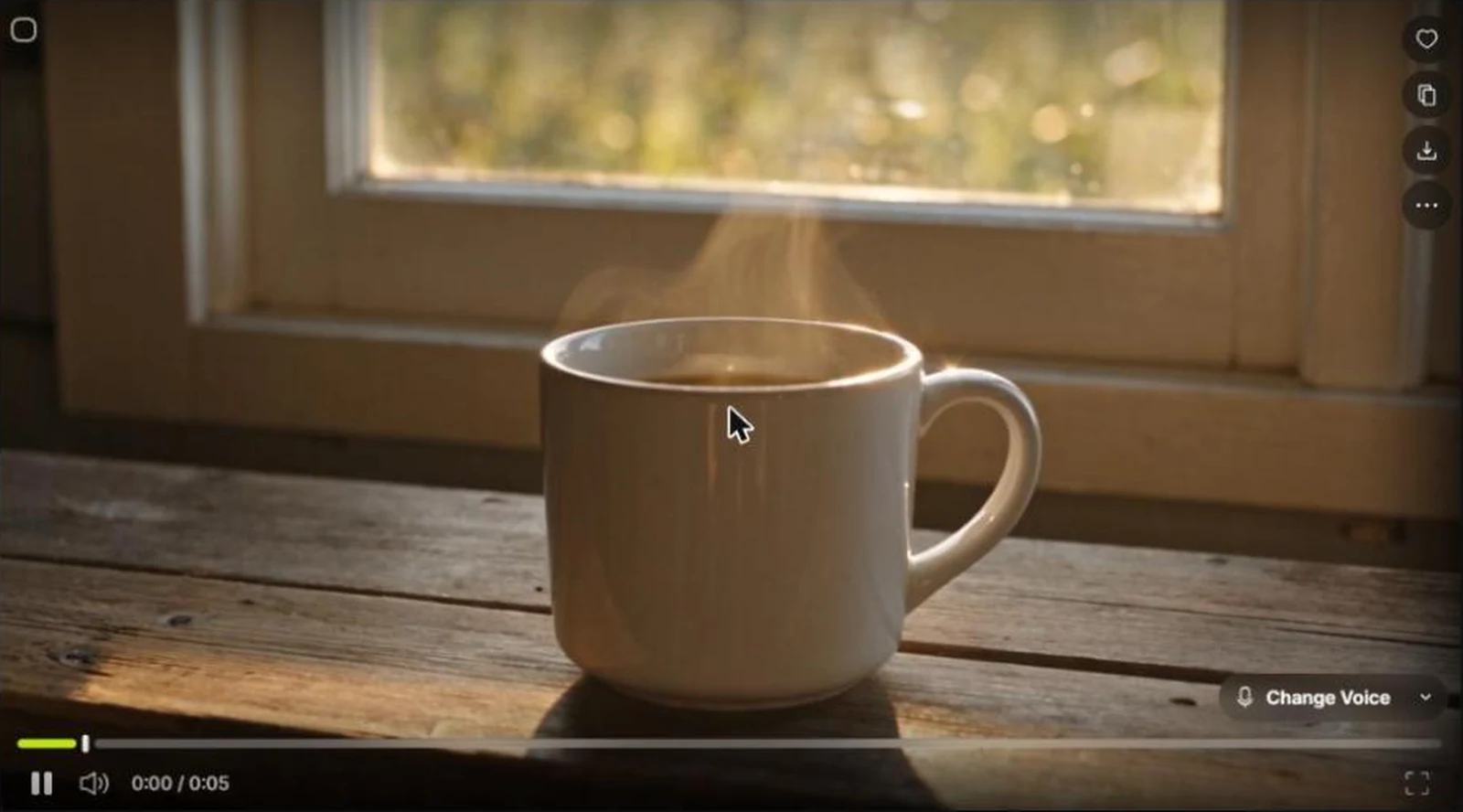
The clip took about four minutes on our station. This is the best result of the day for a quick line: a low sun that reflects in the lens, a volute of steam that twists up, a slow motion towards the cup. The cup is not that of the photo, which is normal when you don't provide any images. In 720p, the image is clean but a little soft on the grain of the wood. To compare with the standalone version of the model, see our review Kling AI and Kling price.

Test 3: Seedance 2.5 with sound (35 credits)
Seedance 2.5 is the flagship model of the range. It opens in 1080p, bitrate « High » for 80 credits. In 720p, the price rose to 35 credits, the figure that Higgsfield also published in its guide prices. It's almost five times the price of the Kling clip.
We started and waited. The button displayed « Generating » for more than ten minutes without ever tipping on a result. After reloading the page, the clip was in history. The credits had been debited from the start: nothing lost, but the interface does not warn when a job ends, which bothers when each page load takes one to two minutes.
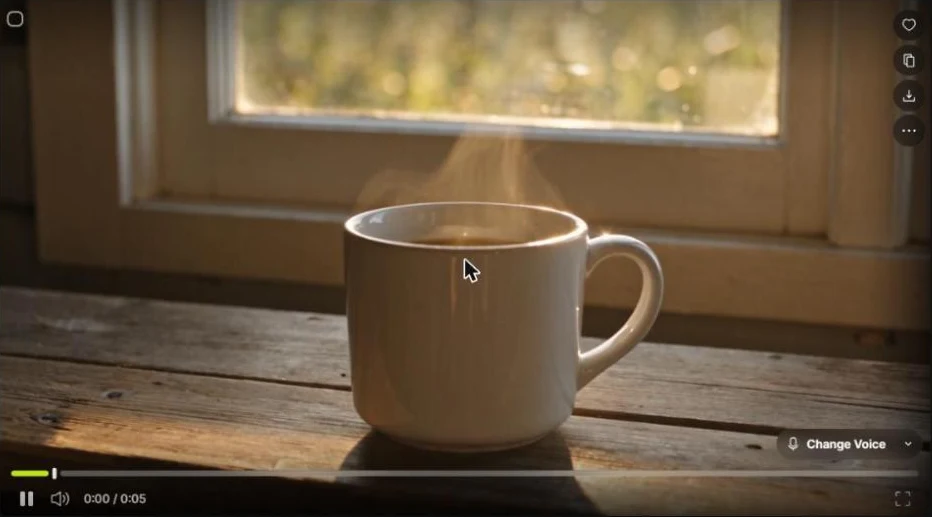
The clip is very successful. The atmosphere is warmer and more cinematic than Kling's, the cup is clear and photographic, the steam softer and the motion of a fluid camera. The sound was activated and the player proposes a control « Change Voice », but we only considered the image, not the audio track. For the model alone, see our Seedance 2.0 review.
Test 4: from a photo to a video with Kling 3.0 (7.5 credits)
Last test: photo GPT Image 2 as the starting image. Selector proposes a tab « Image Generations », so no need to download and then return the file. Even fast, even 720p, and the price remains at 7.5 credits.
The clip remains true to the photo: same cup, same speckled glaze, same valley behind. The steam rises, the camera moves and the cup grows in the frame. As the source was square, the clip is also, in 1:1. If you are aiming for vertical or large format, first generate the image in the correct format.

How much do these 56.5 credits really cost?
Higgsfield's usage page displays a value in euros for what it spends. Our first three generations (6.5 + 7.5 + 35 = 49 credits) were valued 1.96 euro, or about four cents the credit, which corresponds to the price of the Ultra package divided by its credits. With the fourth clip, the total is 56.5 credits, about 2.30 euros.
Here is what the packages allow for the prices in credits noted. The number of clips are our calculation: monthly credits divided by the price in credits of a 5-second clip, rounded to the bottom, excluding free or unlimited allowances.
| Package | Price/month | Credits | Kling 3.0, 720p (7.5) | Seedance 2.5, 720p (35) |
|---|---|---|---|---|
| Starter | 19 $ | 270 | 36 clips | 7 clips |
| More | 59 $ | 1 200 | 160 clips | 34 clips |
| Ultra | 129 $ | 3 000 | 400 clips | 85 clips |
This gives about 0.53 $, 0.37 $ and 0.32 $ per Kling clip, compared to about 2.71 $1,74 $ and 1.52 $ per clip Seedance 2.5. The call price of a multi-model package says very little: it is the chosen model and the accepted resolution that make the bill.
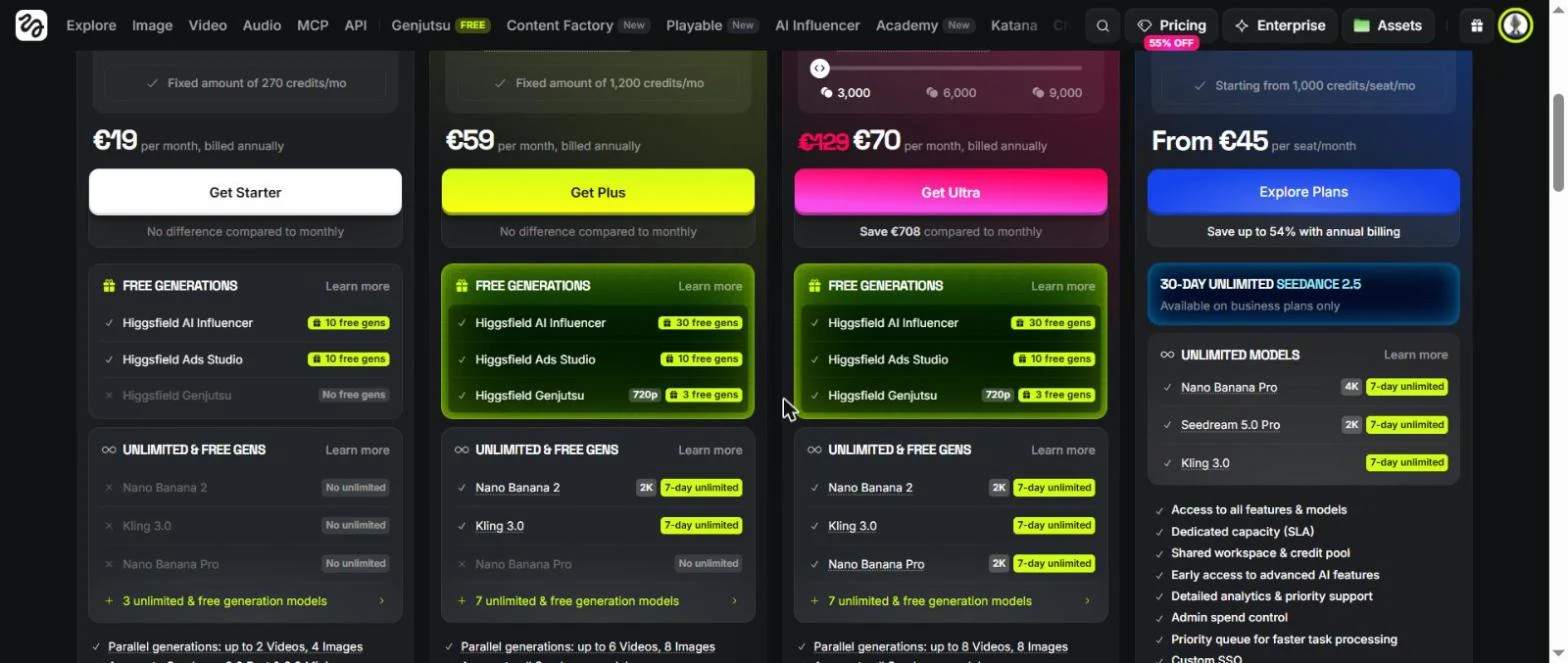
Higgsfield Price (released 26.10.2026)
Packages and credits come from the rate page and its table comparison. Our account displayed prices in euros with a personal promotion; we use the catalogue prices and treat the figures in dollars and euros as equivalents. Higgsfield's award blog, dated October 24, announces Starter at 15 $ for 200 credits and over 49 $ for 1,000: check the numbers before buying.
- Free: 0 credit, limited use of some image models, one job at a time, not commercial use.
- Starter, 19 $ : 270 credits, 2 parallel videos and 4 images, commercial use included.
- Plus, 59 $ : 1,200 credits, 6 videos in parallel, more free and unlimited models, 30 generations free of charge tool influencer AI.
- Ultra, 129 $ : 3,000 credits (a cursor rises to 9,000), 8 videos in parallel, the longest list of unlimited models over 7 days.
- Team and Scale: per head office packages for companies, with shared credit reserve and professional audit.
Annual billing lowers the monthly price, and our account has been offered an annual promotional offer as soon as it opens. Models « unlimited » are narrower than it appears: a short list, especially for a seven-day window on monthly packages, and the page specifies that they do not apply via MCP, CLI, Canvas or Supercomputer.
What's stopping
- Loading times. Each page, even the account settings, asked for one to two minutes before answering. Higgsfield is heavy in graphics: a lighter machine may come out better, try it during the trial period.
- Not live. « Generating » never turned into a result without reloading.
- The offer screen. One « Annual secret offer » with countdown opens in full screen at the beginning of a session. The button « Skip Special Offer » is in a corner.
- Pop-ups. Welcome Bundle, Kling 4.0 announcement, banner « Free generations », yellow bar with countdown, in one afternoon.
- Cheap default settings. 4K on Kling, 1080p on Seedance. Check the button every time.
Higgsfield facing alternatives
If you want a single model at a low price, a tool Single-editor will be cheaper. For a bundle of models at lower entry prices, DeeVid AI and its alternatives are to be watched, with a comparison DeeVid AI against Kling AI. Our ranking of best AI software video and our guide for create a video with AI Go around the market.
Higgsfield makes sense when you really change your model: you prepare a plan on Kling 3.0 in 720p, then you rewrite the only plan you have on Seedance 2.5 in 1080p.
- Yes if you want to compare multiple models with a single credit reserve and check the price before each rendering.
- Yes if you start from a fixed image and want to liven up without leaving the application.
- Not if you expect a quick and lightweight interface, or if only one model is enough.
- Attention Models « unlimited » The list is short and limited in time.
Verdict
Our review on Higgsfield after test
Which convinced us: honest prices (the button says true to the decimal), two good quality clips, a shift from photo to video without friction and for the same cost as text.
What's stopping: slow web application, no monitoring of generation status, continuous upgrade offers and default settings that push to the most expensive option.
We tested only four generations: it is not a review on all modules. Our advice: take the smallest paid package that suits your month, work in 720p as long as a plan is not validated, and keep Seedance 2.5 or 1080p for the selected plans.
FAQ: Higgsfield
Is Higgsfield free?
Not really. The Free package gives 0 credit, limited use of a few image models, one job at a time and not commercial use. Paid packages start at 19 $ per month for Starter (270 credits), then 59 $ for Plus (1,200 credits) and 129 $ for Ultra (3,000 credits). Higgsfield Award Blog Announces Starter at 15 $ and over 49 $ Check the live page. Price recorded on 26.10.2026.
How many credits does a video on Higgsfield cost?
This depends on model, resolution, duration and sound. In our account, a 5-second Kling 3.0 clip cost 7.5 credits in 720p without sound, and 30 default credits in 4K. A clip Seedance 2.5 of 5 seconds with its cost 35 credits in 720p and 80 in 1080p.
Does Higgsfield debit what it displays?
In our test, yes. We noted the price of the button before each of the four generations (6.5, 7.5, 35 and 7.5 credits) and the historical usage showed exactly these amounts.
Which model to choose on Higgsfield?
For short clips with low budget, Kling 3.0 in 720p was the best value for our test. Seedance 2.5 costs about five times more for 5 seconds and adds a generated sound. We didn't test Veo, Wan or Higgsfield DoP models.
Can Higgsfield turn a photo into a video?
Yes. We used an earlier generated image as the starting image of a Kling 3.0 clip. This cost the same 7.5 credits as the text to video and gave 5 seconds with steam and slow forward travel. The clip kept the square image format instead of 16:9.
Is Higgsfield better than a tool One model?
If you want to compare multiple models with a single credit reserve, yes. If only one model is enough, the entry price is average: Kling, Pika and DeeVid AI start lower in our price table. Higgsfield also pushes constantly upgrade offers, which we found painful.
Can Higgsfield videos be used commercially?
The table comparison packages indicate commercial use as included on Starter, Plus and Ultra, and not included on Free. We did not export or publish any files: read the conditions before a client project.