InVideo AI is in 2026 generators the most complete text-to-video on the market — 50 million users, 8 million videos created each month, and a single argument: integrated access to Sora 2 Pro, Veo 3.1, Kling 3.0 and Seedance 2.0 in a single platform, where separate subscriptions would cost more than 450 $/month. Version 4.0 (2026) offers an ultra simple workflow: you type in a quick, easyAI writes the script, selects visuals, generates the voiceover, adds subtitles and transitions, delivers the video in 3 to 20 minutes. Plan More than 28 $/month (50 min AI monthly generation, without watermark, commercial use). Verdict after 3 weeks of testing: the best all-in-one proposal on the market in 2026 for content creators and channels YouTube faceless, less relevant to anyone looking for a precision editor.
📌 Essentials
- Publisher : InVideo (Indian company founded in 2017, based in Mumbai). 50M users, 52.5M $ raised in funding.
- Unique argument 2026 : integrated access to video models AI border — Sora 2 Pro, Veo 3.1, Kling 3.0, Seedance 2.0 in a single interface.
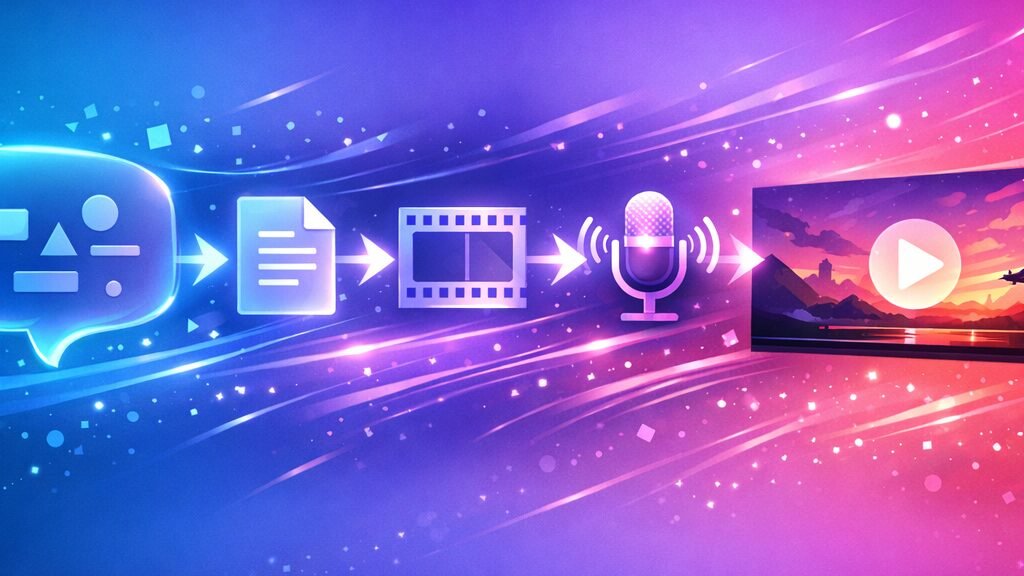
- Workflow signature : prompt text → script + visuals + voiceover + subtitles + music + transitions, delivered in 3-20 min.
- 2 products : InVideo AI (text to video generation) + InVideo Studio (traditional drag-and-drop editor).
- Freetier : 10 min AI generation/week, 4 exports/sem, watermark, 720p, no commercial use.
- Paid prices : Plus 28 $/month (20 $ annual), Max 60 $/month (48 $ Generative for Sora 2 Pro intensive use.
- For whom : marketing creators, channels YouTube faceless, social media managers, agencies. Not suitable for editing frame by frame.
Want to test Sora 2 + Veo 3.1 + Kling 3.0 in a single platform? InVideo AI offers a freetier without credit card.
Contents: What is it?InVideo AI • New products InVideo AI v4.0 • The 8 key features • Prices and plans 2026 • The free plan in practice • Practical test on 3 cases of use • Strengths and Limits • Alternatives • FAQ
What is it?InVideo AI in 2026?
InVideo is a browser-based video creation platform, founded in 2017 by Sanket Shah in Mumbai. Initially positioned as a drag-and-drop editor with templates (InVideo Studio), the company turned massively towards theAI in 2023-2024 with the launch ofInVideo AI — a separate product that generates complete videos from a simple quick text. In May 2026, the two products coexist: InVideo AI for automatic generation, InVideo Studio for traditional publishing.
The term « InVideo » is sought 6,000 times a month in France, « InVideo a » 1,900 times. Total cumulative semantic volume InVideo About 9,000 monthly queries. This is one of the tools text-to-video AI the most popular of the French market, just behind the generalist leaders as Kling AI.
The positioning is clear: target the content creators marketing, channels YouTube faceless, social media managers and agencies who want to produce videos in volume without editing each frame manually. The value proposition: turning an idea into a video that can be published in 5 to 20 minutes, including scripts and stocks. Workflow details faceless in our guide chain YouTube profitable faceless 2026.
New products InVideo AI v4.0 in 2026
Version 4.0dInVideo AI deployed early 2026 brings three major breaks that radically change the perceived value of the platform.
1. Integrated access to video models AI border
It's single argumentInVideo in 2026. The platform partnered with OpenAI (Sora 2 Pro), Google (Veo 3.1), Kuaishou (Kling 3.0 + Kling 3.0 Omni) and ByteDance (Feedance 2.0). Accessed separately, these models would cost more than 450 $/month cumulative (ChatGPT Pro to 200 $/month for Sora 2 + dedicated subscriptions Kling, Veo, Seedance). InVideo integrity 200+ modelsAI in one interface — It is today without direct competitor on this point. Comparison detailed in our Seed 2.0 review and our Kling AI review 2026.

2. Magic Box — edition by natural language
Instead of manually editing your video on a timeline, you type commands in natural language: « 3 seconds intro shortcuts », « replace voiceover by a more dynamic female voice », « add bold yellow subtitles ». LAI Run. This is the Magic Box concept, deployed in v4.0. Excellent for fast iterations, less accurate than a classic editor for fine adjustments (image-by-image timing, advanced colorimetric calibration). For agency workflows in volume, this is a time-saving real.
3. AI Avatars + voice clone integrated
InVideo AI v4.0 now includes a libraryavatars AI and voice clone (closing your own voice from a 30-second sample). These functions were previously exclusive to specialized competitors such as Creativey AI or Synthesia. With this addition, InVideo now covers the UGC ads segment in addition to the faceless YouTube — Strategic market enlargement addressed in 2026.
The 8 key features ofInVideo AI in 2026
InVideo AI v4.0 presents eight main capabilities that structure the daily experience. Here's what's behind the button « Generate ».
1. AI Text-to-Video Generator
The heart of the product. You type a quick in natural language (« Create a 60-second video about the benefits of morning yoga, warm tone, women's audience 30-50 years old »), and InVideo ensemble orchestra : writing script, selection of visuals from 16M+ assets, generation of a voiceover in 50+ languages, adding synchronised subtitles, transitions and background music. Total time: 3 to 20 minutes depending on the time required. It's the signature function which justifies subscription.
2. Access to 200+ modelsAI
As mentioned in the novelties v4.0, InVideo integrity Sora 2 Pro, Veo 3.1, Kling 3.0, Kling 3.0 Omni and Seedance 2.0 in one platform. To generate a pure text-to-video kinematic clip, choose the template from a drop-down menu. Today it is the most economical way to access Sora 2 Pro (ChatGPT Pro to 200 $/month in direct access, here included in Plus à 28 $/month subject to credit conditions).
3. AI Avatars + Voice Clones for UGC ads
Library AI built-in to generate UGC-style videos without turning in front of the camera. Voice clone from a sample of your voice (30 sec minimum). Less provided than Creativey AI on the number of davatars (200+ vs. 1,500+) but largely sufficient for which does not only make e-commerce ads.
4. Magic Box — edition natural language
Editing your video via text commands rather than a timeline. Very useful for rapid iterations (« changes voice », « add a 5 seconds intro », « accelerate the pace »). Limited precision for fine frame-by-frame adjustments, but workflow wins for 80% of marketing use cases.
5. AI VFX (Relight, Prop Swap, Virtual Production)
Nextspecial effects AI owners: Relight changes the light of a scene without turning the plane, Prop Swap replaces an object in a video, Virtual Production incrust your subject in generated backgrounds AI. Niche but powerful for creative agencies that want VFX workflow without After Effects.
6. AI Workflows (long-form + short-form)
Preconfigured workflows for the most requested formats: explain videos YouTube (4-10 min), Reels Meta (15-60 sec), TikTok (15-60 sec), real estate walkthroughs, product promos. Each workflow automatically optimizes the aspect ratio, duration, rhythm and call-to-action. Our comparison AI for YouTube Shorts 2026 contextualise against competitors.
7. AI Product Photography (catalogue + 360°)
New in 2026: automatic generation of e-commerce products. You upload a product photo,AI generates mockup variants, catalog shots, 360° packshots. Useful for dropshippers and DTC brands who want to enrich their product sheet without photo studio.
8. Stock library 16M+ assets (iStock, Storyblocks, Shutterstock)
Native integration with iStock premium libraries, Storyblocks and Shutterstock. Access to 16 million+ d'assets royalty-free direct from InVideo, without separate subscription. It is one of the largest catalogues in the market in 2026, ahead of competitors who are generally limited to free Pexels and Pixabay.
🎬 The generator text-to-video all-in-one
Access to Sora 2 Pro, Veo 3.1 and Kling 3.0 in a single platform
InVideo AI v4.0 integrates 200+ modelsAI of which video models AI border, 16M+ assets stock, voice clone, AI avatars and AI VFX. Freetier 10 min/week, without credit card. Plan More than 28 $/month (20 $ in annual terms).
Freetier · Without credit card · 50+ languages
InVideo AI pricing 2026: How much does it really cost?
The InVideo a pricing structure in three main stages + options for use for premium models. This is the official grid found in May 2026.
| Plan | Monthly price | Generation AI | Included |
|---|---|---|---|
| Free | 0 $ | 10 min/week | 4 exports/sem, watermark, 720p, without commercial use |
| Plus (annual) | 20 $/month | 50 min/month | Without watermark, 1080p, 80 iStock/month, 2 voice clones, commercial |
| Plus (monthly) | 28 $/month | 50 min/month | Same Annual plus without commitment |
| Max (annual) | 48 $/month | 120 videos/month | 4K, 320 iStock, voice clone unlimited, priority rendering |
| Max (monthly) | 60 $/month | 120 videos/month | Same annual Max without commitment |
| General | On request | Extended appropriations | Intensive access Sora 2 Pro, Veo 3.1, Kling 3.0, API, enterprise |
Our reading : the plan More than 20 $/month in annual is the sweet spot for 80% of serious creators — 50 minutes of generation AI monthly cover about 20-30 short videos or 5-8 long videos, with authorized commercial use and 1080p without watermark. Max Plan at 48 $/month in annual is only justified if you produce more than 100 videos per month (agency, channel YouTube growth, marketing team). The Generative plan is for the power users of Sora 2 Pro / Veo 3.1 intensive.
Good plan: annual savings of 28% vs. monthly
If you know you're going to use InVideo regularly (more than 3 consecutive months), move to annual saving 28 % on Plus (20) $ vs 28 $) and 20% on Max (48 $ vs 60 $). Seasonal promotion: Black Friday, end of year, September — Watch them promo codes InVideo (additional savings of 10-30 per cent).
InVideo Free AI: what does the free plan really allow?
The keyword « InVideo free » is searched 400 times a month in France (+ 50 on « InVideo free » + 60 on « InVideo have in French free »). Let's detail exactly what the free plan allows in 2026.
What is included
10 minutes of generation AI per week + 4 exports per week. Aucune carte bancaire demandée à l’inscription. Accès au workflow text-to-video complet, à la Magic Box d’édition langage naturel, et à une sélection limitée de modèles AI (pas les modèles frontière premium). Suffisant pour évaluer sérieusement la plateforme sur 2-3 semaines avant de souscrire.
The real limits of freetier
Four important ceilings. 1) Watermark InVideo on all exports — visible in the lower right, excludes any direct commercial use. (2) Resolution capped at 720 p — insuffisant pour publier propre sur YouTube en 2026 où le 1080p minimum est attendu. 3) Usage commercial interdit sur le free tier (clause des Terms of Service). 4) Pas d’accès aux modèles frontière premium (Sora 2 Pro, Veo 3.1 Pro, Kling 3.0 Omni) — limité aux modèles standards.
Pour publier propre dès le premier export, le plan Plus à 20 $/mois en annuel reste le minimum pertinent. Pour comparer aux autres free tiers du marché, voir notre top 10 AI generators video free 2026.
Accéder à InVideo AI en français
L’interface InVideo est disponible en anglais — pas d’application InVideo AI en français native en mai 2026. Cependant, le moteur supporte les prompts en français et génère des voix off françaises de très bonne qualité (50+ langues supportées dont le français avec plusieurs voix naturelles). Vous pouvez donc produire des vidéos en français même si l’UI reste en anglais. Pour une expérience 100 % francophone sur les générateurs vidéo AI, l’agrégateur Deevid AI reste l’option la plus accessible côté interface.
Practical test on 3 cases of use
Nous avons testé InVideo AI Plus pendant 3 semaines sur trois cas représentatifs. Voici les résultats sans filtre marketing.
Cas 1 — Vidéo explainer YouTube 4 minutes en français
Objectif : créer une vidéo explainer YouTube de 4 minutes en français sur « les 5 étapes pour démarrer une chaîne YouTube faceless » à partir d’un simple prompt.
Result : excellent. InVideo a généré un script structuré en 5 sections cohérentes, sélectionné des B-roll pertinents depuis iStock, ajouté une voix off française naturelle (Aria, voix la plus chaleureuse), inséré des sous-titres dynamiques. Temps total : 14 minutes du prompt à l’export 1080p. Le résultat est publiable tel quel après une légère retouche de pacing sur une transition. Note : 8,5/10. Le sweet spot d’InVideo AI — le cas où l’outil démontre toute sa valeur pour les chaînes YouTube faceless.
Cas 2 — Clip cinématique via Sora 2 Pro intégré
Test du modèle frontière premium : générer un clip cinématique 8 secondes via Sora 2 Pro depuis InVideo, prompt « A misty mountain forest at sunrise, drone shot ascending slowly through pine trees, golden rays piercing through fog, cinematic depth of field ».
Result : excellent pour la qualité, mais consomme rapidement les crédits. Le clip généré via Sora 2 Pro est de qualité cinéma — fluide, stable temporellement, profondeur convaincante. Une génération de 8 secondes Sora 2 Pro consomme environ 6-8 minutes du quota mensuel (sur les 50 min du plan Plus). Note : 9/10 sur la qualité brute, 6/10 sur l’économie de crédits. Pour de l’usage intensif de Sora 2 Pro, mieux vaut le plan Max ou Generative.
Cas 3 — Ad UGC short-form pour Meta Ads
Test de la fonction avatars + voice cloning pour générer une ad UGC 30 secondes verticale (Meta Ads / TikTok).
Result : bon, mais en deçà de spécialistes UGC. La bibliothèque d’avatars InVideo (200+) est moins fournie que Creativey AI (1 500+) et le lip-sync est légèrement moins naturel. Pour qui ne fait pas uniquement de l’UGC ads e-commerce, InVideo reste très utilisable. Pour les agences performance marketing intensives, Creatify ou Arcads gardent l’avantage. Note : 7/10. Suffisant pour 80 % des besoins, mais pas la spécialité d’InVideo.
Strengths and limits observed in real use
Major forces
- Accès intégré aux modèles vidéo AI frontière (Sora 2 Pro, Veo 3.1, Kling 3.0, Seedance 2.0) — sans concurrent direct en 2026 pour le rapport prix/qualité.
- Workflow text-to-video le plus complet du marché — du prompt à la vidéo publiable en 5-20 minutes incluant script, voix off, sous-titres, transitions, musique.
- Magic Box (édition langage naturel) — itérations rapides sans timeline classique, gain de temps réel pour 80 % des ajustements.
- Bibliothèque stock 16M+ assets (iStock, Storyblocks, Shutterstock) intégrée — pas besoin d’abonnement séparé.
- Support multilingue 50+ langues dont le français avec voix naturelles — idéal pour cibler plusieurs marchés.
- Voice cloning + avatars AI ajoutés en v4.0 — élargit le cas d’usage UGC ads en plus du faceless YouTube.
- Annual pricing très compétitif — 20 $/mois Plus en annuel reste inférieur à la plupart des concurrents équivalents.
Limitations to be incorporated
- Précision des commandes AI inconsistante : la Magic Box exécute parfois différemment de l’intention — 10-15 % d’ajustements manuels nécessaires.
- Le copy généré reste « safe » plutôt que « sharp » — pour des scripts vraiment percutants, mieux vaut écrire vous-même et utiliser InVideo pour la production visuelle uniquement.
- Pricing fragmenté : entre durée AI gen et nombre d’iStock et voice clones, le suivi du quota mensuel demande de l’attention.
- Consommation rapide des crédits sur modèles frontière : Sora 2 Pro et Veo 3.1 brûlent vite les 50 min du Plus. Calibrer son plan en conséquence.
- Not applicable in native French — interface anglo-saxonne, même si le moteur supporte parfaitement les prompts et voix françaises.
- Pas adapté au montage de précision — pour des ajustements frame par frame ou de l’étalonnage avancé, un éditeur classique comme Filmora ou DaVinci Resolve reste indispensable.
- Avatars UGC moins fournis que les spécialistes Creatify ou Arcads (200+ vs 1 500+).
Alternatives à InVideo AI selon votre profil
Depending on your usage case, several alternatives deserve consideration in 2026. Our comparison Top 10 AI Software video 2026 gives the general context.
Filmora — pour le montage classique avec AI
Si votre besoin va au-delà de la génération text-to-video pure et inclut du montage de précision (étalonnage, multipiste, ajustements frame-par-frame), Filmora 15 reste plus pertinent. Filmora intègre aussi Sora 2 et Veo 3.1 nativement depuis 2026, mais avec un workflow timeline classique. Voir notre Filmora avis 2026 and comparatif Filmora vs InVideo.
Creatify AI — pour les UGC ads e-commerce
Si votre cas d’usage est exclusivement UGC ads e-commerce (dropshipping, marques DTC, agences performance marketing), Creativey AI est plus spécialisé : 1 500+ avatars vs 200+ chez InVideo, URL-to-Video natif, Batch Mode pour A/B testing intensif. Voir notre Creatify AI avis 2026.
Synthesia / HeyGen — pour les avatars enterprise
Pour la communication enterprise multilingue institutionnelle (formation interne, présentations corporate, multilingue à grande échelle), Synthesia or HeyGen sont plus spécialisés sur la qualité avatar et le support enterprise. Voir notre alternatives à Synthesia 2026 and alternatives à HeyGen 2026.
Deevid AI — l’agrégateur francophone
Deevid AI est une plateforme française qui agrège Kling, Veo 3.1, Hailuo et Pika dans une interface 100 % francophone. Approche différente d’InVideo : pas de workflow text-to-video complet avec script + B-roll + voix off automatisés, mais accès direct aux modèles dans une interface guidée en français. Complémentaire à InVideo plutôt que concurrent direct — Deevid pour générer vos clips AI cinématiques, InVideo pour les monter en vidéo complète avec voix off et stocks.
🇫🇷 Préfères-tu une interface française ?
Accédez aux meilleurs modèles vidéo AI dans une interface 100 % française
Deevid AI agrège Kling 3.0, Veo 3.1, Hailuo et Pika dans une interface entièrement francophone. 100 crédits offerts à l’inscription. Complément idéal à InVideo AI pour générer vos clips cinématiques en français.
100 crédits offerts · Interface française · Sans engagement
FAQ : tout savoir sur InVideo AI en 2026
InVideo AI est-il vraiment gratuit ?
Oui partiellement. Le plan Free offre 10 minutes de génération AI par semaine et 4 exports/semaine, sans carte bancaire. Cela permet de créer environ 1-2 vidéos courtes par semaine pour évaluer la plateforme. Limitations du free tier : watermark InVideo sur tous les exports, résolution plafonnée à 720p, usage commercial interdit, pas d’accès aux modèles frontière premium (Sora 2 Pro, Veo 3.1, Kling 3.0). Pour publier propre dès le premier export, le plan Plus à 20 $/mois en annuel est le minimum pertinent.
Quel est le prix d’InVideo AI en 2026 ?
The InVideo a pricing se décline en plusieurs paliers en 2026 : Free (0 $, 10 min/sem, watermark), More (20 $/mois en annuel ou 28 $/mois en mensuel, 50 min AI gen/mois, 80 iStock, 2 voice clones, 1080p, commercial), Max (48 $/mois en annuel ou 60 $/mois en mensuel, 120 vidéos/mois, 320 iStock, voice cloning illimité, 4K, priority), et General (sur devis, accès intensif Sora 2 Pro et Veo 3.1, API enterprise). L’annuel économise 28 % sur Plus et 20 % sur Max.
InVideo AI propose-t-il Sora 2 et Veo 3.1 ?
Oui, c’est l’argument unique d’InVideo en 2026. La plateforme intègre Sora 2 Pro, Veo 3.1, Kling 3.0, Kling 3.0 Omni and Seedance 2.0 dans une seule interface, là où l’accès séparé à ces modèles coûterait plus de 450 $/mois cumulés (ChatGPT Pro à 200 $ pour Sora 2 + abonnements dédiés Kling, Veo, Seedance). Inclus à partir du plan Plus avec quota de crédits, accès intensif sur le plan Generative.
InVideo AI fonctionne-t-il en français ?
L’interface InVideo reste en anglais en mai 2026 — pas d’InVideo AI en français native. Cependant, le moteur supporte parfaitement les prompts en français et génère des voix off françaises de très bonne qualité (50+ langues supportées avec plusieurs voix naturelles par langue). Vous pouvez donc produire des vidéos publiables en français même avec une UI anglo-saxonne. Pour une expérience 100 % francophone sur les générateurs vidéo AI, l’agrégateur Deevid AI reste l’option la plus accessible.
InVideo AI vs InVideo Studio : quelle différence ?
InVideo propose deux produits distincts qui partagent la même marque. InVideo AI est le générateur text-to-video automatique — vous tapez un prompt, l’AI fait tout (script, visuels, voix off, sous-titres). InVideo Studio est l’éditeur drag-and-drop traditionnel avec timeline et templates (5 000+) — vous montez manuellement vos vidéos comme dans CapCut ou Filmora. La plupart des utilisateurs en 2026 utilisent InVideo AI, Studio reste utile pour qui veut un contrôle manuel.
Quelle est la durée maximale d’une vidéo sur InVideo AI ?
Sur le plan Plus, vous pouvez générer des vidéos jusqu’à environ 4-5 minutes par session. Sur Max, jusqu’à 10 minutes et plus selon les crédits restants. Pour des contenus très longs (formations, webinaires de plus de 30 minutes), il faut découper en plusieurs sessions et assembler. Cas d’usage le plus fréquent : vidéos de 1 à 5 minutes pour YouTube, ou shorts/Reels de 15 à 60 secondes.
InVideo AI vs Filmora : lequel choisir ?
Cela dépend de votre workflow. InVideo AI excelle sur la génération automatique text-to-video avec script et stocks intégrés — idéal pour les chaînes YouTube faceless et le content marketing en volume. Filmora excelle sur le montage de précision avec timeline, étalonnage, multipiste — idéal pour qui édite manuellement avec des plans tournés ou veut un contrôle frame-par-frame. Détails dans notre comparatif Filmora vs InVideo 2026.
InVideo AI propose-t-il une API ?
Oui, l’API InVideo est disponible sur le plan Generative (enterprise). Elle permet d’intégrer la génération vidéo automatique dans des workflows automatisés : génération massive pour ad agencies, intégrations CMS, batch processing pour e-commerce. Tarification sur devis selon le volume mensuel. Pour les utilisateurs Plus et Max, l’accès se fait uniquement via l’interface web.
🎯 Verdict
In May 2026, InVideo AI v4.0 est la proposition text-to-video la plus complète du marché grand public. L’argument décisif : integrated access to Sora 2 Pro, Veo 3.1, Kling 3.0 and Seedance 2.0 dans une seule plateforme, là où les abonnements séparés coûteraient plus de 450 $/mois cumulés. Le workflow signature (prompt → vidéo complète avec script + stocks + voix off + sous-titres + transitions en 5-20 minutes) reste sans concurrent direct pour les chaînes YouTube faceless, les social media managers et les agences content marketing.
Les vraies limites : pas d’application en français native, précision Magic Box parfois inconsistante, copy « safe » plutôt que « sharp », consommation rapide des crédits sur modèles frontière, et avatars UGC moins fournis que les spécialistes (Creatify reste devant sur ce point). Pour les francophones qui veulent une interface française pour la génération de clips, Deevid AI est un complément idéal à InVideo.
Notre recommandation : commencez par le free tier InVideo AI (10 min/semaine sans carte bancaire) pour valider le workflow sur 2-3 semaines. Si oui, le plan Plus à 20 $/mois en annuel est le meilleur rapport qualité/prix du marché pour 80 % des créateurs sérieux — l’accès intégré aux modèles frontière justifie largement le tarif. Pour comparer aux autres options : notre comparatif Filmora vs InVideo, our top 10 des logiciels AI vidéo 2026 and our guide chain YouTube cost-effective.